
 Need help?
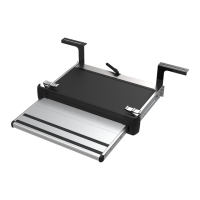
Do you have a question about the Thule Slide Out G2 and is the answer not in the manual?
Visual references to safety manuals and general warning symbols.
Icons indicating road conditions requiring caution while driving.
Visuals and diagrams related to electrical connections and safety precautions.
Icon illustrating caution for product packaging and handling.
Product dimensions and applicable vehicle standards for installation.
Detailed measurements for mounting hole positioning.
Primary connection of the 12V power supply to the device.
Installation of optional electronic control units or switches.
Visual guide for extending the product.
Visual guide for retracting the product.
Visual demonstration of a maintenance action, e.g., cleaning or inspection.
Illustration for checking or securing a component during maintenance.
Visual guide on operating the manual release system.
Detailed visual steps for manual release operation.
Details the electronic control unit accessory (308812).
Details the relay accessory for automatic retraction (308200).
 General
| Brand | Thule |
|---|---|
| Model | Slide Out G2 |
| Category | Automobile Accessories |
| Language | English |






 To Next Page
