24
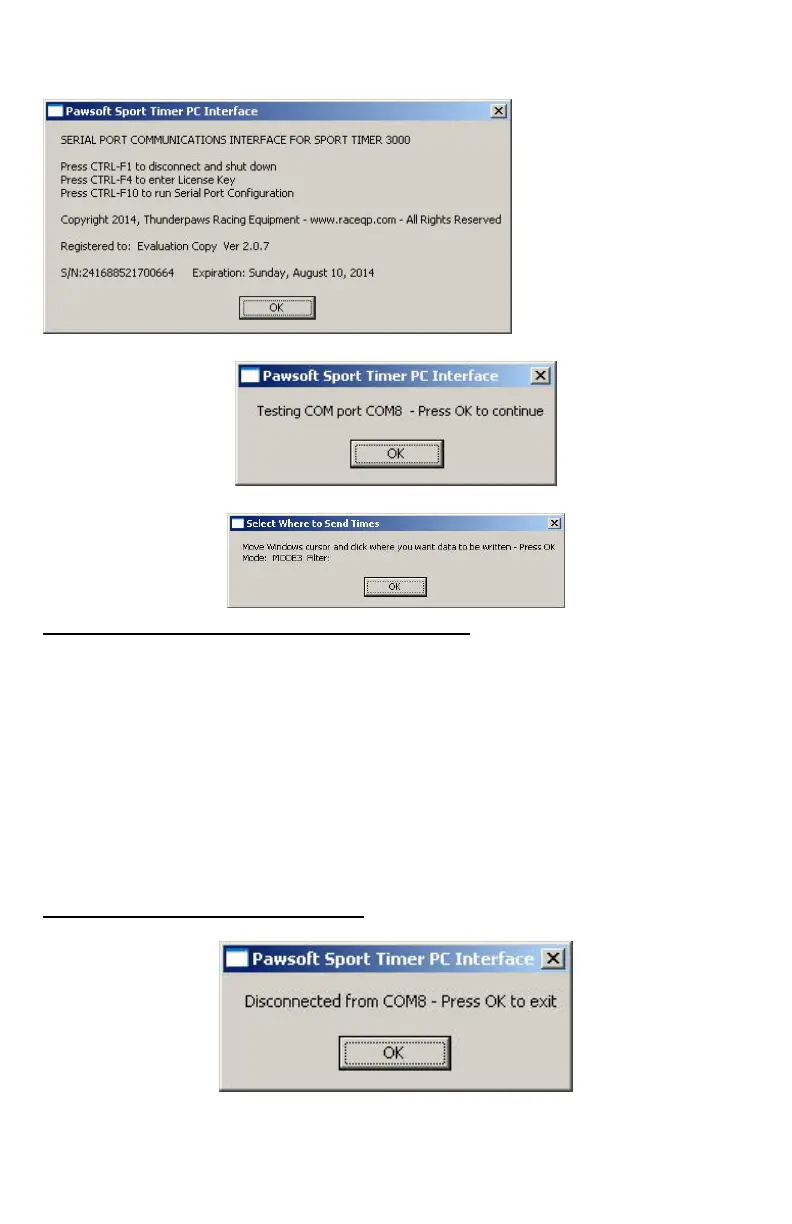
And you will see this Startup Screen (click OK):
COM Port test (click OK):
Cursor location select(click OK):
Receiving times from the Sport Timer
ANY Windows application will accept the times sent by the Sport Timer
PC Interface at the location of the Windows cursor. For example:
• WORD PROCESSOR - TEXT PROCESSOR - SPREADSHEET
• DATABASE - EVENT MANAGEMENT SOFTWARE
1. Start the Pawsoft software application
2. Click the cursor where you want times to be inserted.
3. Times from the Sport Timer will be “typed” at the cursor location
as they come in wirelessly from the PC Interface.
4. In any MODE except HEX, the cursor will move to the next line or
the next cell after inserting a time
Shutdown Pawsoft software
Press CTRL F1 to shutdown Pawsoft software:
Or, just unplug the USB cable.


 To Next Page