6
Call notication
Your Thuraya XT-LITE allows you to
receive a notication of an incoming call
even if your satellite signal is too weak to
receive the call itself. This is particularly
useful when the Thuraya XT-LITE is in
your pocket with the antenna stowed, and
only has a weak signal.
1 Fully extend the antenna of your
Thuraya XT-LITE.
2 Ensure that you have direct line of
sight to the satellite.
3 As soon as the signal strength
is strong enough, the warning
disappears from the display. You
can now accept the call as usual by
pressing the Call key.
Software Upgrades
A software upgrade is only required
if Thuraya releases a newer software
version. Before performing an upgrade
please check your current software
version under
Security
>
S/W version
to
see if an upgrade is required.
1 Download and install the latest XT-
LITE upgrader le from www.thuraya.
com.
2 Download the latest XT-LITE software
from www.thuraya.com.
3 Power on your Thuraya XT-LITE with
a fully charged battery.
4 Connect the PC and the Thuraya XT-
LITE using the USB cable.
5 Double click the XT-LITE upgrader
icon on the desktop and the program
will guide you through the upgrade
process.
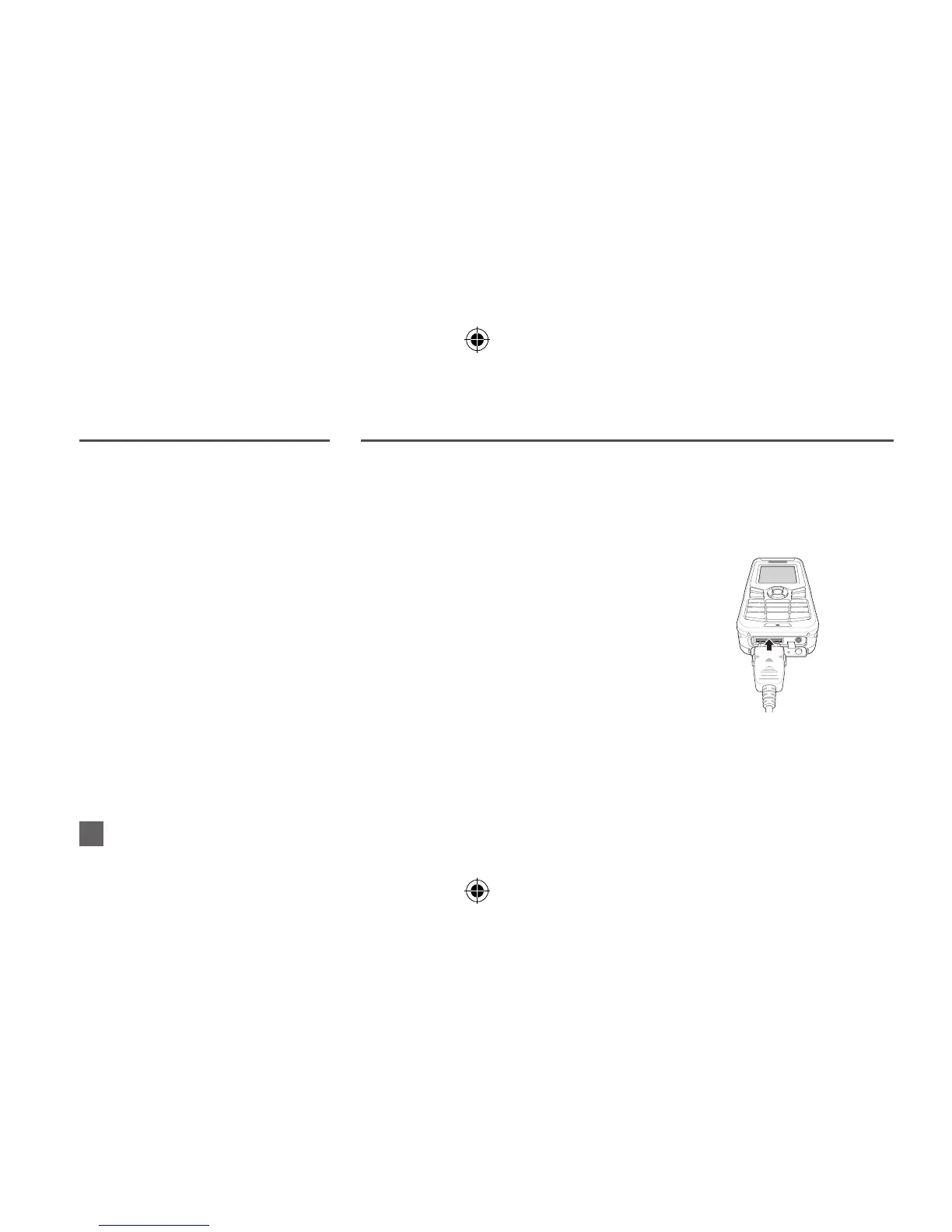
How to connect the data cable for a
software upgrade:
Open the cover at the bottom of the
phone and rmly connect the USB cable
to the UDC jack.
Afterwards attach the other side of the
data cable to your PC.



 To Next Page