10
► < New >: create new experiment file or file folder, this operation key is inactivated when
the system status is Running. Press the icon, there are three options in the pull down
menu.
New Folder: create a new experiment file folder.
New Experiment: create a new experiment file.
New Experiment from Selected Experiment: users could press and select a pre-existed
experiment file in the experiment file displaying area, and create a new experiment based on
the selected experiment settings.
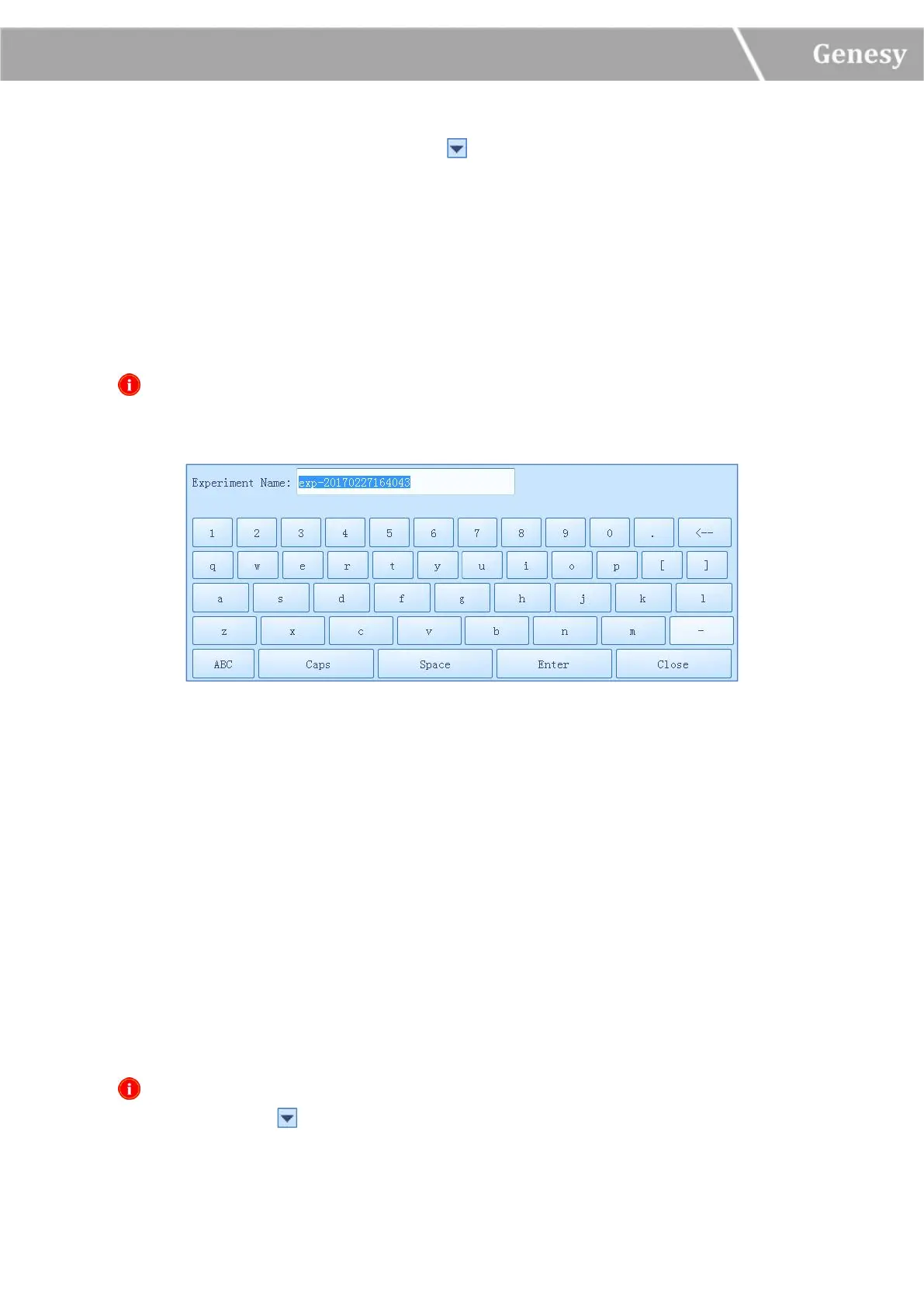
Reminding: The system will pop up a keyboard for users to name the new experiment file
or file folder, as shown in figure 3-2-4.
Figure 3-2-4 Experiment File Operation Area - Keyboard
Users could press < Enter > to confirm the new experiment file or file folder name and exit
the keyboard, or press < Close > to directly exit the keyboard.
► < Rename >: rename the selected experiment file or file folder.
► < Delete >: delete the selected experiment file or file folder.
► < USB… >:execute file transmission between the instrument and USB device.
Export Experiment: export the selected experiment file or file folder from the instrument to
the USB device.
Import Experiment: import the selected experiment file or file folder from the USB device to
the instrument.
Reminding: If there are more than one USB devices connected to the current instrument,
please press the icon on the < USB… > operation key to select the USB device.


 To Next Page