23
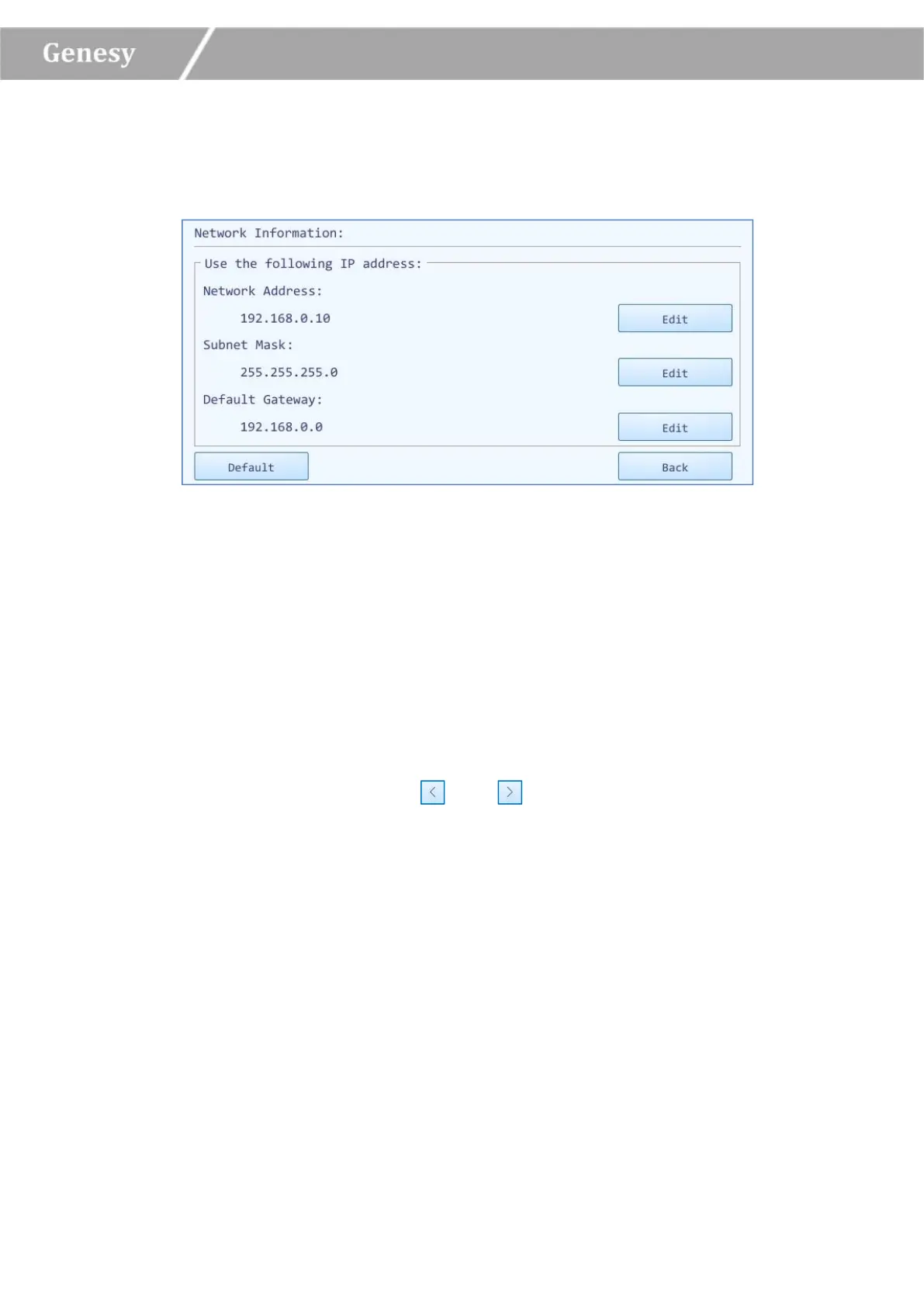
► Network Information: display the network address information of the current instrument.
Users could press < Edit > to edit the network address, the system will pop up the network
operation window, as shown in figure 3-4-6.
Figure 3-4-6 Network Operation Window
In the IP Setting box, users could view all the network IP addresses, or press < Edit > to
modify the corresponding item.
Users could press < Default > to recover the default network IP settings of the current
instrument.
Users could press < Back > to turn back to the configuration tab.
► LCD Brightness: users could press and icons to adjust the screen brightness
(dark: 1 ~ bright: 5).
► Touch Screen Sound: users could press < Open > or < Close > to decide whether to enable
the touch screen sound.
► Current Date/Time: users could press < Set > to set the date and time displayed on the
current instrument system, the system will pop up the date/time setting window, as shown
in figure 3-4-7.


 To Next Page