8
Turn it back on
IDENTIFYING THE PARTS
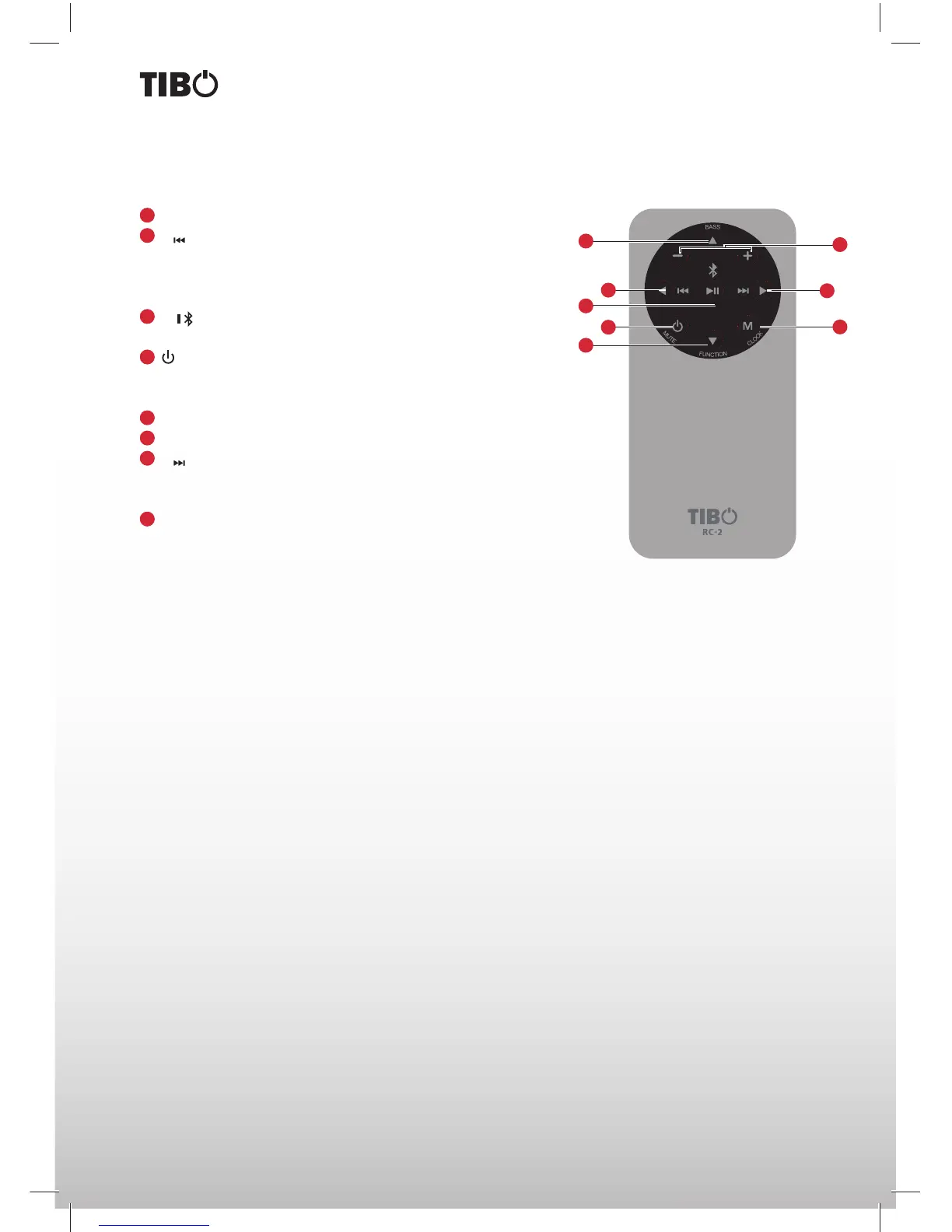
Remote control
1
/BASS Select a preset sound effect: Bass 1, Bass 2 or Bass 3.
2
Skip to previous track.
Tune to a radio station by searching backward.
Select previous radio station.
Adjust brightness level in standby mode.
3
/ Start or pause playback.
Activate Bluetooth pairing mode.
4
/MUTE Turn on the unit or switch to Eco Power standby mode.
Press and hold to turn off the product and switch to Eco Power
standby mode. Mute or resume sound of the unit.
5
/FUNCTION Select a source.
6
VOL+/VOL- Increase or decrease volume level.
7
Skip to next track. Tune to a radio station by searching forward.
Select next preset radio station. Adjust brightness level in standby
mode.
8
M/CLOCK In standby mode press and hold this button to set the
clock. Press and hold this button to search radio stations automati-
cally. Preset station for tuner.
1
2
3
4
5
6
7
8


 To Next Page