50
ⓒ 2019. this is engineering Inc. All Rights Reserved.
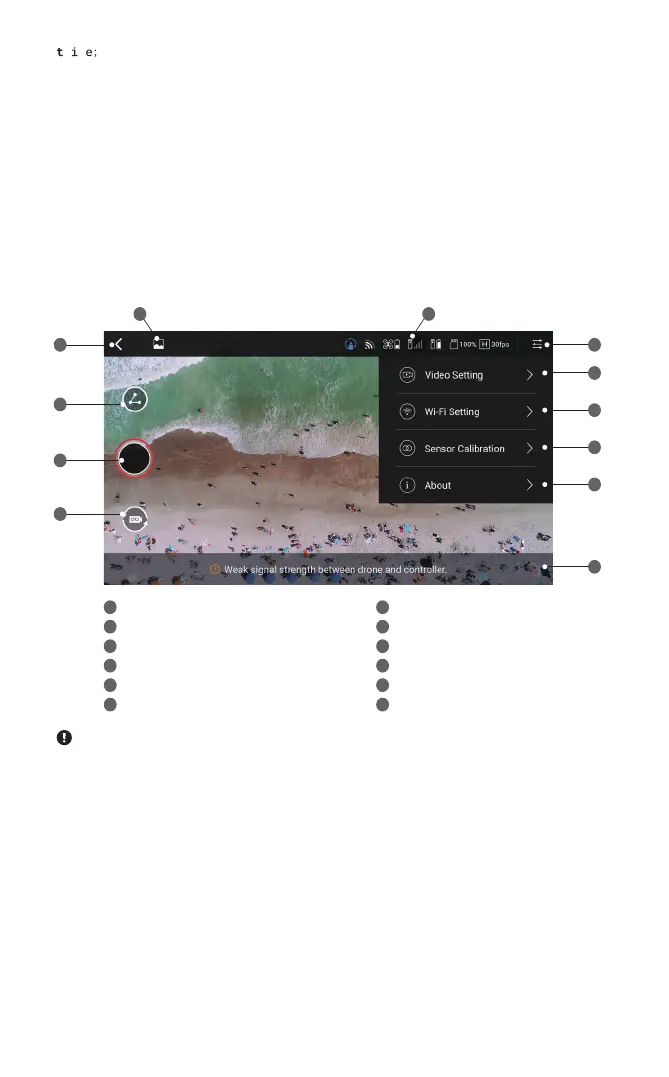
4. See below for details on the interface of the application.
Go to the main screen
Go to the gallery
Drone/controller status information
Setting menu
Lezero Pilot mode
Wi-Fi setting
Sensor calibration
Version information
Take video/photo
Change video/photo mode
Notice
Video quality/frame settings
1
5
2
6
3
4
7
8
9
10
11
12
The screenshots of the application interface provided in this User Manual are for illustration purposes only, and
may not be an exact representation of the application.
1
2
5
3
4
6
7
8
9
12
11
10


 To Next Page