Page 26
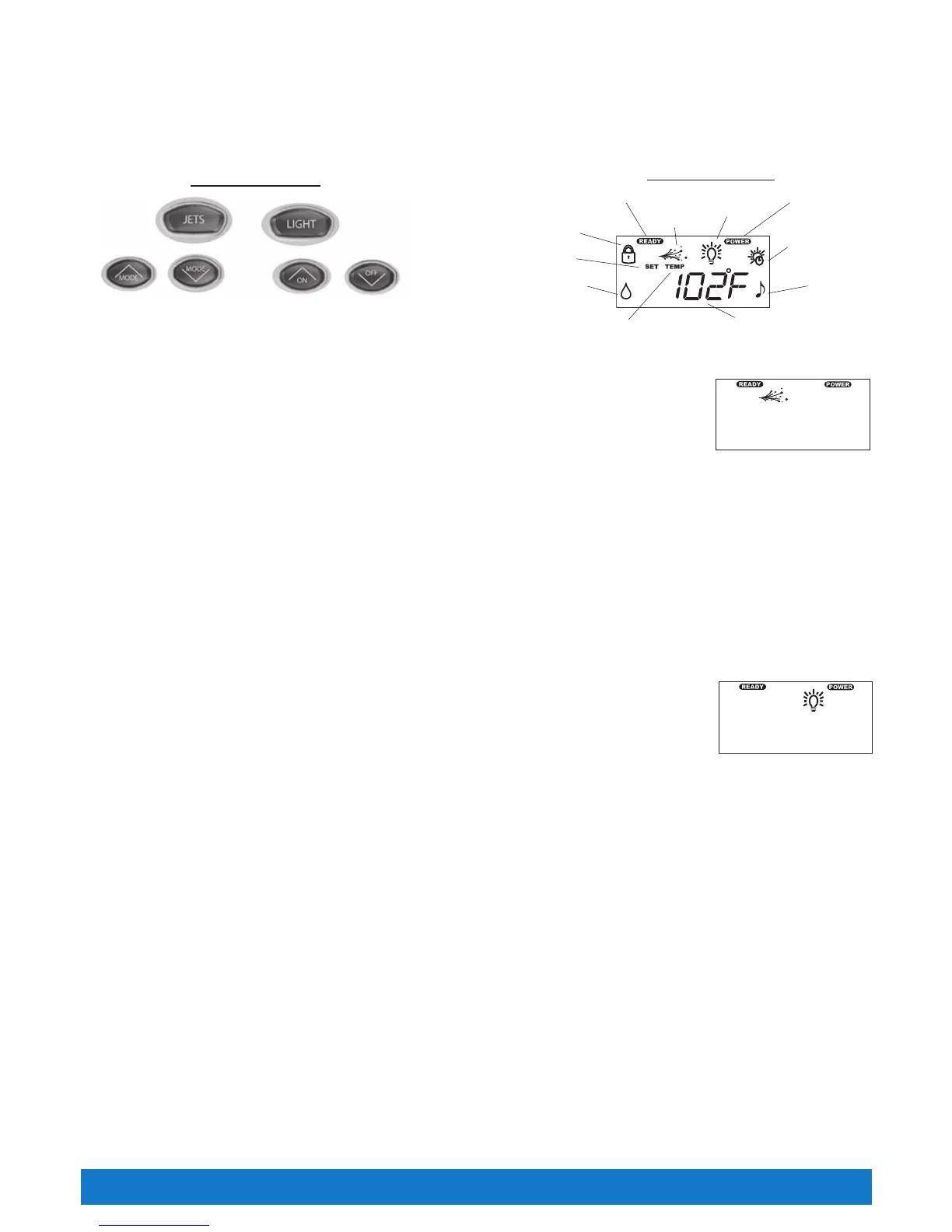
CONTROL PANEL BUTTON AND DISPLAY
The control panel has buttons which the spa user presses to set the temperature, turn the light on and off, activate or deactivate the jet pump and
several other functions depending on what has been added to your spa. The control panel display responds to let you know you’ve pressed a
button, and that the selected function has been performed. After a period of non-use, pressing any button will wake up a sleeping display, as well as
performing its function. Function icons when in active mode will remain lit during the sleeping display
JETS CONTROL
The JETS button activates the jet pump. When the JETS button is pressed, the JETS symbol will illuminate on
the control panel display. The symbol will remain lit until the button is pressed to turn off the jet pump, or after
two hours of continuous operation when the pump is automatically shut off by the control system.
If the jet pump will not engage, make sure SPALOCK is deactivated.
Pressing the JETS button operates the jets as follows:
CASPIAN
™
:
● 1st press = low speed of jet pump 2 ● 2nd press = high speed of jet pump 2 ● 3rd press = high speed of jet pump 1 & 2
● 4th press = high speed of jet pump 1 and low speed of jet pump 2 ● 5th press = high speed of jet pump 1
● 6th press = jet pumps OFF
BENGAL
®
(M) & SUMATRAN
®
:
● 1st press = jet pump ON ● 2nd press = jet pump OFF
BENGAL (MM):
● 1st press = jet pump low speed ● 2nd press = high speed jet pump ● 3rd press = jet pump OFF
LIGHT CONTROL
The light control uses four positions: High, Medium, Low, and Off. To turn on the spa light, press the LIGHT button.
This will place the light in the High, or maximum intensity position. When the light turns on, the light symbol will also
illuminate on the control panel display. Press the LIGHT button again to lower the intensity of the light to the Medium
position. Press the LIGHT button again to lower the intensity even more, placing the light intensity in the Low
position. Press the LIGHT button one more time to shut the light off. When the light is deactivated, the light symbol
will also turn off.
If the light is left on, it will automatically be turned off by the control system after 6 hours of continuous operation. The light symbol on the panel will
also turn off when the light is deactivated.
If the light will not turn on, make sure SPALOCK is deactivated. SPALOCK disables the controls on the control panel.
LIGHT
All Tiger River
®
spas come equipped with a light to enhance nighttime use. The spa uses a specially designed low voltage dimmable LED
light source. If your spa is equipped with the optional multicolor light, follow the instruction card provided with the light for operation.
INDICATOR LIGHTS
At a glance, the indicator lights are readily visible on the main control panel. The two indicator lights (POWER and READY) work independently
from the rest of the control panel display. That way, even if the control panel is off, you can simply glance at the “READY” indicator light to
determine whether or not your spa is within the range of your set temperature.
Power indicator: The POWER indicator is ‘on’ when the spa is properly supplied with power. It also provides a diagnostic function – a blinking
POWER indicator indicates that the heater high-limit has tripped, meaning that either the spa water is above its acceptable temperature range, or
a malfunction has occurred within the spa (such as low circulation due to a clogged filter). An ‘off’ POWER indicator means that there is a problem
with the spa control panel or the power supplied to the spa.
Ready indicator: The READY indicator will light when the spa water temperature is within 2-1/2°F of the set temperature, and will turn off when the
temperature is outside of that range. If you increase or decrease the temperature setting of the spa, the READY indicator will turn off until the spa
temperature reaches the acceptable range for the new set temperature. Additionally, a blinking READY indicator indicates that a problem exists
with the temperature sensor.
Control Panel Operations
Control Panel Buttons
Ready Indicator
Set Icon
Lock Icon
Water Care
Icon
Jets Icon
Light Icon
Power Indicator
Summer Timer
Icon
Audio Icon
Character Display
Temp Icon
Control Panel Display
Jets Display
Light Display



 To Next Page