LOCKING FEATURES
The two locking features, SPALOCK and TEMPERATURELOCK,areenabledfromthecontrolpanelbypressingtheMODE▲orMODE▼
button until the TOOLSmenuisillustrated.ThenpresstheON▲buttontoentertheTOOLSsubmenus.UsetheMODE▲orMODE▼button
to scroll through the submenus to get to the locking features. Once enabled, a lock will remain active until the specific button combination is applied
to disable the lock. Even if power is disconnected from the spa and soon thereafter reapplied (such as in a power outage) the lock will remain in place.
TEMPERATURE LOCK
The TEMPERATURELOCK feature deactivates the temperature control function of the control panel. The jets and the
light functions will operate normally. TEMPERATURELOCK is most often used by people who do not want others to
tamper with or change the set temperature of the spa water.
TEMPERATURELOCKisasubmenuoftheTOOLSmenu
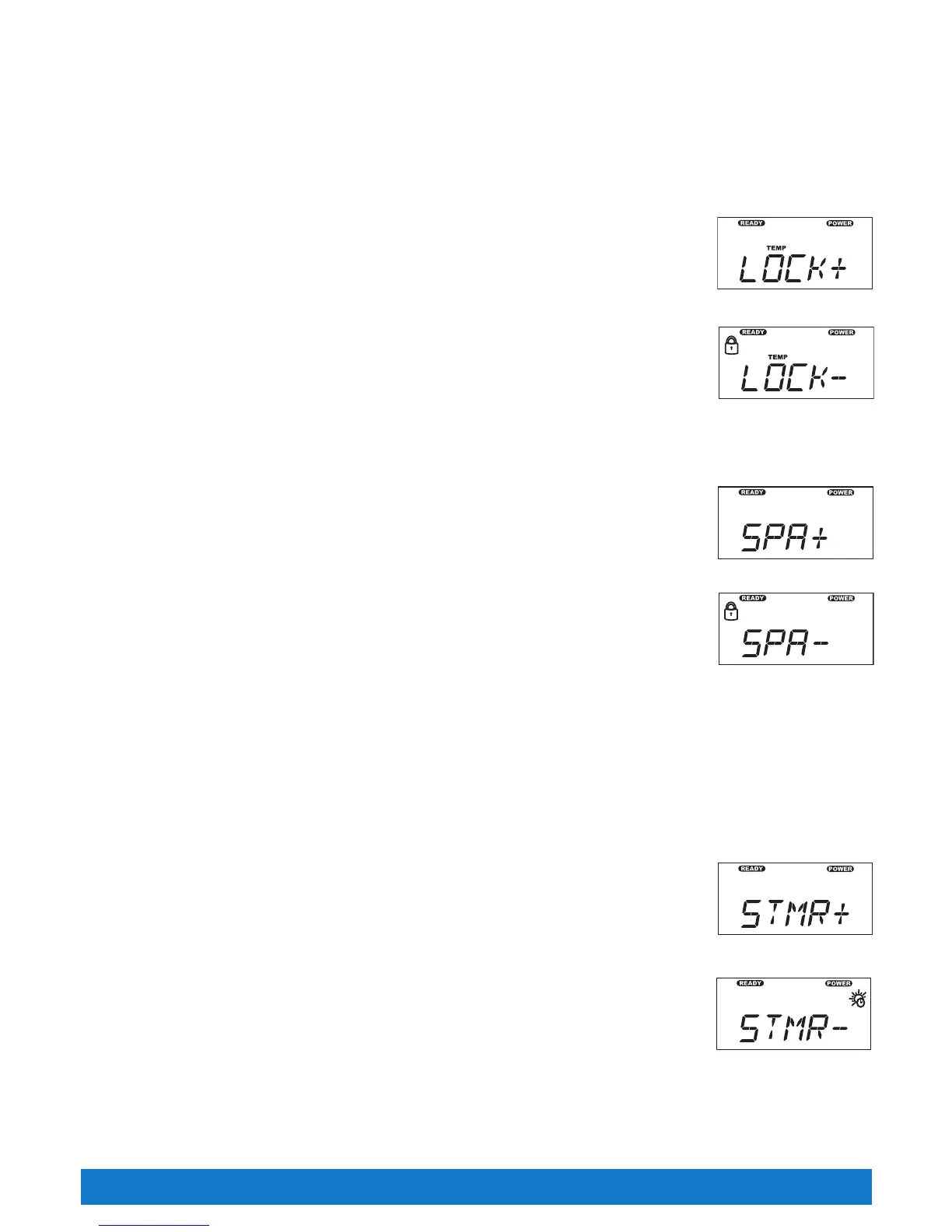
To activate the TEMPERATURELOCK,presstheMODE▲buttonintheTOOLSsubmenuuntiltheLOCK+
symbolisilluminatedonthedisplay.Thelockiconwillflashonandoffwhendeactivated.PresstheON▲buttonto
activate the
TEMPERATURELOCKfeature.
When the TEMPERATURELOCK is activated, the JETS, LIGHT and any other features your spa may have will
operate normally, and the temperature setting can be viewed but can NOT be changed. If a temperature button is
pressed, the control panel will display the lock symbol and the set temperature for 30 seconds, then turn off.
To deactivate the TEMPERATURELOCK,presstheMODE▲buttonintheTOOLSsubmenuuntiltheLOCK-
symbolisilluminatedonthedisplay.PresstheOFF▼buttontodeactivatetheTEMPERATURELOCKfeature.
SPA LOCK
The SPALOCK feature deactivates all of the functions of the control panel. It is generally used to prevent unwanted
useofthespa.TheSPALOCKmenuisasubmenuoftheTOOLSmenu.
To activate the SPALOCK,presstheMODE▲buttonintheTOOLSsubmenuuntiltheSPA+symbolisilluminated
onthedisplay.Thelockiconwillflashonandoffwhendeactivated.PresstheON▲buttontoactivatetheSPALOCK
feature.
NOTE: When Spa is locked, any display other than SPA having a - or + after it will be replaced with an * after the
word indicating the function is locked out. The * will only go away after the Spa is unlocked.
When the SPALOCK is activated, the buttons for the jets, temperature control, light, and any other features your spa
may have are deactivated. If a button is pressed, the control panel will display the lock symbol and the word SPA for 30
seconds, then turn off.
To deactivate the SPALOCK,presstheMODE▲buttonintheTOOLSsubmenuuntiltheSPA-symbolisilluminated
onthedisplay.PresstheOFF▼buttontodeactivatetheSPALOCKfeature.
LOCK OVERRIDE
The Lock Override feature is for spa users who normally keep the set temperature locked. Should the user wish to lock all spa controls temporarily,
the spa lock can be applied over an already-applied temperature lock. Then, when the spa lock is removed, the temperature lock will remain on to
prevent unwanted tampering with the set temperature.
SUMMER MODE
Your Tiger River
®
spa is equipped with a Summer Mode timer. The Summer Mode timer can be activated during
extremely hot summer months if it becomes difficult to maintain water temperatures low enough for comfort. Upon
switching to the ON mode, the circulation pump (which can add heat to the water through normal operation) and
heater will immediately shut down for the next eight hours. Additionally, the summer mode display on the control
panel will activate and remain active for as long as the summer mode is on. Following this eight hour period, the
circulation pump and heater will automatically re-start and will operate normally for the next sixteen hours. The
circulation pump and heater will continue to turn off for an eight hour period every day that the timer remains in
the ON position. In this way, the amount of heat transferred to the spa water will be minimized. When the outside
temperatures begin to cool, the Summer Mode timer should be turned to the OFF position (the summer mode icon
on the main display will shut off). This is the efficient 24 hour circulation mode that keeps the heater operation and
operating costs to a minimum during colder/heavier usage months.
NOTE: Whenever power is disconnected and then reconnected to the spa, the Summer Mode timer will reset
starting with the 8-hour shutdown mode. If a different eight-hour shut down time is desired, deactivate the Summer
Mode, then reactivate at the beginning of the desired eight-hour shut down time.
IMPORTANT: The Summer Mode will not lower the spa’s water temperature below the ambient air temperature.
To activate the Summer Mode, simply follow these steps:
Page 28
Summer Mode Display
Summer Timer ON Display
Control Panel Operations
Spa Locked Display
Spa Lock Display
Temp Lock Display
Temp Locked Display



 To Next Page