11-6
ZR Owner’s Manual
OM_ZR_0913RevA
CHAPTER 11: CASTERS And FORKS
IWARNING
The fork stems on Frog Legs
®
made for the TiLite ZR are a custom size. Therefore, if you need to replace your Frog
Leg
®
forks or stems, you must order replacements from TiLite.
If you ignore this Warning, the new Frog Legs
®
that
you purchase will not t into the “Bullet” Caster Housing on your TiLite ZR.
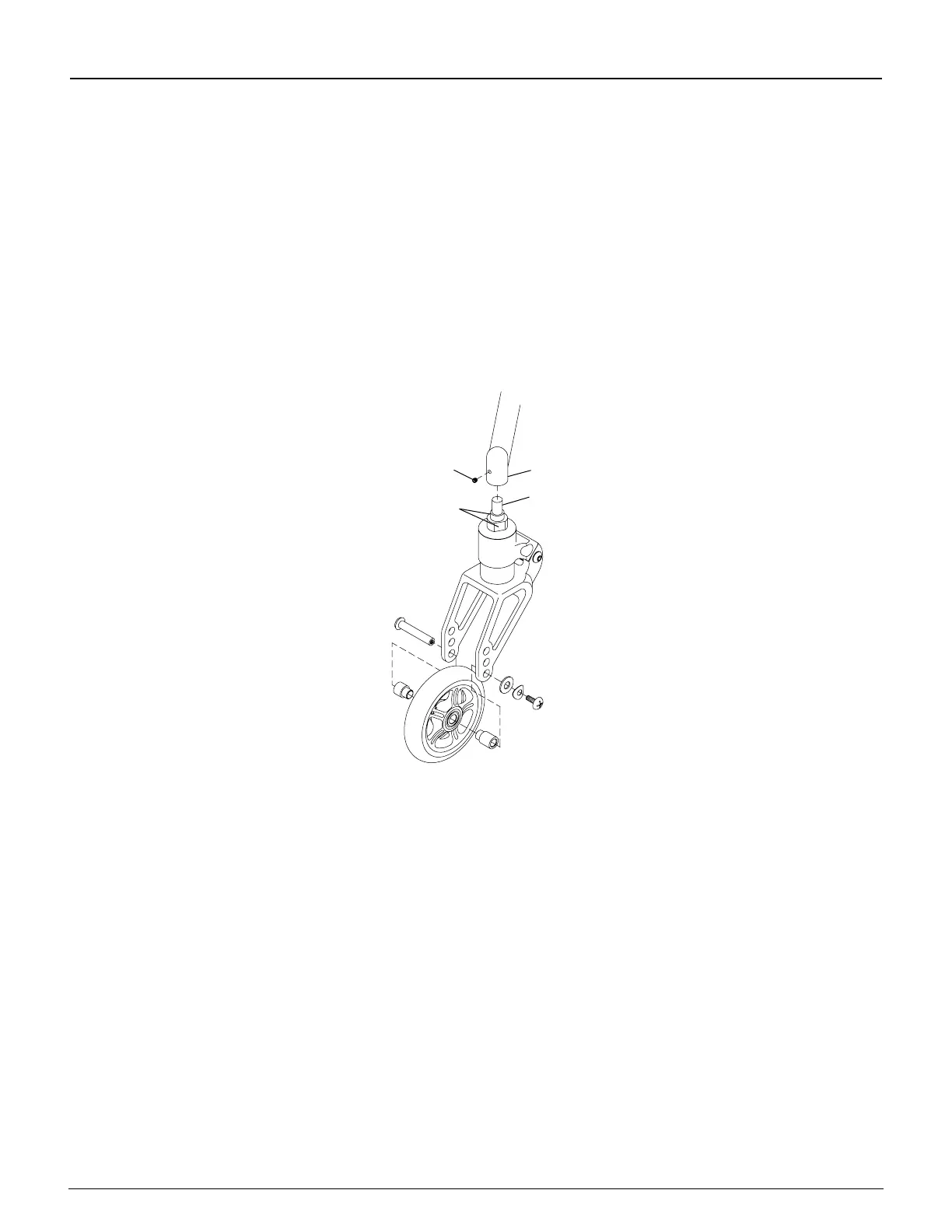
1. Remove the casters. See “Replacing Casters” on page 11-5.
2. Remove the set screw that secures the stem bolt inside the “Bullet” Caster Housing.
3. Loosen and remove the stem bolt using the Open End wrench on the ats indicated in Figure 11-8.
4. After properly treating the new Frog Legs
®
fork stem with a medium strength threadlock, install the new stem bolt
into the “Bullet” Caster Housing and securely tighten.
5. After properly treating the set screw with a medium strength threadlock, install the set screw fully into the “Bullet”
Caster Housing and tighten to 32 inch-lbs.
6. Reinstall the casters. See “Replacing Casters” on page 11-5.
Figure 11-8
Replacing Frog Legs
®
Set Screw
Stem Bolt
Flats
“Bullet” Caster
Housing


 To Next Page