5.1. BASIC CONCEPT
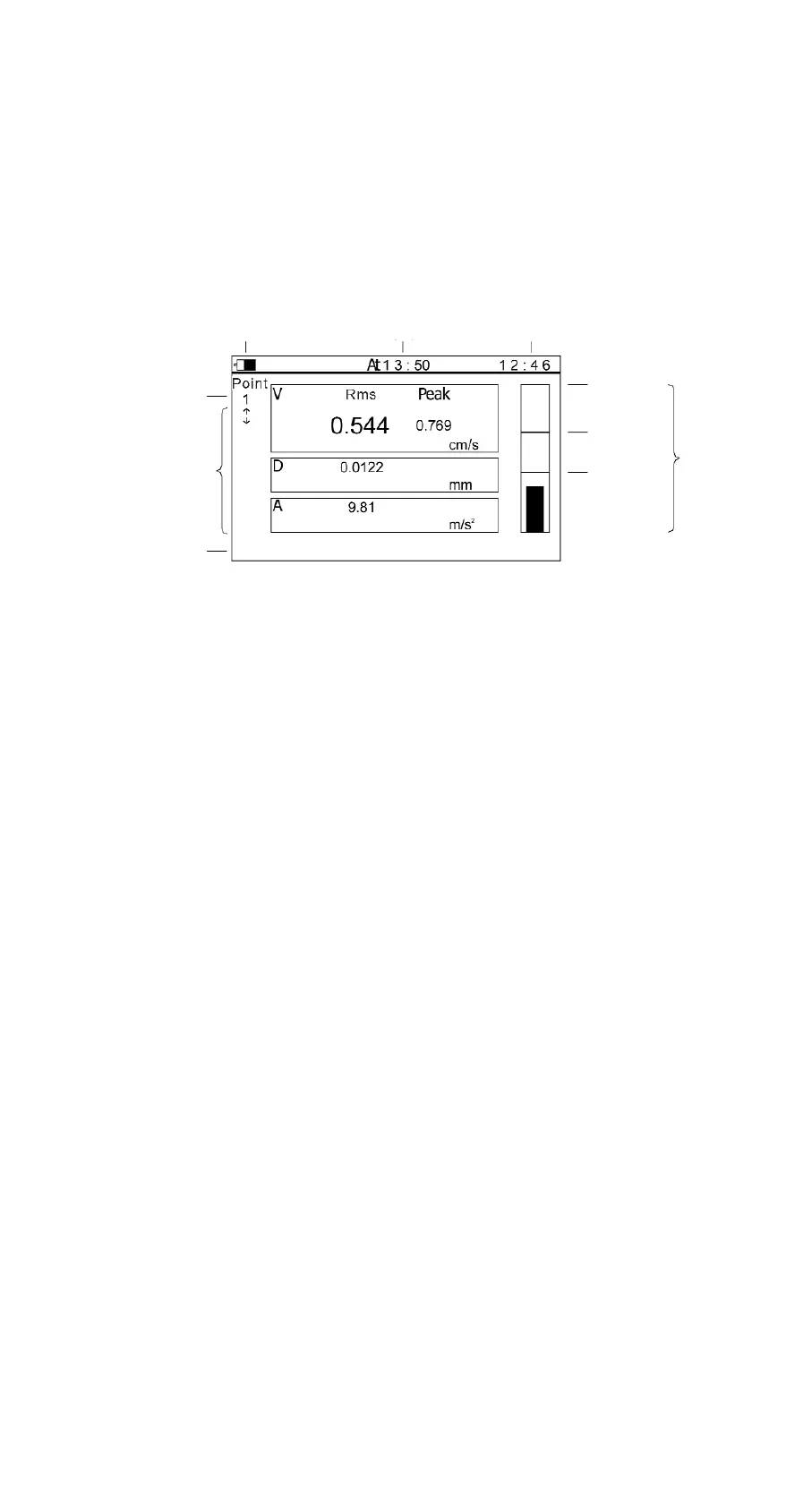
Special display mode is as follows (see Figure 5-1).
Figure 5-1
- Battery status: The full scale indicates the power is 100%.
- Working status: When the measurement goes on, displays one moving column.
When the measurement is finished, displays "at hh : mm".
- Time: Current time.
- Measurement point number: One point number correspond to one testing point,
TV300 will keep up to 62 historical results for each point.
- Measurement values: Indicate the testing results of the acceleration, velocity, and
displacement.
- Status Bar: Indicate the relative relation of testing result, last testing result, warning
limit and alarm limit.
- Main menu: Consist of display, analyse, view and system.
5.2. SIMPLE TEST
- Press “on/off” key to power on;
Press “MEAS” key to start the testing operation (displays one moving column);
Press “MEAS” key again to finish the test;
Read the measurement values
- When testing continuously, the measurement point number can increase
automatically. Users can also choose the measurement point number by Up/Down
keys.
Manual TV-300 9
5HOW TO USE THE METER
Status
bar
Alarm
limit
Warning
limit
The last
measure
result
Time
Working
status
Battery
status
Point
number
Time
Main menu
SystemAnalyse ViewDisplay


 To Next Page