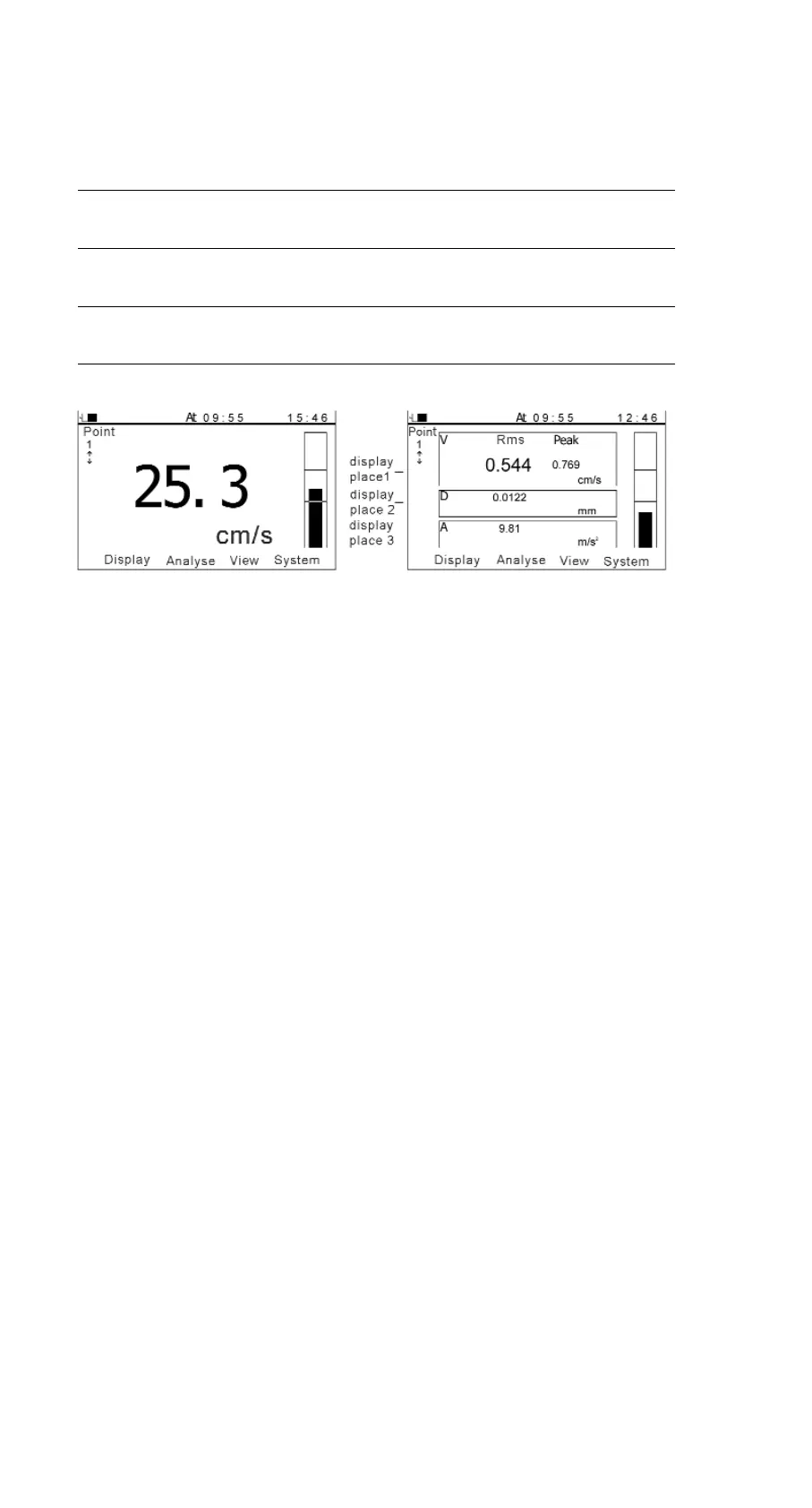
Display area/ Display area Display area Display Display
Selected parameter 1 (left) 1 (right) area 2 area 3
Velocity RMS of peak value of peak-peak peak value of
velocity velocity value of acceleration
displacement
Displacement peak-peak RMS of RMS of peak value of
value of displacement RMS of acceleration
displacement
Acceleration peak value of RMS of RMS of peak-peak
acceleration acceleration RMS of value of
displacement
Figure 5-8 Velocity-common Figure 5-9 Velocity- special
5.4.4.4. Personal settings
- Languages:
There are two languages available: Chinese and English.
- Auto shutdown:
The meter will shutdown automatically if there is no operation for a
while. And users can set the delay time themselves.
- LCD contrast:
Users can adjust LCD contrast by Left/Right keys.
5.4.4.5. Time
Time is the assistant information of the measurement results. TV300 can
automatically record the time when the test is performed. If the time is
not correct, it should be reset manually.
5.4.4.6. Software information
It consists of the model of the meter and the software identifier.
14 Manual TV-300


 To Next Page