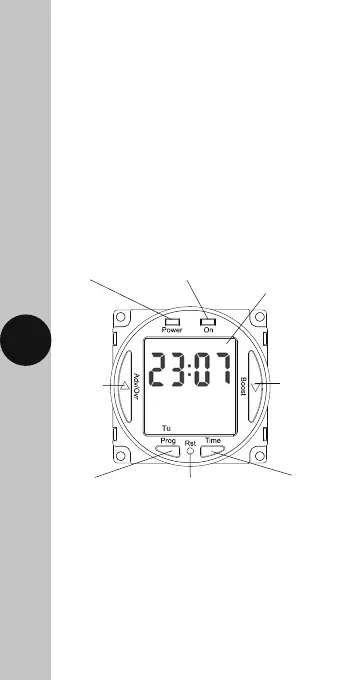
Power LED Output LED
Advance
button
Boost
button
Programme
button
Illuminated
screen
Reset
button
Time
button
• Power Status
LED Indicator: Red
• Output LED
Indicator: Green
• 7 Day Time Period: (7 Day, 5 + 2 Days
or Individual Day) –
4 ON/OFF switching
programmes per day
• Operating
Temperature: 0°C to +40°C
• CE Approved
4. Installation
• Ensure the mains supply is switched off
and the circuit supply fuses are removed
or the circuit breaker turned off.
• Connect the installation wiring to the
module, according to the legend printed on
the rear side of the time switch, or according
to the connection section below.
2
Note: Not suitable for use with
Discharge Lighting.












 To Next Page