14
15
4TH CENTER HAND ADJUSTMENT
To readjust a misaligned 4th center hand:
1. Pull the crown to its outer position. The upper and
lower hands reset to the ends of their sweeps
automatically.
2. 4th center hand should point to 12 o’clock. If within
5 seconds of pulling the crown to its outer position the
4th center hand does not point to 12 o’clock, press
Button A or B to move the hand counterclockwise or
clockwise until it points to 12 o’clock.
3. Push crown to closed position when finished.
FLY-BACK CHRONOGRAPH
OVERVIEW
AA
B
23
1 2
3
1 2
3
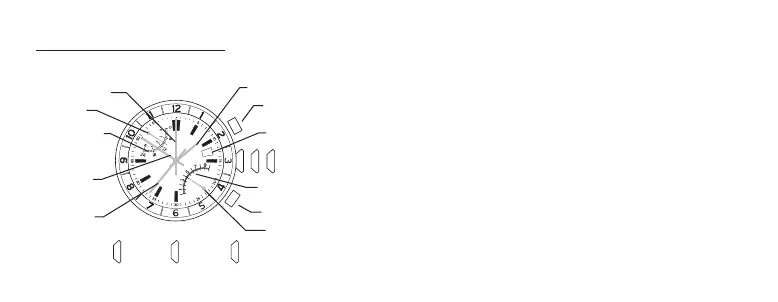
UPPER HAND
CHRONO HOURS
2ND TIME ZONE
4TH CENTER HAND
SECOND HAND
DATE WINDOW
CROWN
CHRONO MINUTES SCALE
LOWER HAND
BUTTON A
BUTTON B
MINUTE HAND
HOUR HAND
CLOSED
POSITION
MIDDLE
POSITION
OUTER
POSITION



 To Next Page
 Loading...