EasyManua.ls Logo

Timex T608 - User Manual

Timex T608
20 pages
Print Icon
To Next Page IconTo Next Page
Loading...
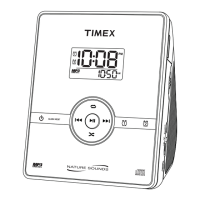
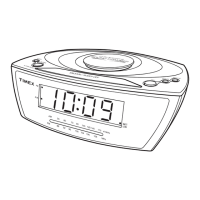
Model T608
Stereo CD Dual Clock
Radio with Nature Sounds
Para instruccionese en Espanol, llame al 1-800-888-4491.
For questions or comments regarding this or other products,
please call our toll-free number 1-800-888-4491.
For additional information, online registration,
and exclusive special offers visit our website:
www.sdidirect.com
ALM 1
ALM 2
PM
RANDOM
REPEAT
FM 88 92 96 100
104 108 M
Hz
106
AM
54 60 70 80 100 120 140
170
x
10
kHz
SNO
O
ZE
PROG.
P
U
S
H
T
O
O
P
E
N
F. FWD/
R
E
W
IN
D
/
ALARM RESET/
OFF
RADIO /SOUNDS /
SLEEP ON
P
LA
Y/P
A
U
SE
S
TO
P

Questions and Answers

  • M
    Matthew PhelpsAug 16, 2025
    How do I set the clock or alarm time on my Timex T608 Clock Radio?
    • H
      henry12Aug 16, 2025
      If you're having trouble setting the clock or alarm time on your Timex Clock Radio: * Ensure that the display is flashing. Press the Time Set button when setting the time, or slide one of the Alarm-1 or Alarm-2 switches to the “Set” position when setting the alarm times.
  • B
    Beth GarzaAug 19, 2025
    What to do if my Timex Clock Radio has no display and won't play CD/radio?
    • C
      cbautistaAug 19, 2025
      If your Timex Clock Radio has no display and the CD/radio won't play, it could be due to a few reasons: * The unit might not be connected to an AC outlet. Ensure it's properly connected. * The AC outlet itself might not have power. Try plugging the unit into another outlet. * The outlet might be controlled by a wall switch that's turned off. Avoid using such outlets.
  • Z
    Zachary WilliamsAug 22, 2025
    Why is there low or no volume on my Timex Clock Radio?
    • D
      David LeAug 22, 2025
      If your Timex Clock Radio is on but has low or no volume, here are some possible reasons: * The main volume might be turned all the way down. Try raising the volume using the volume dial. * Headphones might be connected to the headphone jack. Disconnect the headphones.
  • J
    johnsonmichelleAug 25, 2025
    How to fix a Timex T608 Clock Radio when the alarm doesn't sound?
    • M
      Monica AvilaAug 26, 2025
      If the alarm on your Timex Clock Radio isn't sounding, consider these possibilities: * The alarm might not be set correctly for AM/PM. Double-check the alarm time setting. * The alarm icons might not be visible on the display. Press the Alarm Mode Button until the Alarm icon appears.
  • R
    Ronald PierceAug 28, 2025
    Why does my Timex T608 Clock Radio alarm sound at the wrong time?
    • M
      Mark WallaceAug 28, 2025
      If your Timex Clock Radio alarm sounds at an incorrect time, it could be due to these reasons: * The wrong alarm icon might be active on the display. Ensure that only the alarm you intend to use is displayed. * The alarm might not be set correctly for AM/PM. Make sure the correct AM/PM is selected.
  • S
    Sean HunterAug 31, 2025
    What to do if my Timex T608 shuts off unexpectedly?
    • S
      Shannon RobertsAug 31, 2025
      If your Timex Clock Radio shuts off unexpectedly, it might be due to the following: * The unit may be in Sleep Mode instead of Power On Mode. Press the Radio On/Sleep button once to turn the unit back on. * The unit may have been turned on by the alarm, and the alarm time has ended. Press the Radio On/Sleep button once to turn the unit back on.
  • M
    Margaret SmithSep 3, 2025
    Why is the buzzer alarm heard when waking to CD on my Timex T608 Clock Radio?
    • J
      Jeremiah Rodgers DDSSep 3, 2025
      If you hear the buzzer alarm when trying to wake to a CD on your Timex Clock Radio, consider these factors: * A CD might not be inserted into the CD player. Always ensure a CD is inserted when waking to CD. * The CD might be inserted incorrectly. Always insert the CD with the label surface facing up. * The compartment CD player door might not be closed completely. Push down gently until the door is completely closed. * There might have been a power failure. All alarms default to buzzer during a power failure as long as working batteries are inserted correctly inside the battery compartment.
  • J
    Jeffrey Hernandez DDSSep 5, 2025
    How to stop my Timex T608 CD player from skipping?
    • S
      Sandra MayerSep 6, 2025
      If the CD skips while playing on your Timex Clock Radio, it could be caused by: * A dirty or defective disc. Check the bottom of the disc and clean if necessary with a soft cleaning cloth, always wipe from the center out. * A dirty lens. Clean with a commercial lens cleaner.
  • J
    James BeckerSep 8, 2025
    Why is the FM reception poor on my Timex T608?
    • K
      kwestSep 9, 2025
      If you're experiencing poor FM reception on certain stations with your Timex Clock Radio, it may be due to a weak or distant station. Try adjusting the direction of the FM wire antenna.
  • K
    Kelly ChambersSep 12, 2025
    Why is the AM reception poor on my Timex Clock Radio?
    • R
      Richard LawrenceSep 12, 2025
      If you're experiencing poor AM reception on certain stations with your Timex Clock Radio, it may be due to a weak or distant station. Rotate the unit to try and gain better reception.

Summary

A Consumer Guide to Product Safety

Important Safety Instructions

Covers water, ventilation, heat, power sources, grounding, cord protection, and cleaning precautions.

Additional Safety Precautions

Details on object entry, attachments, overloading, service, antenna, and nonuse.

FCC Information and Laser Safety

Explains FCC compliance, interference reduction, and laser safety warnings.

Installation and Maintenance

Installation and Setup

Steps for physically setting up the unit and connecting it to power.

Battery Backup Installation

Instructions for installing a 9-Volt battery for backup power.

Care and Cleaning

Cleaning instructions and care for prolonged periods of non-use.

Controls and Indicators

Front Panel Controls

Identification and function of buttons and switches on the front of the device.

Clock Display and Indicators

Explanation of the digital clock display, indicators, and radio dial.

Setting the Clock Time

Setting the Current Time

Step-by-step guide to accurately setting the current time on the clock display.

Listening to Compact Discs

Basic CD Playback Operations

Loading, playing, pausing, stopping, and skipping tracks on a CD.

Advanced CD Features

Using repeat, random playback, programming tracks, and music search.

Listening to the Radio

Radio Operation and Tuning

Instructions for turning on, tuning, and adjusting volume for radio playback.

Antenna Adjustment for Reception

Guidance on positioning the FM antenna and rotating for AM reception.

Operating the Alarms

Setting Dual Alarm Times

Instructions for setting Alarm-1 (CD/Buzz) and Alarm-2 (Radio/Sounds).

Wake-Up Sound Options

Configuring alarms to wake with CD track, beeping sound, radio, or nature sounds.

Turning Off the Alarm and Snooze

Disabling and Silencing Alarms

How to stop the alarm, reset for next day, or use the snooze function.

Sleeping to Compact Discs

CD Sleep Timer Function

Playing a CD with a timer that automatically shuts off the unit.

Sleeping to Radio with Timer

Radio Sleep Timer

Using the sleep timer to listen to the radio for a set duration.

Sleeping to Nature Sounds with Timer

Nature Sounds Sleep Timer

Setting a timer to play nature sounds for a specified sleep period.

Stereo Headphone Jack

Headphone Usage and Impact

Connecting headphones for private listening and their effect on speakers.

Troubleshooting Common Issues

Alarm and Playback Problems

Solutions for alarms not sounding, incorrect times, no display, or CD playback errors.

Reception, Volume, and Settings

Addressing radio reception, volume issues, unexpected shutdowns, and time setting problems.

Limited 90-Day Warranty Information

Warranty Terms and Process

Details on warranty period, repair/replacement process, and associated fees.

Warranty Exclusions and Legal Rights

Conditions not covered by warranty and consumer legal rights.

Timex T608 Specifications

General IconGeneral
BrandTimex
ModelT608
CategoryClock Radio
LanguageEnglish

Related product manuals