13
Alarm Operation
Important!
• To wake to the CD Player or Buzzer you must set Alarm 1 to the desired wake time.
• To wake to the Radio or Nature Sound, set Alarm 2.
Wake to CD or Buzzer
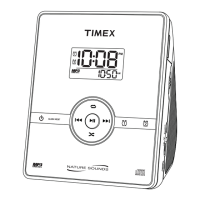
1. Press and hold the Alarm-1 Button until the display flashes and the Alarm-1 icon appears in the upper
right corner of the display. You have a few seconds to begin setting the alarm before the display reverts to
the standard setting.
2. Press the Forward/Minute Button and Reverse/Hour Button to set the alarm time. Remember
to set the correct AM or PM time.
3. After you have programmed the settings, press the Alarm 1 Button or wait a few seconds to return to
the standard display. The Alarm-1 Indicator will appear on the display, showing that Alarm 1 is set.
4. For wake to Buzzer, make sure that a CD is not inserted in the CD player.
5. If you wish to wake to a CD rather than the Buzzer, make sure a disc is inserted correctly into the CD player
and the volume is left at a comfortable level to wake up to. (See Listening to Compact Discs).
6. To disarm the alarm, press the Alarm 1 Button once. To re-arm, press the Alarm 1 Button for 2
seconds.
Note: The CD alarm will play at the currently set volume level when it turns on.
Wake to Radio or Nature Sound
1. Press and hold the Alarm-2 Button until the display is flashing and the Alarm-2 icon is showing on the
upper right corner of the display. You will have a few seconds to begin setting the alarm before the display
reverts to the standard setting.
2. Press the Forward/Minute Button and Reverse/Hour Button to set the alarm time. Remember
to set the correct AM or PM time.



 To Next Page