10
9. CHARGING THE CAMERA
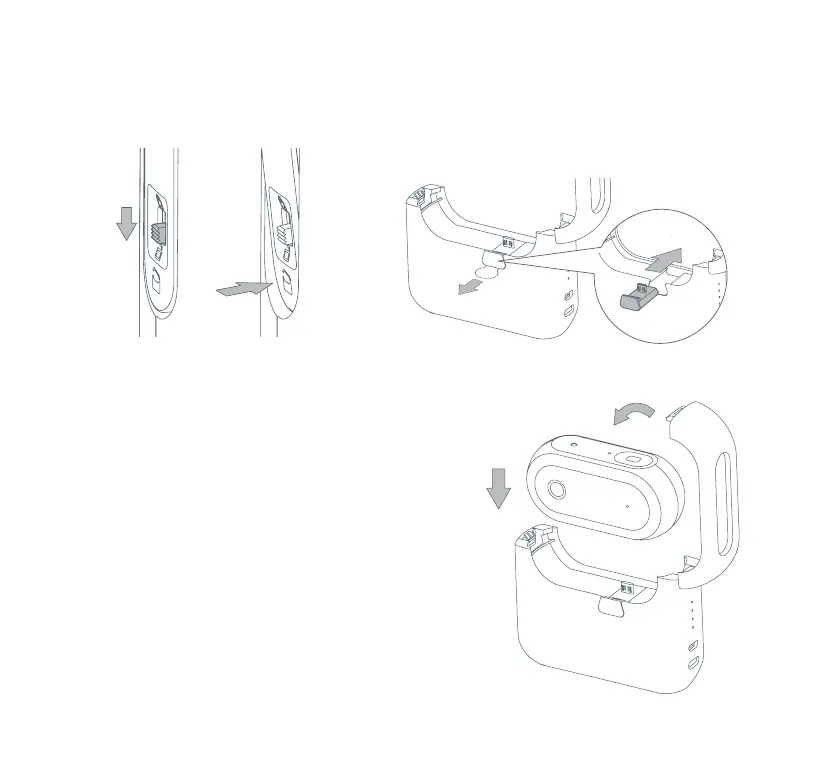
1. Slide the switch down and press the
button below to unlatch the housing
of the Power Bank.
2. Remove the plastic insulation tab. Make sure the
inserted connector is compatible with your Camera.
Replace the original Micro USB Connector with
the USB-C Connector provided for Cameras with
USB-C input ports.
3. Attach your Camera onto the Power Bank using the
connector. Close the housing of the Power Bank to
begin charging. Slide the switch up to lock the housing.
Caution: The Power Bank should not be used to charge
a device when the Power Bank is being used with the
Camera. If you want to use the Power Bank to charge
an additional device, we recommend disconnecting the
Camera.



 To Next Page