9
Power / Mode Status 5” Touch Screen LCD Monitor Camera
Power On Blue LED light stays on. Monitor powers on when the engine
is turned on. Alternatively, press and hold the power button
for more than 2 seconds to power on the Monitor.
Blue LED light stays on.
Low Voltage Indication Red LED light ashes. N/A
Power Off LED light is off. Press and hold the power button for more than
2 seconds to power off the Monitor.
LED light is off.
Screen Save Mode Blue LED light stays on. Blue LED light stays on.
Pairing Mode Blue LED light stays on. Blue LED light ashes.
Charging Red LED light stays on and then turns off when fully charged. N/A
7. TINY TRAVELER™ MONITOR & CAMERA LED INDICATORS
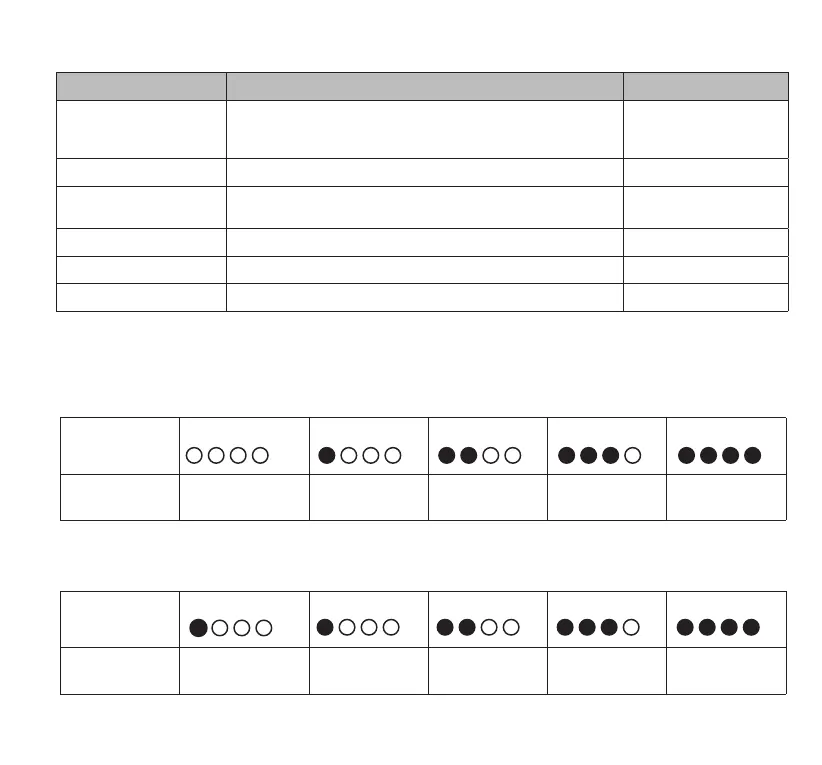
LED Status 1 Flashing Light 1 Solid Light 2 Solid Lights 3 Solid Lights 4 Solid Lights
Battery
Capacity:
0-25% 25-50% 50-75% 75-99% Full
8. CHECKING THE POWER BANK BATTERY LEVEL
Battery Level
Connect your device to the Power Bank to check the current battery capacity. Once the device is
connected, the Power Bank will automatically begin charging the device.
Charging
When charging, the LED Indicators will ash in succession to indicate the current charge level. All lights
will stay on solid when the Power Bank is fully charged
LED Status No Light 1 Solid Light 2 Solid Lights 3 Solid Lights 4 Solid Lights
Battery
Capacity:
Fully
Discharged
0-25% 25-50% 50-75% 75-99%



 To Next Page