13
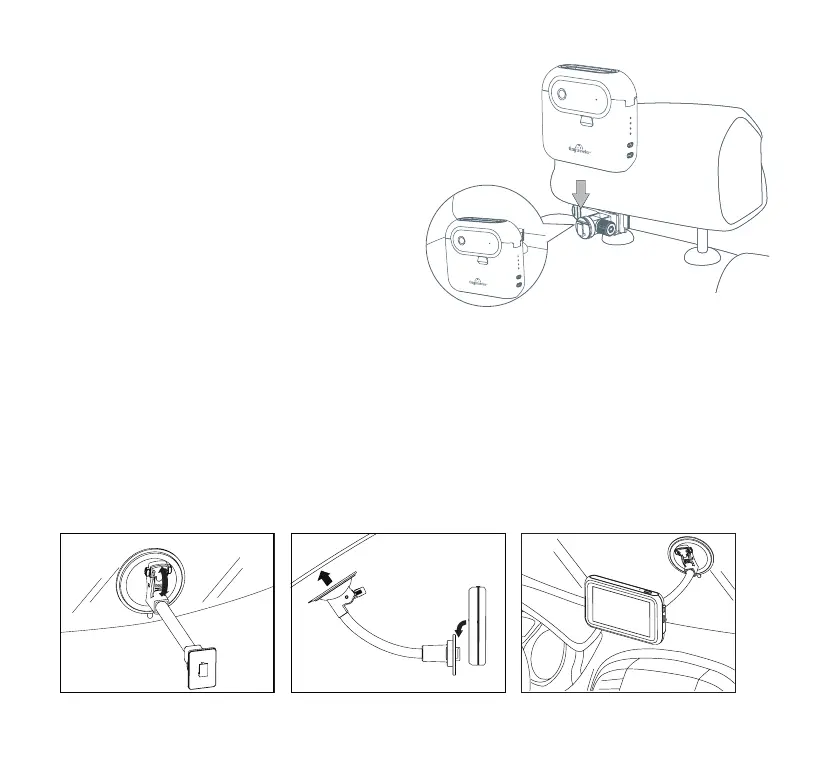
To mount the Camera using the Spring Loaded Clamp, place
the clamp around the headrest pole that best suits the Camera
placement that is needed. Attach the Camera on the bracket
of the clamp. Adjust the angle of the Camera by
loosening the nut and rotate to your desired angle.
Option 2: Spring Loaded Clamp
Select a suitable position for the mount and clean the windshield with a dry/clean cloth.
1. Remove the protective plastic lm from the suction cup and attach the Windshield Mount to the
windshield. Push the lever down to secure the mount while holding the suction cup onto the glass.
2. Attach the Monitor to the Windshield Mount as shown below. For optimal ease of use, we suggest
mounting the Monitor low and near the center of your windshield. You should able to safely glance at
your baby and not need to turn your head from facing forward. Adjust the tube of the Windshield Mount
so the base of the Monitor is touching the surface of the dashboard in order to reduce rattling vibration.
Be sure that the Monitor does not obstruct your view while driving.
Monitor Placement and Operation



 To Next Page