English
8
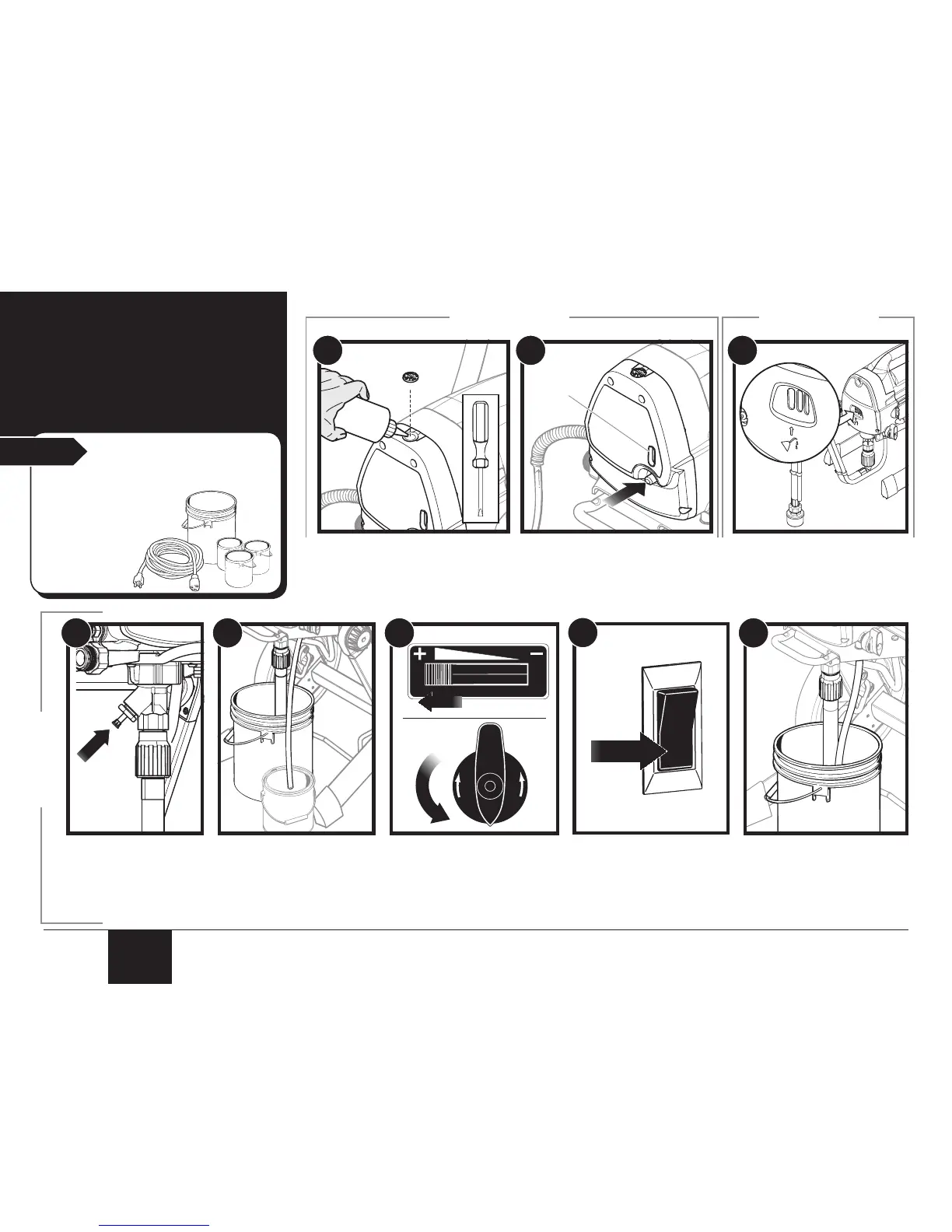
2. Load
Material
Start
You will need:
• The material you plan to spray
• Flat blade screwdriver
(cart models only)
• Piston Lube™
• Extension cord
• Waste bucket
1. Remove AutoOiler cap with a
at blade screwdriver.
Squirt Piston Lube into the
AutoOiler. Replace cap.
2. Push AutoOiler button 2-5 times
to lubricate the uid section.
Press button 2-3 times before
every use. Be sure to check
reservoir level (a) and rell as
necessary.
6. Slide the PressureTrac™ to
maximum pressure (+).
Turn the PRIME/SPRAY
knob to PRIME.
5. Place a full container
of spraying material
underneath the suction
tube (a).
Hold the return tube into a
waste container (b).
4. Fully depress the
Sureo™ valve to
make sure the inlet
ball is free.
7. Plug in the sprayer and
move the ON/OFF switch
to the ON (l) position.
Allow pump to run until
you see spray material
tube.
8. Switch the pump OFF (O).
Place return tube back into
material container and clip
return tube and suction tube
together.
3. Squirt a teaspoon of Piston
Lube™ (P/N 314-480 or
0516750, sold separately) into
the indicated area.
Light household oil can be
substituted if necessary.
CART MODEL ONLY STAND MODEL ONLY
ALL MODELS


 To Next Page