Need help?
Do you have a question about the Titanium Office Professional A3 and is the answer not in the manual?
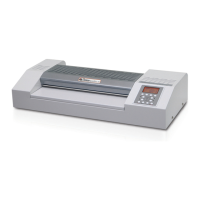
This user manual accompanies this A3 laminator and contains important information on start-up and handling.
The following symbols and signal words are used in this user manual, on the laminator or on the packaging.
The laminator is intended for private use only and for laminating documents as described in this manual.
A faulty electrical installation or excessive mains voltage may result in an electric shock. Ensure proper connection.
Guidance for use by persons with impaired physical, sensory, or mental capacities, or lack of experience.
Improper handling and placement can lead to damage to the laminator or documents. Avoid heat and unstable surfaces.
Ensure the laminator and its components are checked for damage and completeness before use.
Instructions on positioning the laminator and connecting it to a power source.
Steps to turn the laminator on for cold or hot lamination and turn it off.
Details on the automatic sleeping function and other protective measures for the machine.
Improper handling can cause injury. Disconnect power if an object is taken into the infeed slot.
Improper handling can lead to damage to the laminator or documents. Avoid laminating treated surfaces.
Step-by-step guide for performing hot lamination using the device.
Instructions for performing cold lamination using the laminator.
How to use the reverse button to clear jammed items during operation.
The laminator becomes hot during operation. Always let it cool completely before cleaning.
Water penetrating the housing can cause a short circuit. Never submerge the laminator in water.
Procedure for cleaning the heating rollers using a sheet of paper.
Improper storage can damage the laminator. Store in a clean, dry, sun-protected area away from heat.
Instructions for disposing of packaging materials responsibly.
Guidelines for the environmentally sound disposal of old electrical appliances.

 To Next Page
 General