Our Brands: FlinQ | iProtect | Park Assist | ParkEyes | Siqura | VDG
Installations in over 80 countries
TKH Security B.V. | +31 182 592 333 | info.nl@tkhsecurity.com | tkhsecurity.com
Meridiaan 32
2801 DA, Gouda
The Netherlands
Installation ManualPD950/PD980
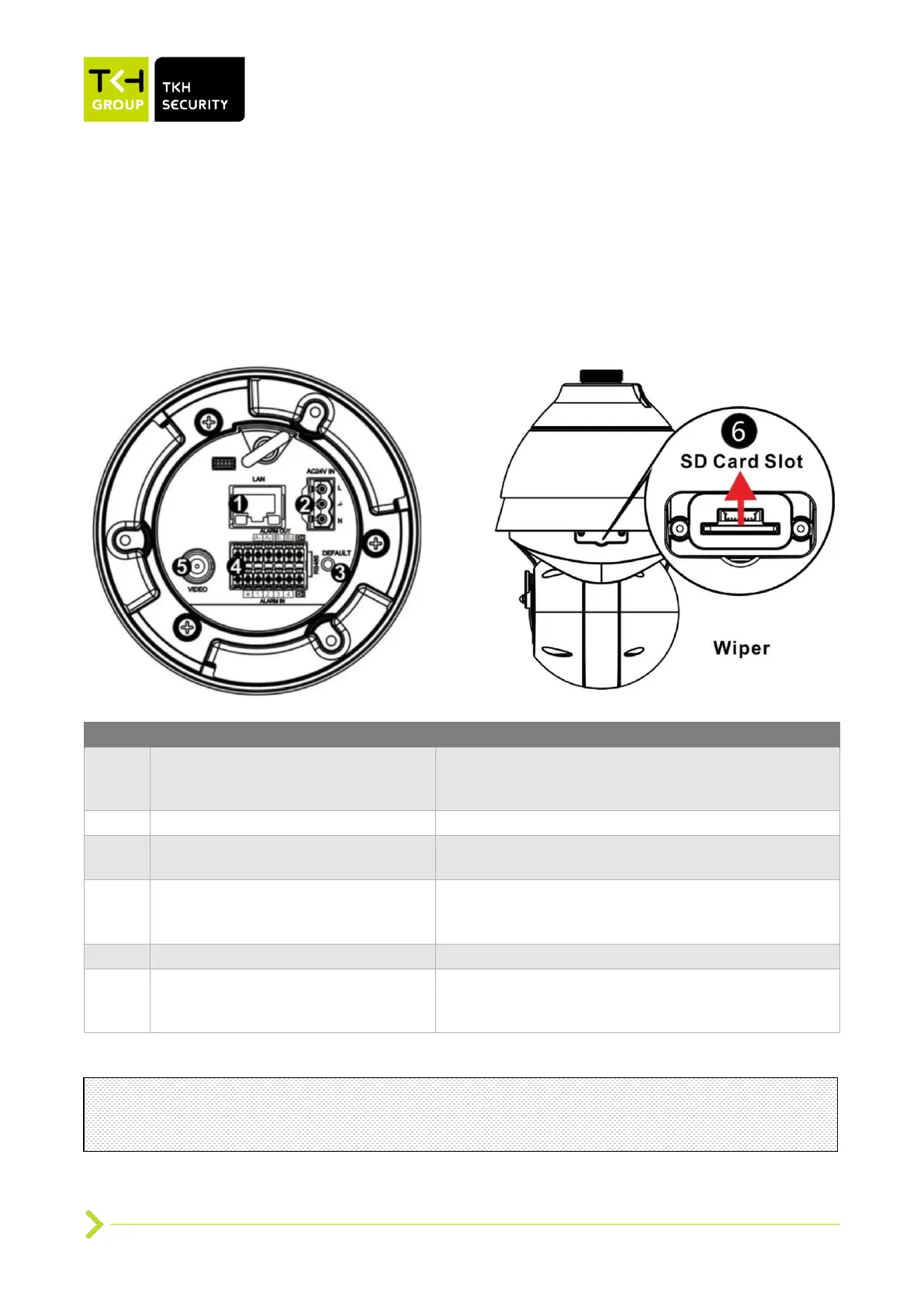
2.3 Connectors
2.3.1 PD950/PD980 connectors
For network communications and optional PoE
802.3bt type 3 class 6 power supply. Contact TKH
Security for a compatible PoE injector.
Press the button with a proper tool for at least 20
seconds to restore the system.
Audio/Alarm I/O and RS-485 connection
Do not connect external power to the alarm I/O
connector of the camera.
Insert the SD card into the card slot to store videos
and snapshots. Do not remove the SD card when
the camera is powered on.
Note: It is not recommended to continuously (24/7) record with the micro SD card, as the
camera may not support long-term continuous data read/write. Contact the manufacturer of
the micro SD card for information about the card’s reliability and life expectancy.


 To Next Page