Our Brands: FlinQ | iProtect | Park Assist | ParkEyes | Siqura | VDG
Installations in over 80 countries
TKH Security B.V. | +31 182 592 333 | info.nl@tkhsecurity.com | tkhsecurity.com
Meridiaan 32
2801 DA, Gouda
The Netherlands
Installation ManualPD950/PD980
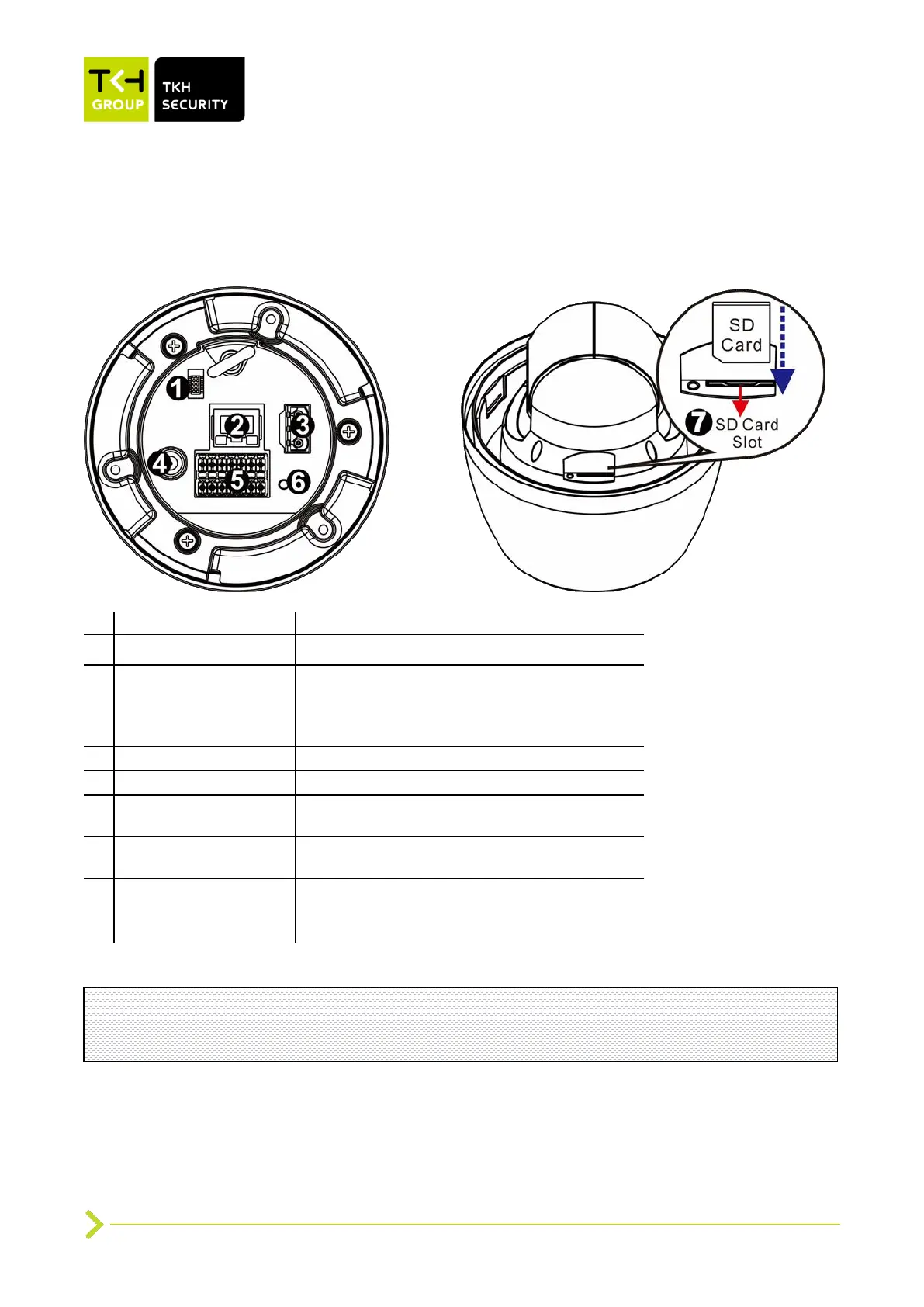
Reserved for manufacturer use
RJ-45 Port
(Contact TKH Security
for a compatible PoE
injector.)
For network and PoE+ connections
Audio/Alarm I/O & RS-485 connection
Press the button with a proper tool for at
least 20 seconds to restore the system.
Insert the SD card into the card slot to store
videos and snapshots. Do not remove the SD
card when the camera is powered on.
Note: It is not recommended to continuously (24/7) record with the micro SD card, as the
camera may not support long-term continuous data read/write. Contact the manufacturer of
the micro SD card for information about the card’s reliability and life expectancy.


 To Next Page