32
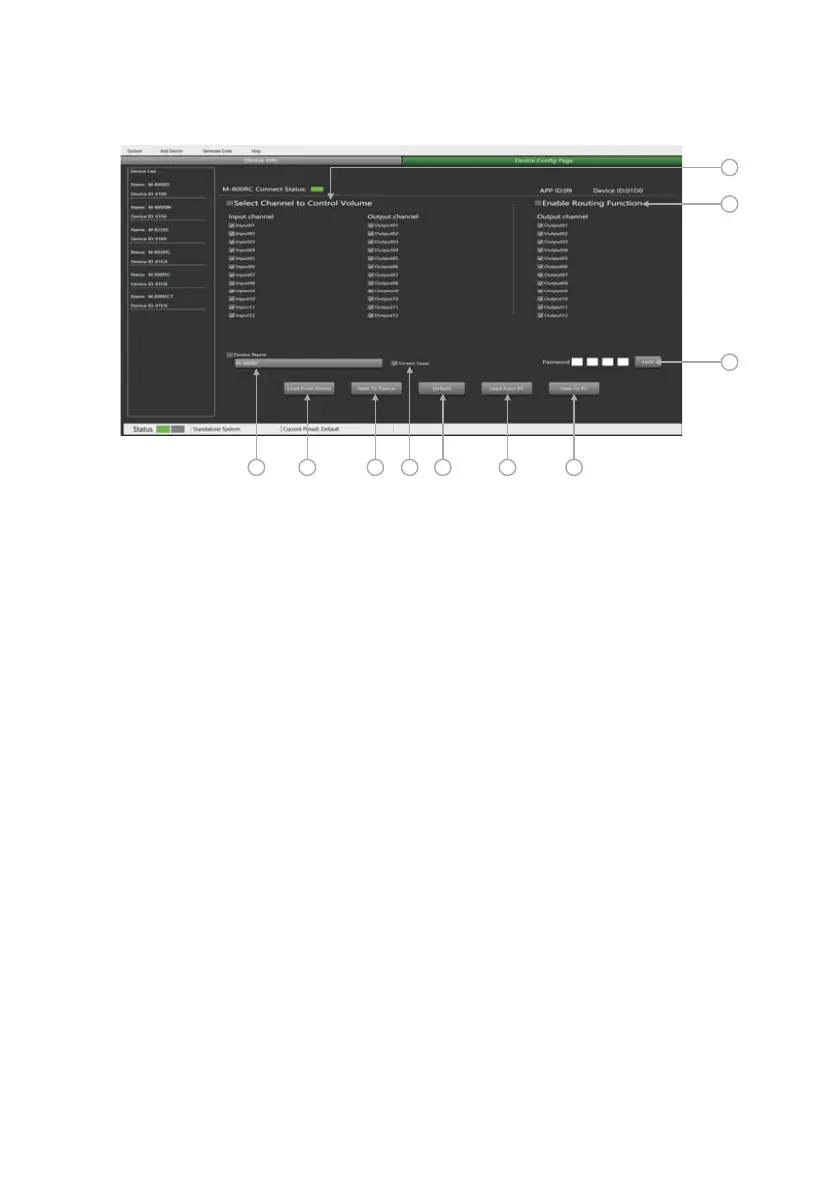
M-800RC Editor
2
3
4 5 6 8 9 107
1
1. Select Channel to Control Volume
-Input Channel 1 - 12: Check the box to control the input of multiple channels at once.
-Output Channel 1 - 12: Check the box to control the output of multiple channels at once.
2. Enable Routing Funciton:
-Output Channel 1 - 12: Check the box to control the routing of output channels 1-12.
3. Lock System: The user can enter numbers and letters as password and click lock. If
he forget the
password that can use factory password: 0000.
Note: After unlocking, no other password can be set. You must first lock and then unlock with
0000 to set
a new lock password.
4. Device Name Setting: Click the box to modify it, and click Save To Device to save successfully.
5. Load From Device: Load presets from device.
6. Save To Device: Save the current parameters to the device.
7. Screen Saver: After checking this box, the machine will sleep after one minute of inactivity.
8. Default: Restore the default preset.
9. Load From PC: Load presets from PC.
10. Save To PC: Save current preset.
Attention: The volume can only be switched on the terminal after the PC software is set, and the volume
cannot be adjusted on the terminal.
Note: The factory setting is ON. In order to prolong the life of the LC-Display, it is recommended that the
user set it to ON.



 To Next Page