6
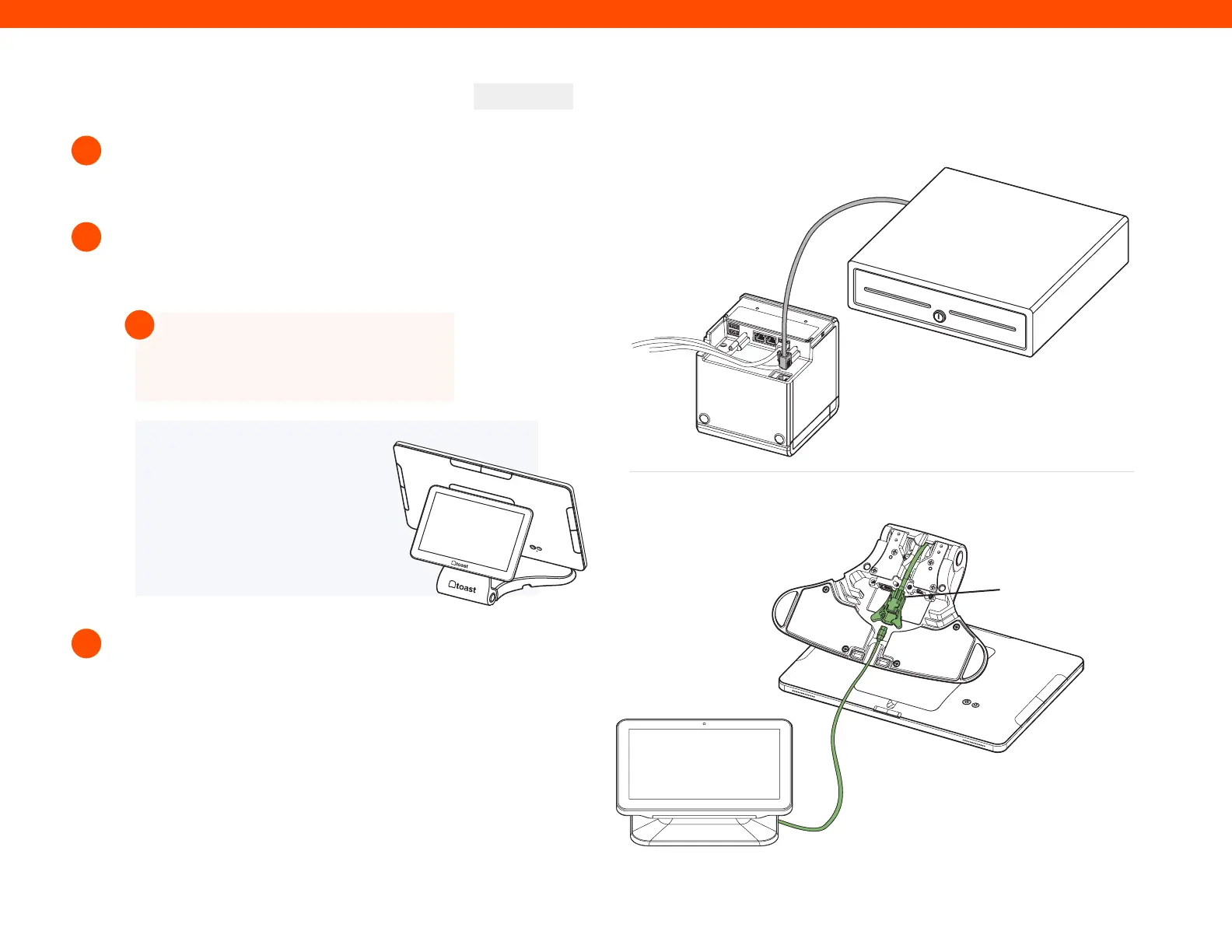
If you have a cash drawer, plug in the cash drawer
cable, which is grey with blue dots, from your
cash drawer to your Toast Printer.
If you have a wedge mount Toast Flex for Guest,
plug the green USB-C cable into the green
port labeled “GFD” on the terminal stand.
Toast Flex + Toast Printer
8
9
10
CONTINUED
NOTE
If you are using the direct
attachment for Toast Flex for
Guest, this is already in place
on the Toast Flex terminal.
(See image on the right)
Set up payment using one of the options below:
Direct Attach
B
A
If you are attaching your Toast Tap (On-Counter)
to the Toast Flex, open the purple box labeled
“Payments.” This box contains your Toast Tap
(On-Counter). Follow the instructions in the printed
guide for Micro USB to Micro USB.
If you have Toast Tap (Direct Attach to Toast Flex),
this will already be adhered to your Toast Flex
terminal.
Step 8
Step 9
Connector Bay
Wedge Mount
Step 8
Step 9
Wedge Mount
TIP
You can coil extra cable under the
Toast Flex for Guest connector bay.
!



 To Next Page