8
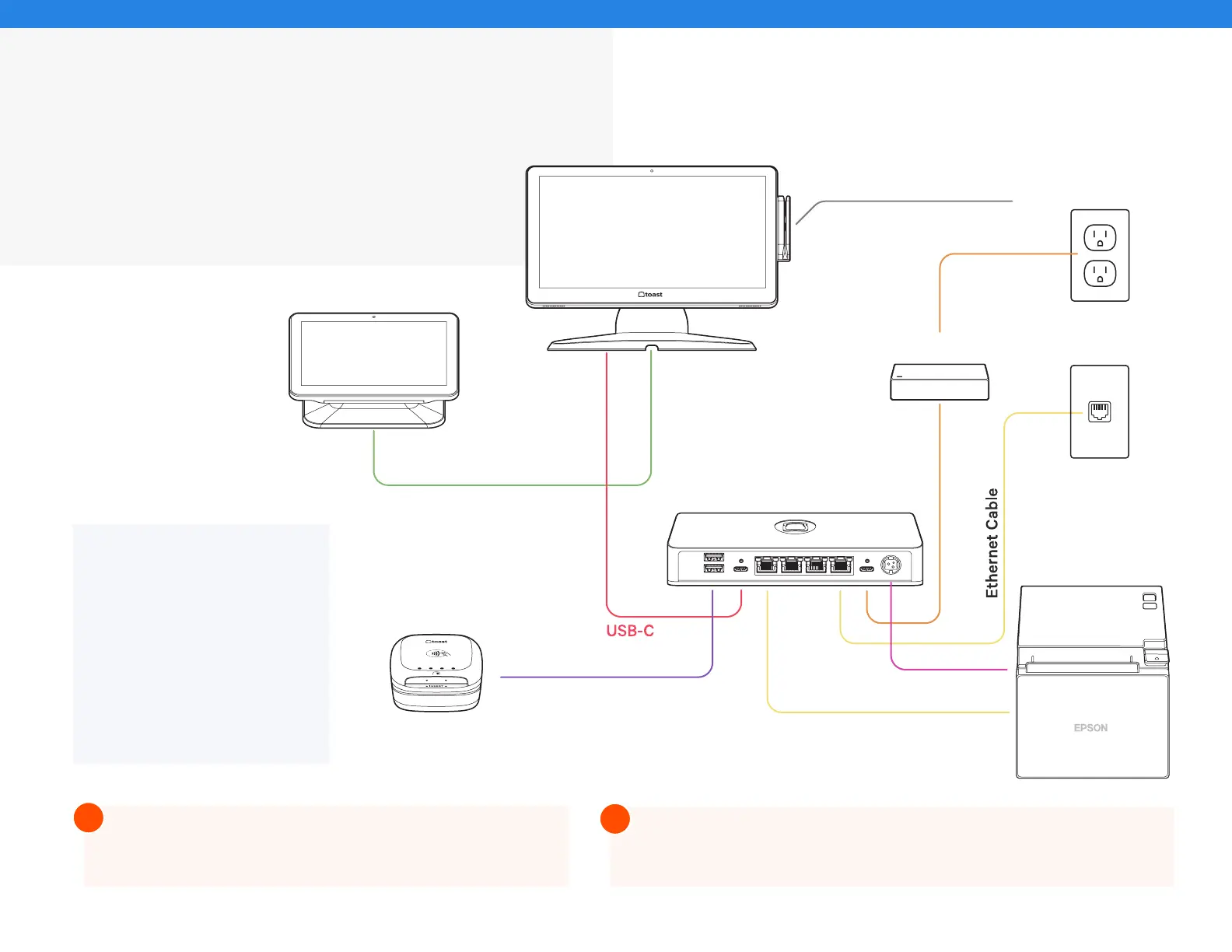
Cabling Diagram
Toast Flex + Toast Hub
Use the cabling diagram as a guide for how
your system will be wired when it’s all set up.
NOTE
If you have a second
terminal, connect the second
power brick from the base of
the terminal stand to the wall.
Connect the second ethernet
cable from the Toast Hub
to the base of the terminal
stand.
If you are using direct attachment for Toast Flex for Guest,
this is already in place on the Toast Flex terminal.
For a full service restaurant, you will have the Toast Tap (Direct Attach
to Toast Flex) already in place instead of a Toast Tap (On-Counter).
Internet Cable
Internet Cable
Toast Flex
Toast Flex for Guest
USB-C
(Only if user has a
Toast Flex for Guest)
USB-A to Micro USB
Toast Tap
(On-Counter)
Wall Outlet
Internet
MSR Card Reader
(Only if user has a
Toast Flex for Guest)
Toast Hub
Power Brick
Ethernet Cable
Printer Power Cable
Epson Printer
!
!



 To Next Page