9
Unpack your hardware:
Toast Flex + Toast Hub
1
2
3
4
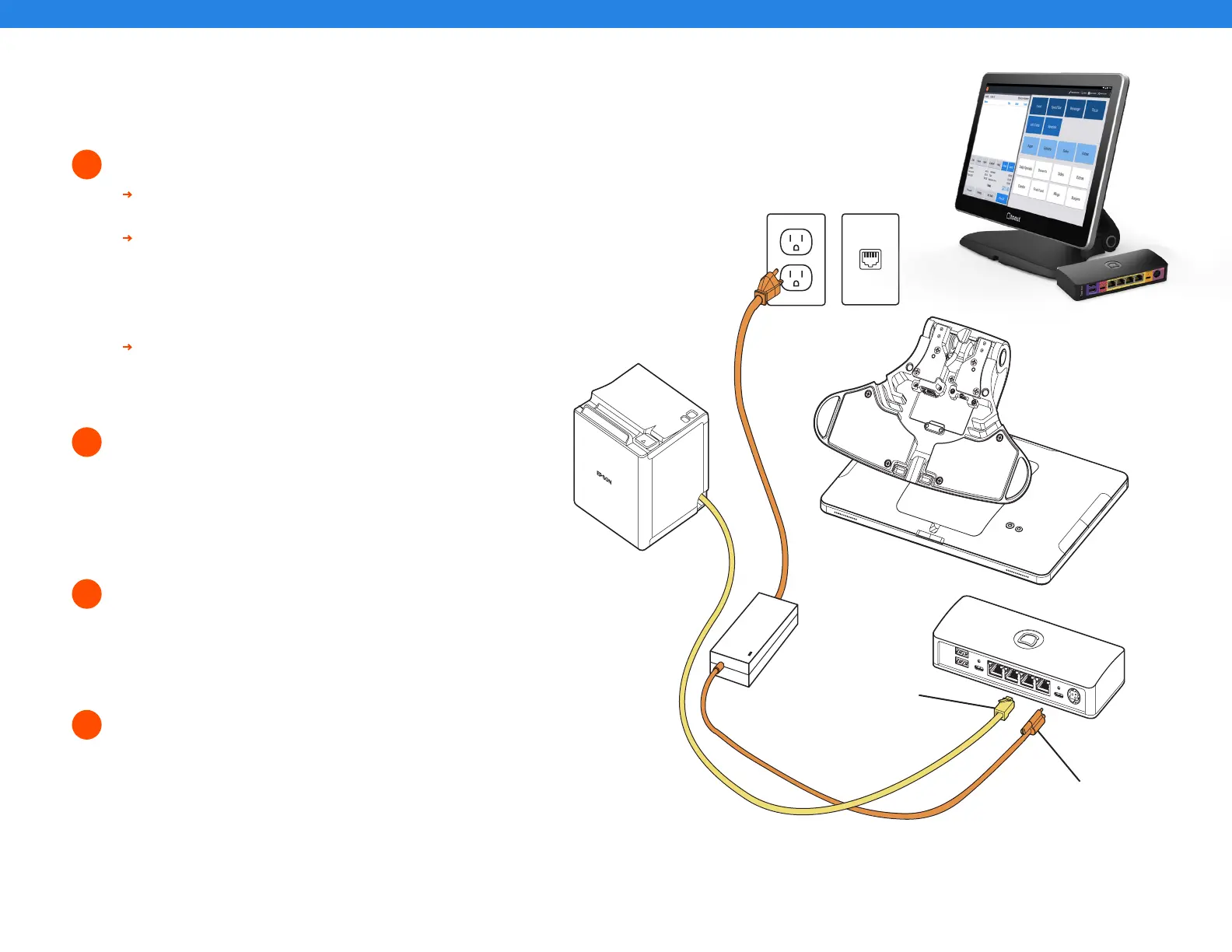
Next, remove the orange box labeled “Power.”
This box contains the power adapter. Plug it
into the orange port labeled “Power In” on the
Toast Hub. Use the thumb screw to secure it.
Ensure the thumbscrew is tight to avoid
connectivity issues.
Then, place the other end near the wall outlet,
but don’t plug it into the outlet yet. Placing it
near the outlet now will help you know where
you want to coil or hide your cables at the end
of installation.
Next, plug the yellow ethernet cable that was
packed in the Toast Hub box and connect
it from the Epson printer to the yellow port
labeled “Printer” on the Toast Hub.
Unpack the Epson Printer box first.
Unpack the Toast Hub box. This box contains three cables:
• Ethernet Cable (Yellow)
• USB-C - USB-C Cable (One end is red and one end is orange)
• Epson Power Cable (Pink with black stripes)
Unpack your Toast Flex terminal and place it on the counter.
This box has two smaller boxes inside:
An orange box and a yellow box.
Step 3
Place near
wall outlet
Step 4
Step 2
Hub
Step 4
Step 2



 To Next Page