10
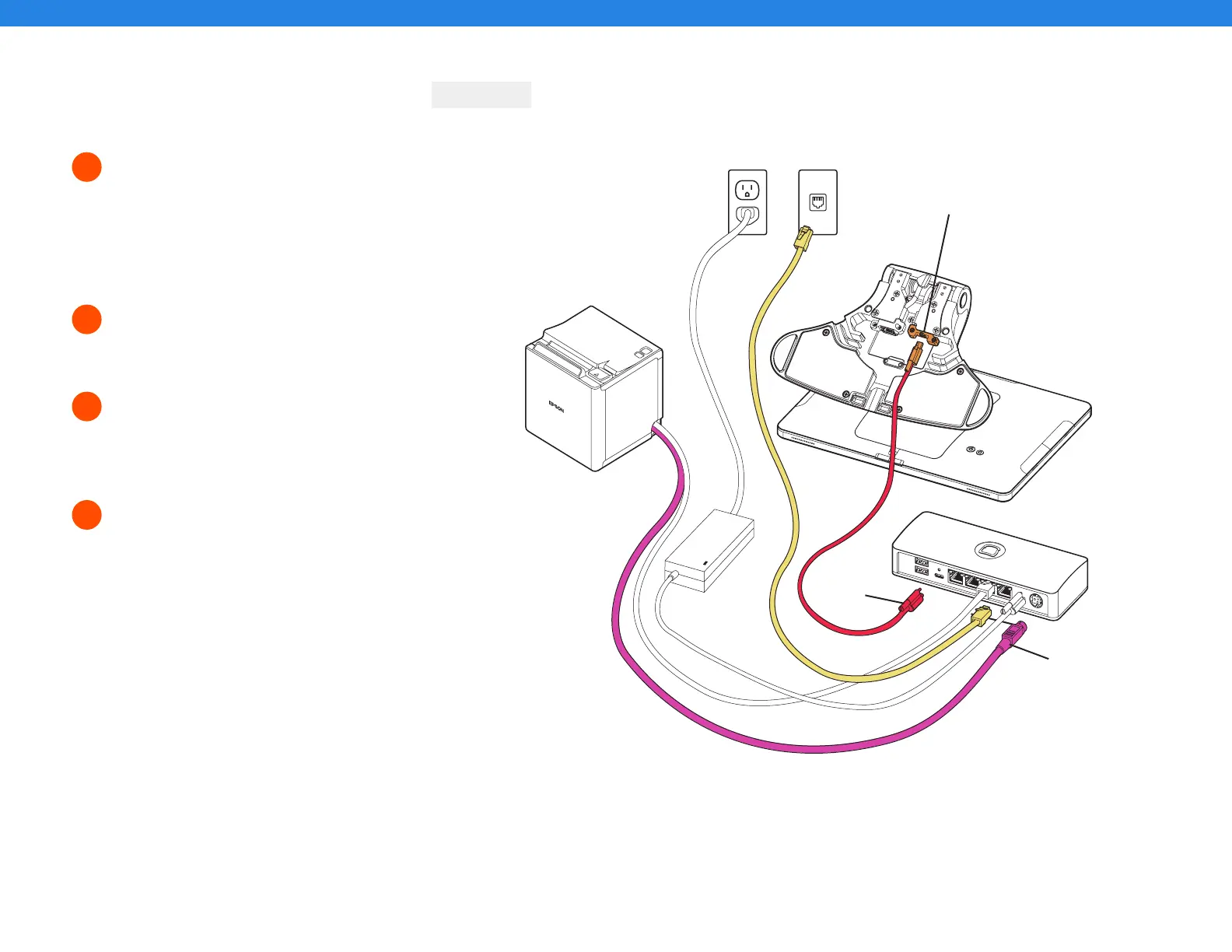
Remove the yellow box labeled “Connect.”
This box contains two ethernet cables.
One is 3 ft and one is 7 ft. Choose the cord
length that best suits your restaurant and
connect it from the wall to the yellow port
labeled “Printer” on the Toast Hub.
Plug the striped pink Epson power cable from
the Epson printer to the striped pink port
labeled “Printer In” on the Toast Hub.
Take the orange end of the USB-C cable and
plug it into the orange port in the base of the
Toast Flex terminal. Use the thumb screw to
secure it.
Take the red end of the USB-C cable and plug
it into the red port labeled “To Stand” on the
Toast Hub. Use the thumb screw to secure it.
This cable sends both data and power to your
Toast Flex terminal.
Step 5
Step 7
Step 8
Step 6
Toast Flex + Toast Hub
5
6
7
8
CONTINUED
Step 5
Step 7
Step 6
Step 8



 To Next Page