ー45ー
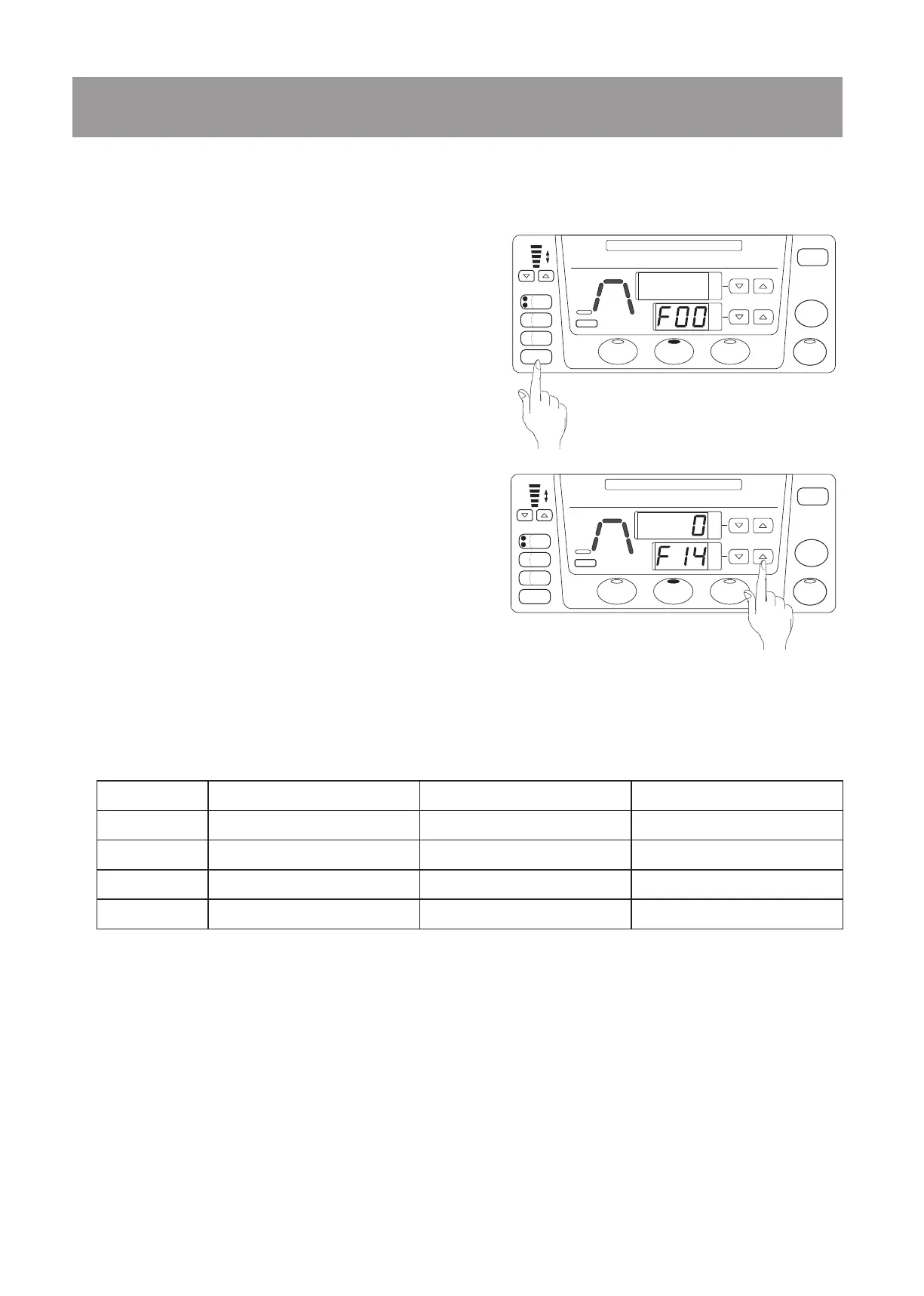
Press the FUNCTION key while the IN PROGRESS
indicator is o. The time display ashes “F00”.
Press the time setting up and down arrow keys to
show the number (F14 or F15). The temperature
display shows the code of time unit for display.
※
F14- Sterilization time
F15- Timer
Press the START key. The temperature display
starts to ash.
Press the temperature setting up and down arrow
keys to show the desired code of the time unit for
display.
①
②
③
④
6-7. Setting the Time Unit for Display
This function allows the operator to change the time unit for display. The time unit for display
for sterilization and timer can be set individually.
Press and hold down the START key.
The buzzer will sound in approximately 4 seconds to indicate that the setting is nalized and
the display will return to normal display.
⑤
Code Time unit for display Display range Setting range
0 Hour: minute 0 : 00
〜
9 : 59 0 : 01
〜
9 : 59
1 Hour 0
〜
99 hours 1
〜
99 hours
2 Minute 0
〜
999 minutes 1
〜
999 minutes
3 Hour : minute / hour 0 : 01
〜
9 : 59
,
10
〜
99 hours 0 : 01
〜
9 : 59
,
10
〜
99 hours
※
The factory default values for F14 and F15 are 0 and 3, respectively.
STOP
MEMORY
STERILIZE
LIQUID
START
FUNCTION
CHECK
TIMER
EXT.
SENSOR
COOLING
FAN
EXHAUST SPEED
FAST
TIME
TEMPERATURE
TIMER
READY
STERILIZE
LID LID
WATER
DRAIN
COVER
CHANGE WATER
°C
SLOW
STERILIZE
IN PROGRESS
STOP
MEMORY
STERILIZE
LIQUID
START
FUNCTION
CHECK
TIMER
EXT.
SENSOR
COOLING
FAN
EXHAUST SPEED
FAST
TIME
TEMPERATURE
TIMER
READY
STERILIZE
LID LID
WATER
DRAIN
COVER
CHANGE WATER
°C
SLOW
STERILIZE
IN PROGRESS


 To Next Page