ー46ー
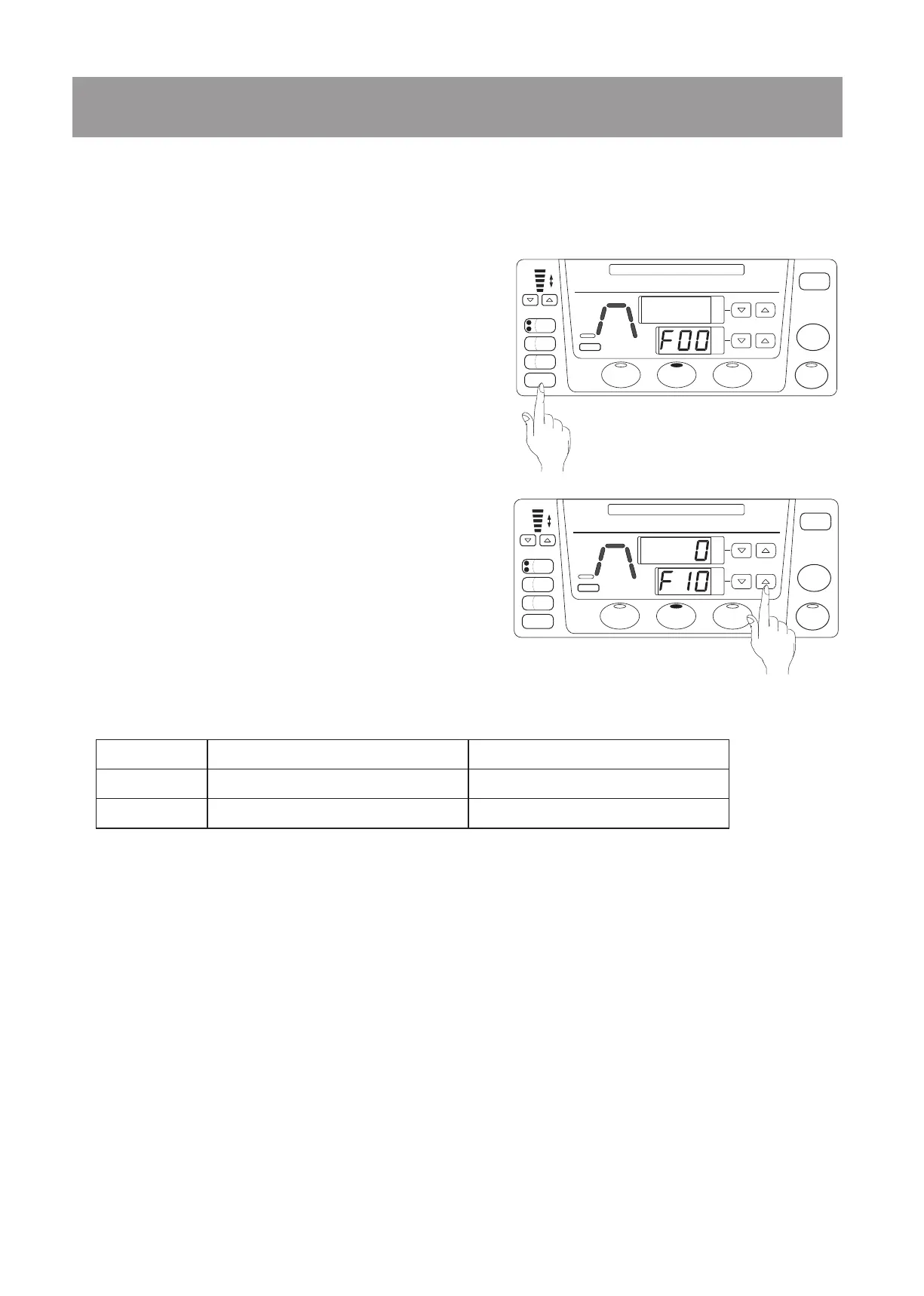
Press the FUNCTION key while the IN PROCESS
indicator is o. The time display ashes “F00”.
Press the time setting up and down arrow keys to
show “F10” in the time display. The temperature
display shows the code of exhaust setting.
Press the START key. The temperature display
starts to ash.
Press the temperature setting up and down arrow
keys to show the desired code of exhaust setting.
①
②
③
④
6-8.
Selecting the Exhaust Setting for the Liquid Sterilization Course
In addition to the normal speed level setting, variable speed setting, which allows the ne
adjustment of the exhaust valve opening, can be selected for the exhaust speed in the liquid
sterilization course.
Press and hold down the START key.
The buzzer will sound in approximately 4 seconds to indicate that the setting is nalized and
the display will return to normal display.
⑤
Code Exhaust setting Description
0 Speed level setting Six levels
1 Variable setting Variable
STOP
MEMORY
STERILIZE
LIQUID
START
FUNCTION
CHECK
TIMER
EXT.
SENSOR
COOLING
FAN
EXHAUST SPEED
FAST
TIME
TEMPERATURE
TIMER
READY
STERILIZE
LID LID
WATER
DRAIN
COVER
CHANGE WATER
°C
SLOW
STERILIZE
IN PROGRESS
STOP
MEMORY
STERILIZE
LIQUID
START
FUNCTION
CHECK
TIMER
EXT.
SENSOR
COOLING
FAN
EXHAUST SPEED
FAST
TIME
TEMPERATURE
TIMER
READY
STERILIZE
LID LID
WATER
DRAIN
COVER
CHANGE WATER
°C
SLOW
STERILIZE
IN PROGRESS


 To Next Page