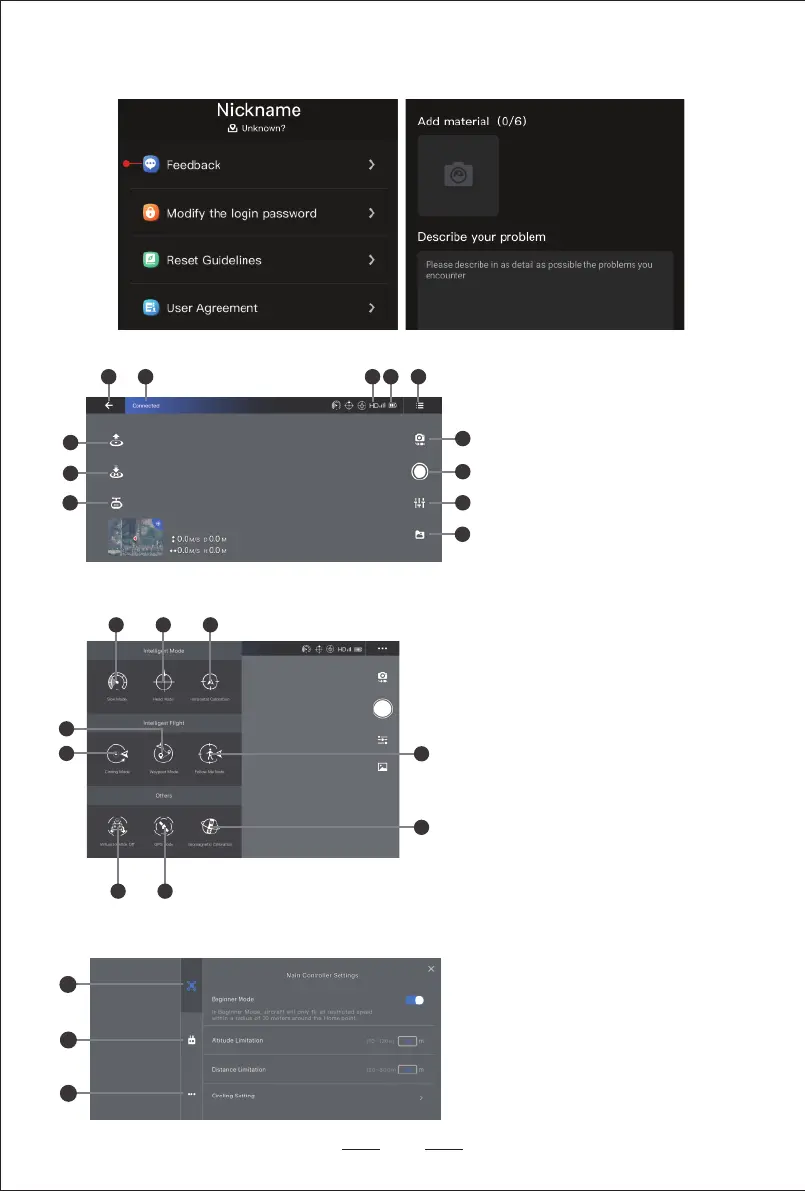
3. Setting Interface
09
1 2 3 4 5
6
7
8
9
10
11
12
1
2
3
1. Operation Interface
1. Home
2. Drone status
3. Transmission signal level
4. Drone power
5. Setting
6. Photo / Video switch
7. Photo Taking / Video Recording
8. Camera setting
9. Picture storage
10. Intelligent flight mode settings
11. One-key return
12. One-key take-off / One-key landing
2. Intelligent Flight Mode
1 2 3
67
8
9
4
5
1. Speed mode
2. Headless mode / Head mode
3. Horizontal calibration
4. Follow me mode
5. Geomagnetic calibration
6. GPS mode
7. Virtual joystick
8. Circling mode
9. Waypoint mode
1. Main controller settings
2. Remote control settings
3. More
5. If you need other help, please go to APP-Personal Center-Feedback and contact us.


 To Next Page