17
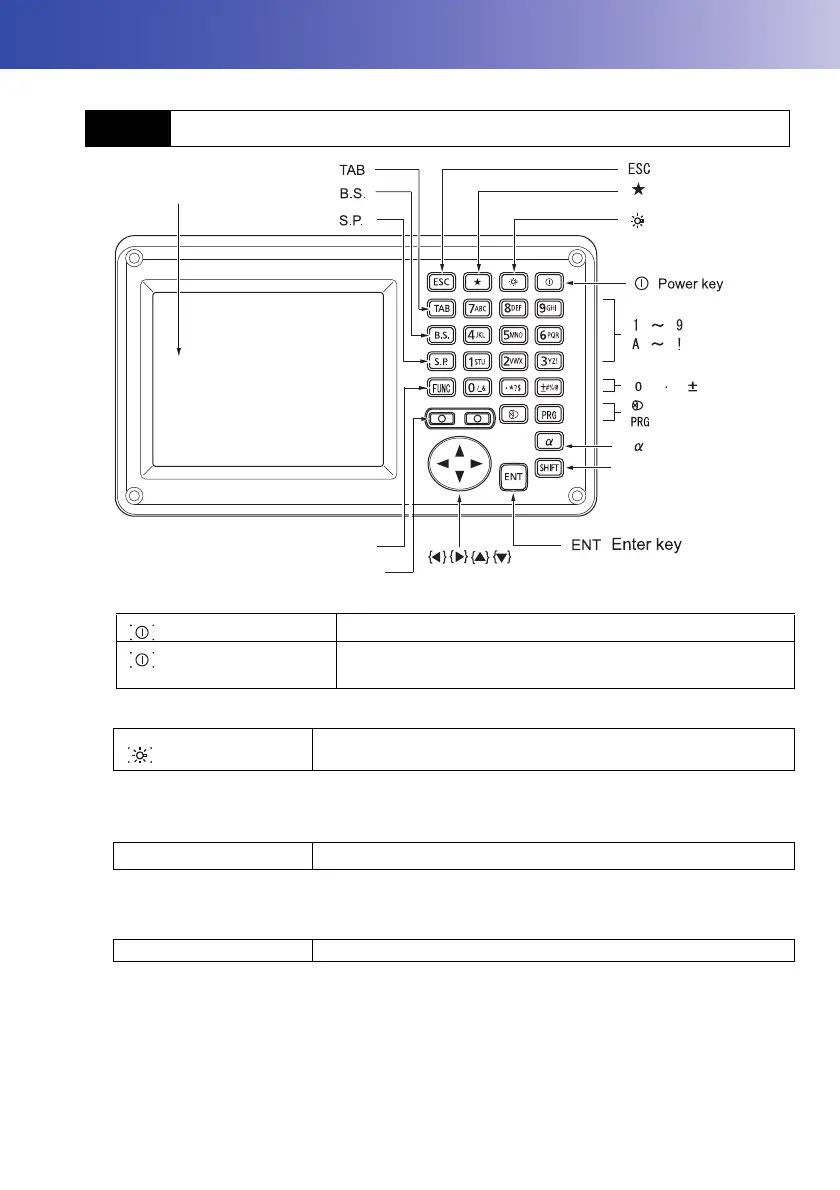
5. BASIC OPERATION
Learn basic key operations here before you read each measurement procedure.
Power ON/OFF
Lighting up the reticle/keys and selecting screen backlight brightness
Brightness level: "20.2 Instrument Configuration"
Switching to Starkey mode
"5.4 Starkey Mode"
Switching to Program mode
• Do not switch between modes by {PRG} or not turn OFF the power just after pressing {PRG}
(during displaying the message "Executing program mode").
5.1 Basic Key Operation
{}
Power ON
{} (
Press and hold: About 1
second)
Power OFF
{}
Switches the reticle illumination and key light On/Off (When Key
light is On, backlight brigthtness goes down)
{
★ }
Switches to Starkey mode / basic mode
{PRG} Switches to program mode/basic mode
SHIFT
Display unit
Luminance sensor / Microphone
Target type
Program mode
Switching the page
Input mode
SHIFT
Illumination key
FUNC
{ }
{ }
{ }
{ }
{ }
{ }
{ }
{ }
{ }
{ }
{ }
{ }
{ }
{ }
{ }
{ }
{ }
{ }
{ }
{ }
Starkey mode



 To Next Page