24
SETUP
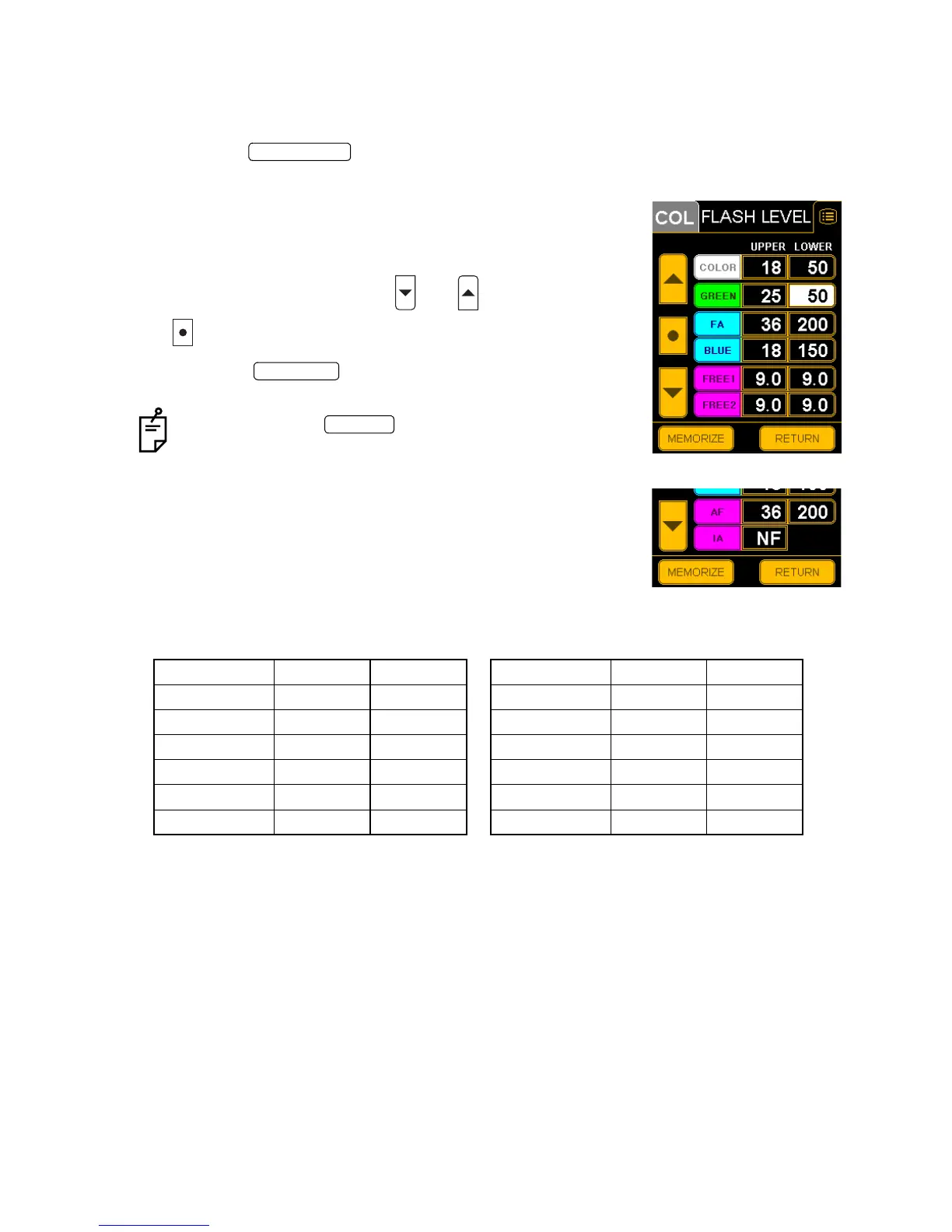
FLASH LEVEL (Flash level standard setting)
You can set the flash level standard value for each photography mode.
The following table shows the data of the factory default.
1 Press the on the "SET MENU" display.
The "FLASH LEVEL" setting display appears.
2 Touch the value indication window to be changed in each
photography mode. Black numbers will appear against a
white background.
3 Change the numeral with the and switches. Use the
switch to return to the initial value.
4 Press the switch, to store the data. The "SET
MENU" display will appear again.
If you press the switch, the data will not be
stored. The data is reset as before and the "SET MENU"
display will appear again.
Initial values
Type IA
UPPER LOWER UPPER LOWER
COLOR 18 50 COLOR 18 50
GREEN 25 50 GREEN 25 50
FA 36 200 FA 36 200
BLUE 18 150 BLUE 18 150
FREE1 9.0 9.0 AF 36 200
FREE2 9.0 9.0 IA NF ---
FLASH LEVEL
Type IA
MEMORIZE
RETURN


 To Next Page