25
SETUP
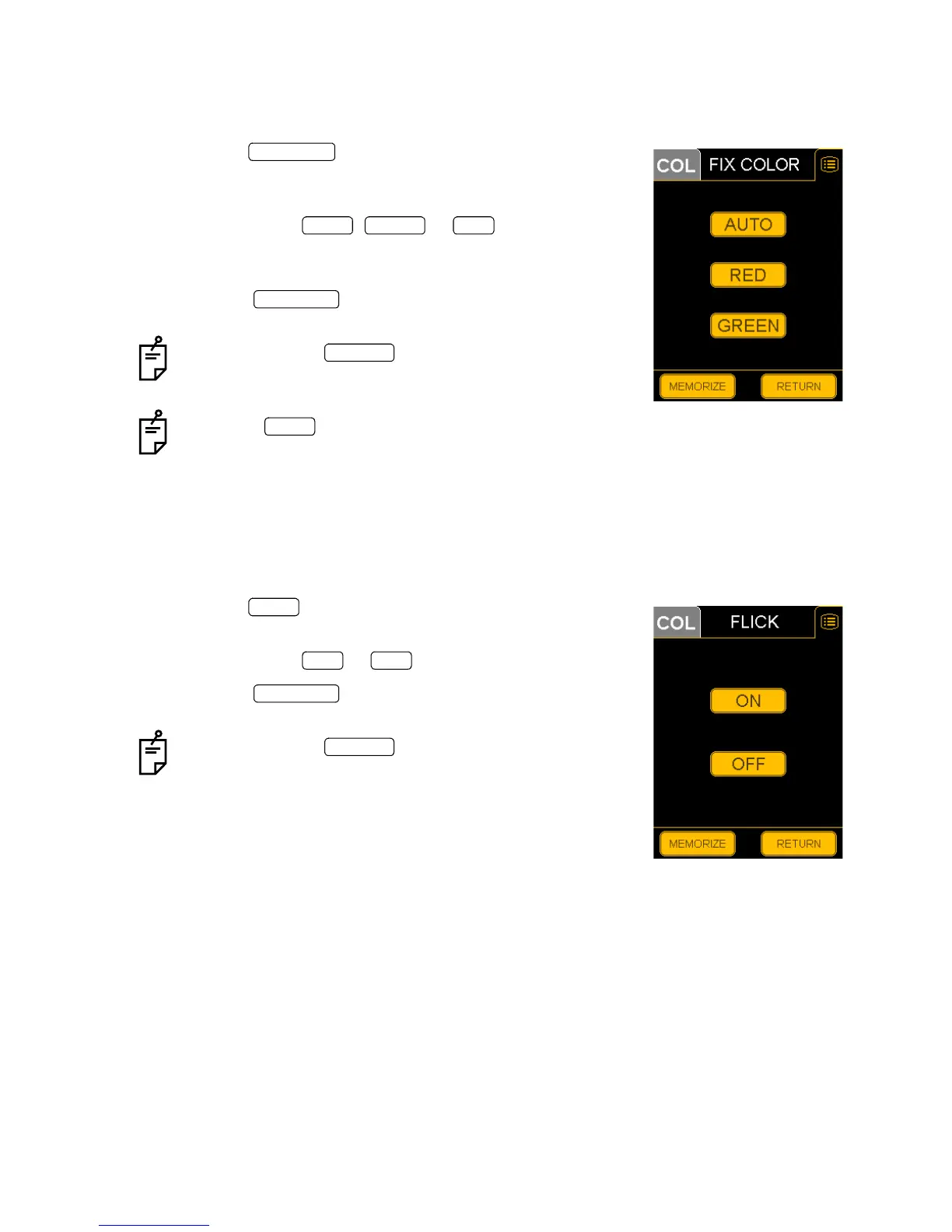
FIX COLOR (External fixation color selection)
You can select "AUTO" (automatic) or "GREEN" or "RED" for the external fixation lamp.
"AUTO" is the factory default.
1 Press the on the "SET MENU" display.
The "FIX COLOR AUTO/GREEN/RED" selection display will
appear.
2 Press and select , or .
When you select "AUTO", color is automatically selected
according to the photography mode.
3 Press the switch, to store the data. The "SET
MENU" display will appear again.
If you press the switch, the data will not be
stored. The data is reset as before and the "SET MENU"
display will appear again.
Press the switch, and "GREEN" is set in ICG fluo-
rescein photography and "RED" is set in other photogra-
phy modes.
FLICK (External fixation blinking selection)
You can set the external fixation lamp to "blinking" (ON) or "lighting" (OFF).
"OFF" is the factory default.
1 Press the switch on the "SET MENU" display.
The "FLICK ON/OFF" selection display will appear.
2 Press and select or .
3 Press the switch, to store the data. The "SET
MENU" display will appear again.
If you press the switch, the data will not be
stored. The data is reset as before and the "SET MENU"
display will appear again.
FIX COLOR
AUTO GREEN RED
MEMORIZE
RETURN
AUTO
FLICK
ON OFF
MEMORIZE
RETURN


 To Next Page