28
When More Water is Needed / Desired
Steps to determine storage needs: See Secon 2, Page 17
Adding extra storage tanks:
a. Open the RO faucet and drain o at least a couple cups of water to release pressure on the in-
ternal bladder.
b. Wait unl you hear the pressure release from the drain line.
c. Turn o the Feed Valve.
d. Remove the ¼” plugs from the SQ (Squeeze) and PW (Tank, Product Water) ports by pushing in
the white collet to release.
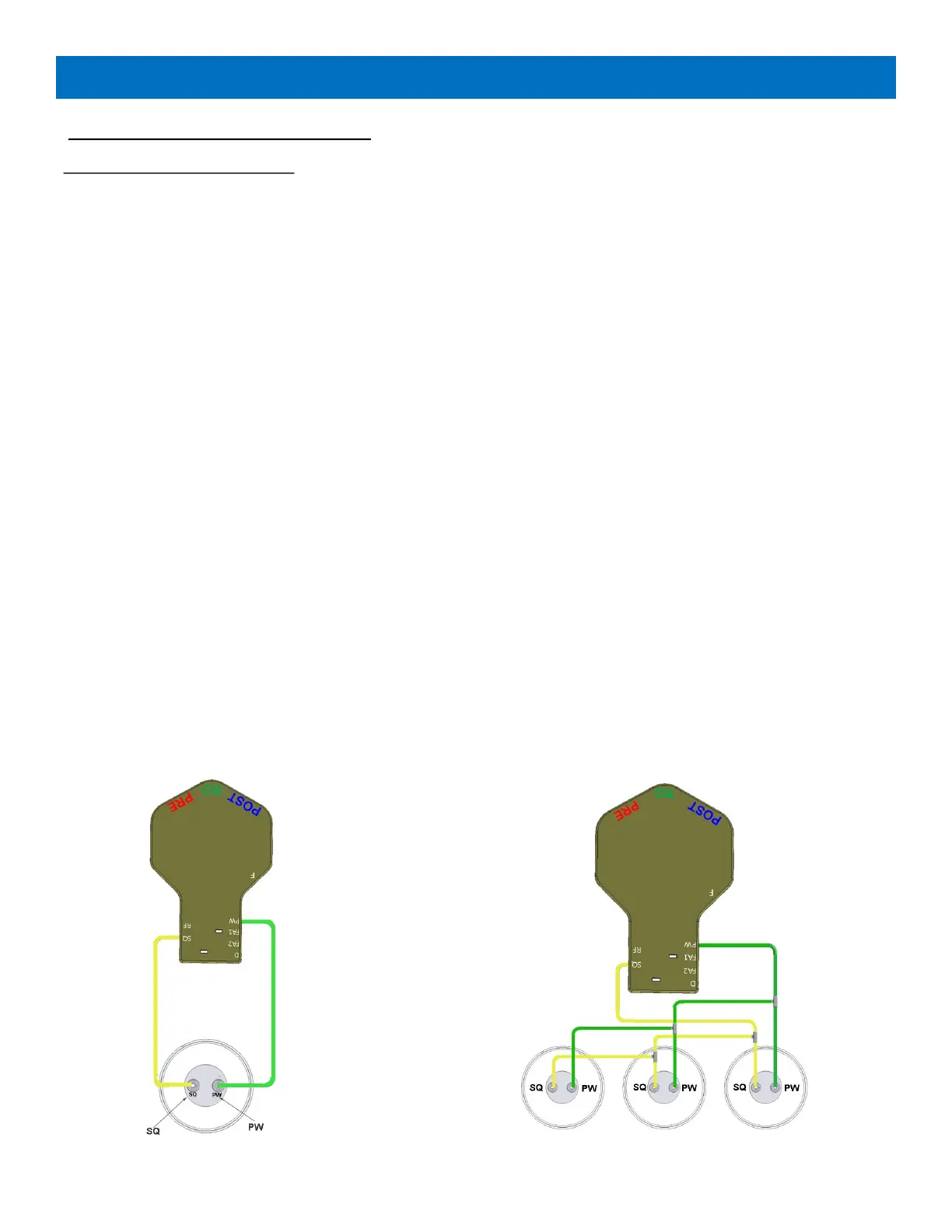
e. Connect ¼” yellow tubing between the matching SQ ports on the WOW RO System manifold
and the spare tank adapter connected to the spare tank (See Figure 9 below for one or mul-
ple tank set-ups).
f. Connect ¼” green tubing between the matching PW ports on the manifold and the adapter
(See Figure 9 below for one or mulple tank set-ups).
g. Aer connecons are completed, turn on the Primary Shut-O Valve and open the faucet. You
will hear a combinaon of air and water eliminated from system. Leave it open unl a solid
stream of water dispenses.
h. Close the faucet.
i. In less than a minute, the CPU Valve will acvate and the system will resume making water
with a noceable exhaust of air and water down the drain.
j. To expel all of the air from the newly added tank, it may be necessary to draw water from
the faucet several mes.
MANIFOLD
SPARE TANK
MANIFOLD
SPARE TANKS
Figure 9: Multiple Tanks


 To Next Page