Display Error and Fault Code Troubleshooting
Before diagnosing an error, shut off the machine, remove the key, and remove the batteries.
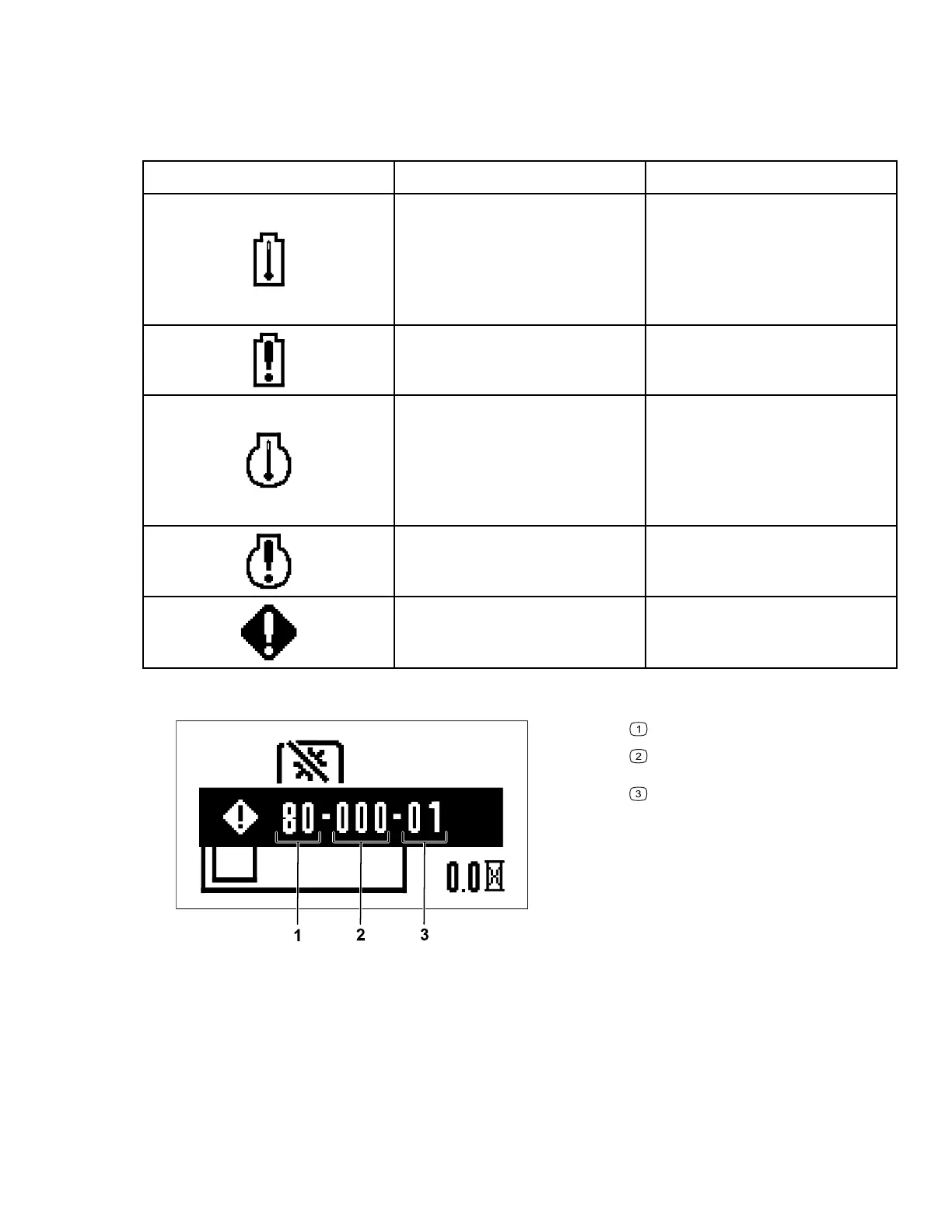
Error Icons
Icon
Description
Corrective Action
The battery temperature is too
high.
1. Shut off the machine,
remove the battery, and
wait for the battery to cool.
2. Operate the machine in
the appropriate
temperature range.
The battery load is too high.
Reduce the load on the
machine.
The motor temperature is too
high.
1. Shut off the machine and
allow it to cool before
starting it again.
2. Operate the machine in
the appropriate
temperature range.
The motor load is too high.
Reduce the load on the
machine.
Fault code
Refer to the following tables.
Fault codes appear on the information display as shown.
G460280
System
Last 3 digits of the controller serial
number
Fault code
Identify the system of the fault using the first 2 digits of the code and the first table, then
identify the fault using the last 2 digits of the code and the table of the appropriate system.
The middle 3 digits correspond to the last 3 digits of the controller serial number, which may
help determine which motor is sending the fault.
Note: The serial number does not display for PMU faults and shows 000 instead.
Troubleshooting: Display Error and Fault Code
Troubleshooting
Page 7–4 3463-565 A



 To Next Page