Connecting your TV
However,thesesignalformatsareconvertedto
matchthenumberofpixelsoftheLCDpanel.
Therefore,theTVmaynotdisplaysmalltext
properly.
IfyouconnectthisunittoyourPC,the
compressedimageisdisplayedinS-XGAmode,
thereforethepicturequalitymaydeteriorateand
charactersmaynotberead.
• L-PCM:Linear-PulseCodeModulation
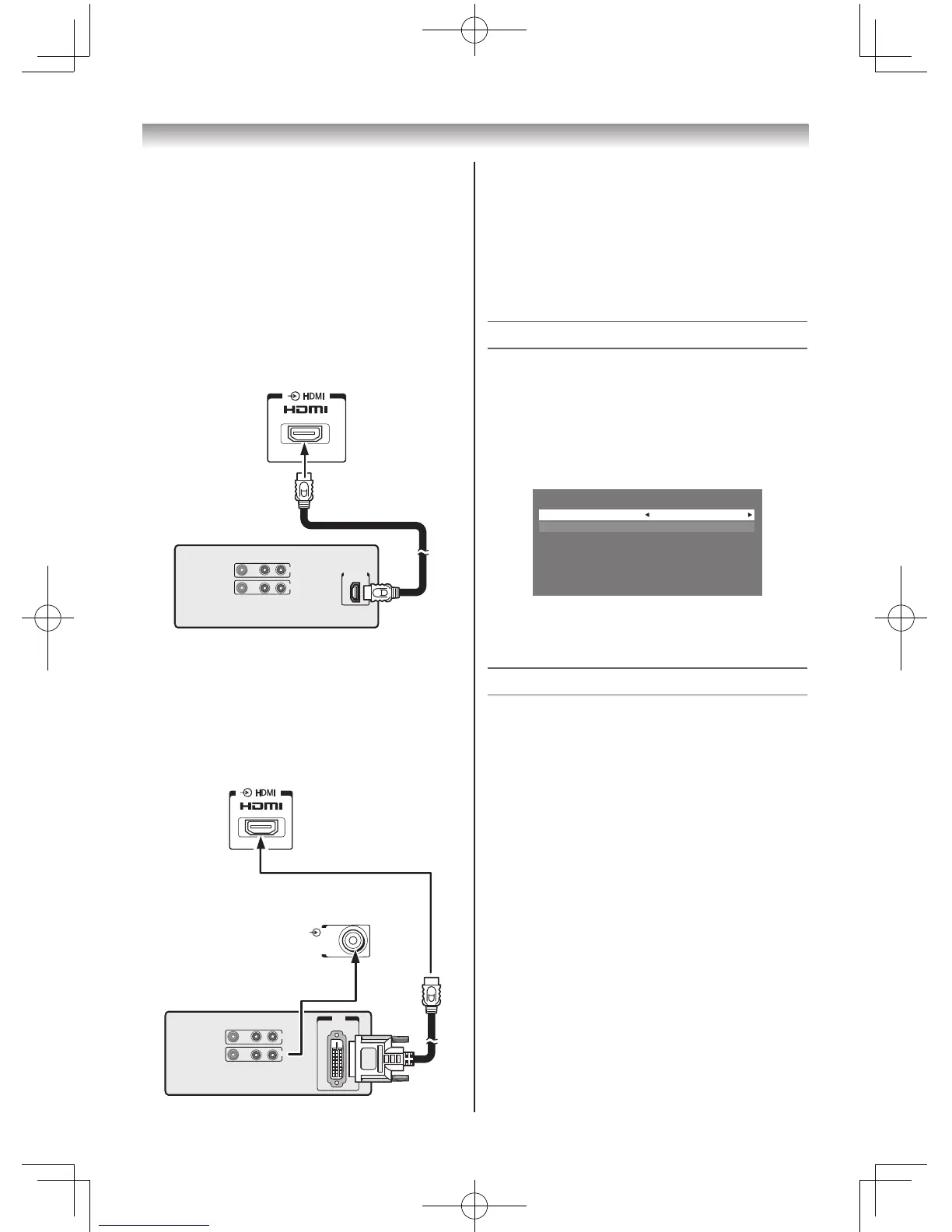
Connecting an HDMI device
OneHDMIcable(typeAconnector)
VIDEO AUDIO
L R
IN
OUT
HDMI OUT
TV back view
HDMI device
RGB/PC
AUDIO
R L
/
MONO
Y
P
R
/C
R
P
B
/C
B
PC/
HDMI
(
AUDIO
)
AUDIO
COMPONENT / VIDEO INPUT
(
FIXED
)
VIDEO
Forproperoperation,itisrecommendedthatyou
useashortHDMIcable.
HDMIcabletransfersbothvideoandaudio.
Connecting a DVI device
OneHDMI(typeAconnector)-to-DVIadapter
cableandaudiocables
PC/
HDMI
(
AUDIO
)
TV back view
TV back view
VIDEO AUDIO
L R
IN
OUT
DVI
OUT
DVI device
HDMI (type A connector)-to-DVI adapter cable
Forproperoperation,thelengthofanHDMI-to-
DVIadaptercableshouldnotexceed3m.The
recommendedlengthis2m.
Standard analogue audio cables
AnHDMI-to-DVIadaptercabletransfersonly
video.Separateanalogueaudiocablesare
required.
Selecting the PC/HDMI Audio mode
YoucanselectPCaudioorHDMIaudiowhen
usingthisfunction.
1 FromtheSETUP menu,andthenpresssor
rtoselectAV Connection.
2 PressQtodisplaytheAV Connection
menu.
AV Connection
PC/HDMI Audio PC
HDMI Audio Digital
3 PresssorrtoselectPC/HDMI Audio,
thenpressvorwtoselectPCorHDMI.
Setting the HDMI Audio mode
YoucanselectsoundofanHDMIorDVIdevice
connectedtotheHDMIinputterminalsfrom
threemodes:
Auto,DigitalorAnalogue.
Note:
Thisfunctionisavailableonlywhenthe
PC/HDMI Audio mode is set to HDMI.
1 FromtheAV Connectionmenu,presssor
rtoselectHDMI Audio.
2 PressvorwtoselectAuto,Digitalor
Analogue.



 To Next Page
 Loading...