EasyManua.ls Logo

Toshiba 24PB1T - Connecting your TV; Connecting a Computer (RGB;PC and HDMI); PC Connector Pin Assignments

Toshiba 24PB1T
32 pages
Print Icon
To Next Page IconTo Next Page
To Previous Page IconTo Previous Page
Loading...
25
Connecting your TV
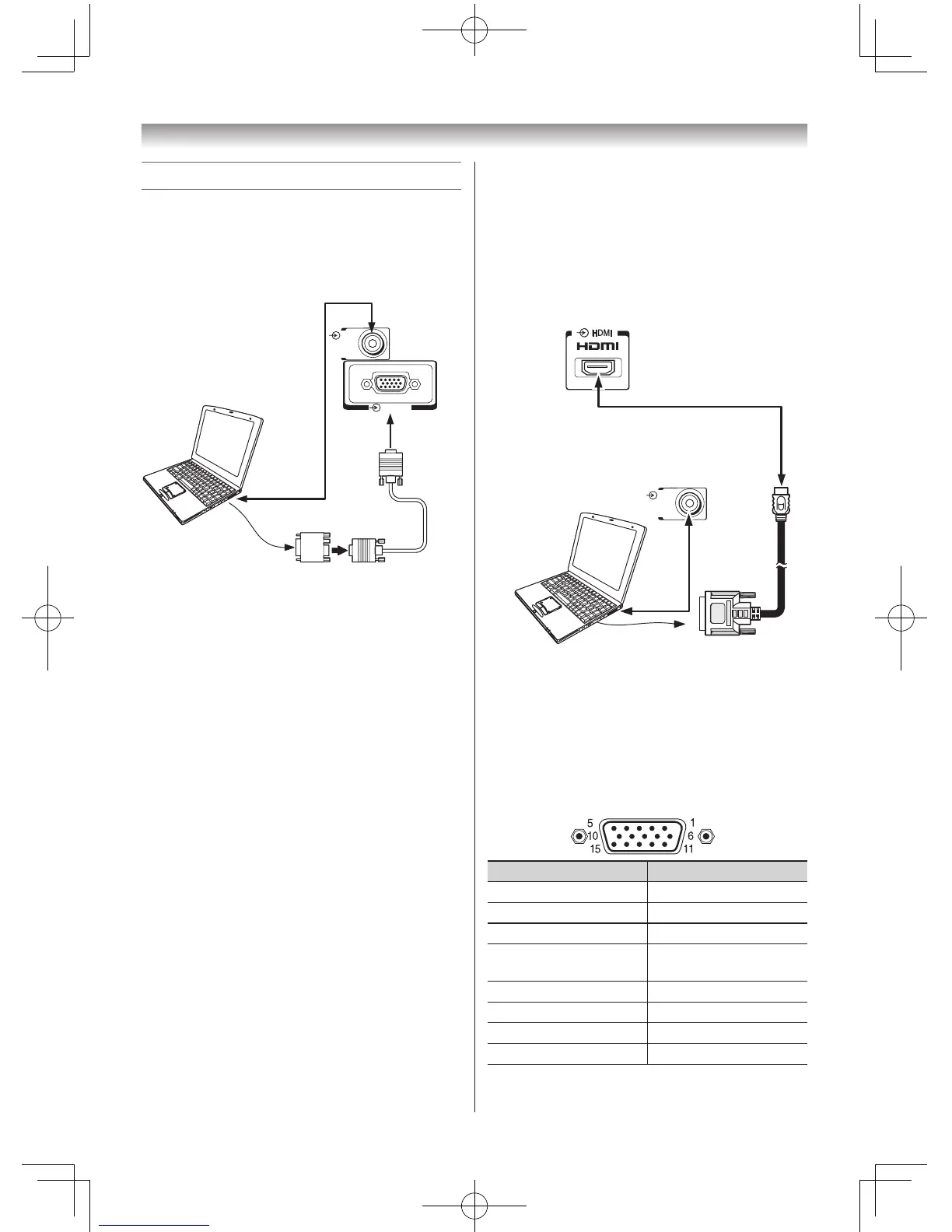
Connecting a computer
To connect a PC to the RGB/PC terminal on
the TV:
AnanalogueRGB(15pin)computercablecan
beconnected.
RGB/PC
PC/
HDMI
(
AUDIO
)
Computer
Audio cable
for PC-to-TV
connection
Conversion
adapter
(if necessary)
RGB PC cable
Mini D-sub
15 pin
TV back view
ConnectaPCcablefromthecomputertothe
oRGB/PCterminalonthebackoftheTV.
The following signals can be displayed:
VGA:VESA640×480@60/72/75Hz
S-VGA:VESA800×600@56/60/72/75Hz
XGA:VESA1024×768@60/70/75Hz
W-XGA:VESA1280×768@60/75Hz
W-XGA:VESA1360×768@60Hz
S-XGA:VESA1280×1024@60/75Hz
Notes:
• SomePCmodelscannotbeconnectedtothisTV.
• IfconnectingacertainPCmodelthatsignalis
particular,thePCsignalmaynotbedetected
correctly.
• Thereisnoneedtouseanadapterfor
computerswithDOS/VcompatibleminiD-sub
15 pin terminal.
• Abarmayappearintheupper,lower,rightor
left side of the screen, or parts of the picture
may be obscured depending on some signals.
Thisisnotthemalfunction.
• Iftheedgesofthepicturearestretched,
readjustthepicturepositionadjustmentsinthe
PC Settings menu.
• DependingonthespecicationofthePCyou
areplayingtheDVD-Videoon,andtheDVD’s
title, some scenes may be skipped, or you may
notbeabletopauseduringmulti-anglescenes.
To connect a PC to the HDMI terminal on the
TV:
WhenconnectingaPCtotheHDMIterminalon
theTV,useanHDMI-toDVIadaptercableand
analogueaudiocables.
IfconnectingaPCwithanHDMIterminal,use
anHDMIcable(typeAconnector).Separate
analogueaudiocablesarenotnecessary.
PC/
HDMI
(
AUDIO
)
TV back view
TV back view
Computer
Audio cablefor
PC-to-TV
connection
Notes:
• Theedgesoftheimagesmaybehidden.
• IfconnectingacertainPCmodelthatsignalis
particular,thePCsignalmaynotbedetected
correctly.
Signal names for mini D-sub 15 pin connector
Pin assignment for RGB/PC terminal
Pin No. Signal name Pin No. Signal name
1 R 9 NC
2 G 10 Ground
3 B 11 NC
4 NC(not
connected)
12 NC
5 NC 13 H-sync
6 Ground 14 V-sync
7 Ground 15 NC
8 Ground

Related product manuals