16 EN16 EN
1. Format (DVD-RW, DVD+RW only):
Allows you to format the disc.
2. Finalize:
Allows you to finalize a disc containing recorded titles.
3. Disc Protect (VR mode DVD-RW, DVD+RW/+R only):
Allows you to protect a disc from accidental editing or
recording.
4. Delete All Playlists (VR mode DVD-RW only):
Allows you to delete playlist.
5. Random Play:
Allows you to activate the random playback feature.
6. Program Play: (Audio CD only)
Allows you to activate the program playback feature.
7. Slide Show: (JPEG files only)
Allows you to select the display time of the slide show
mode.
DVD Menu
Format
Finalize
Disc Protect OFF ON
Delete All Playlists
1
2
3
4
1
2
3
4
<DVD Menu menu>
CD Playback Mode
Random Play
Program Play
Slide Show
1
2
3
5
6
7
<CD Playback Mode menu>
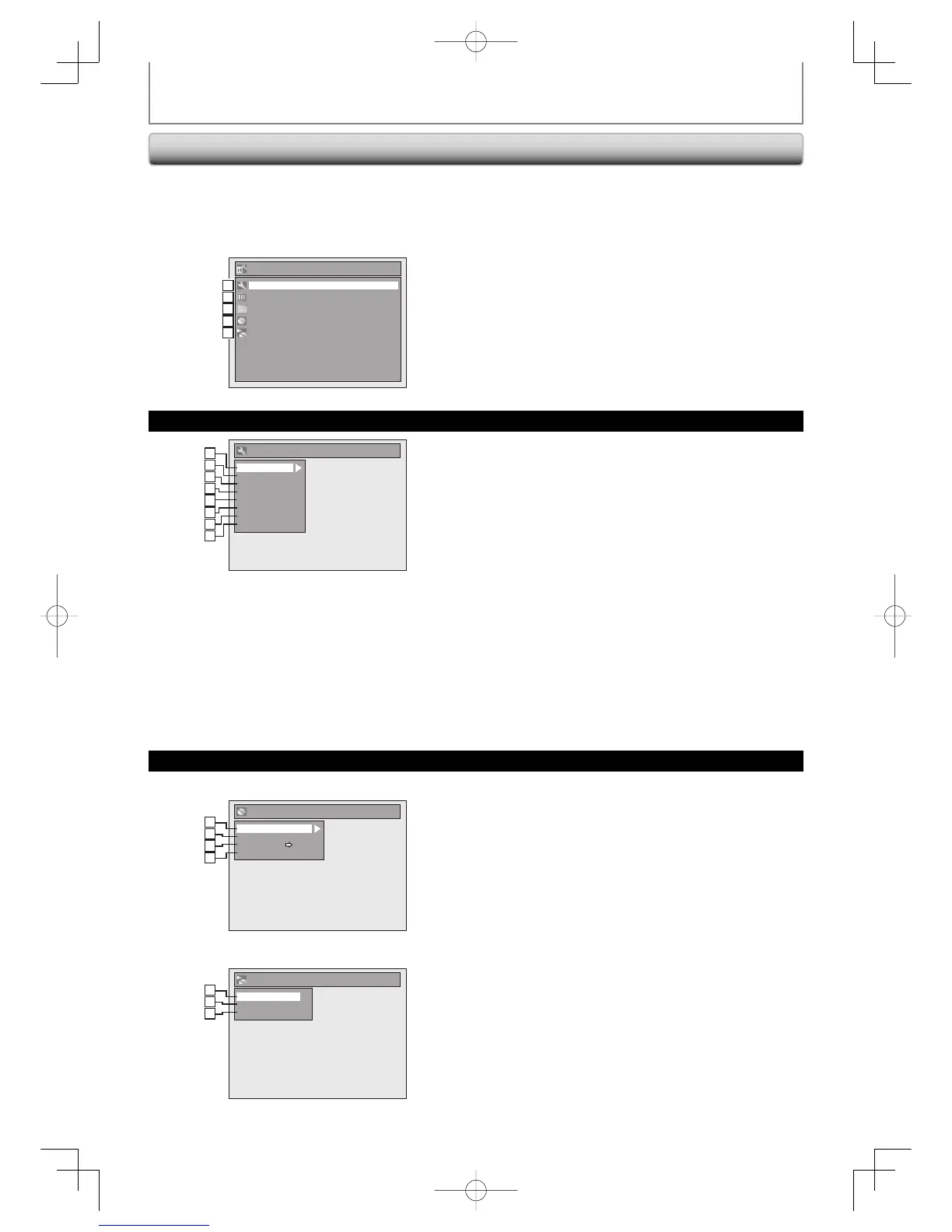
GUIDE TO ON-SCREEN DISPLAYS AND MENUS
Main Menu
Press [SETUP] to display the main menu. Then use
[K / L] to select a menu and press [ENTER] to display the
menu. These menus provide entries to all main functions
of the unit.
1. General Setting:
To go to general setting menu.
2. Timer Programming:
To program a timer recording.
3. Title List:
To call up the title list.
4. DVD Menu:
To set up the DVD setting.
5. CD Playback Mode:
To set up the CD playback setting.
• “CD Playback Mode” is available only when an audio
CD, a CD-RW/-R with MP3 / WMA / JPEG.
Setup
Timer Programming
Title List
DVD Menu
CD Playback Mode
General Setting
1
2
3
4
5
1
2
3
4
5
DVD Menu / CD Playback Mode
General Setting Menu
General Setting
Playback
Display
Video
Recording
Clock
DivX
HDMI
Reset All
1
2
3
4
5
2
3
4
5
1
2
3
4
5
6
7
8
1. Playback:
To set up the unit to play back discs as you prefer.
2. Display:
To set up the OSD screen as you prefer.
3. Video:
To set up the video setting.
4. Recording:
To set up the unit to record to discs as you prefer.
5. Clock:
To set up the clock of the unit as you need.
6. DivX:
To set up the setting for the DivX® playback.
7. HDMI:
To set up the HDMI connection setting.
8. Reset All:
To reset the setting to the factory default.
E7E7AUDEN.indb16E7E7AUDEN.indb16 2007/01/2919:03:452007/01/2919:03:45



 To Next Page
 Loading...











