÷
pl yti
_iting a a st
Erasingaplay.st
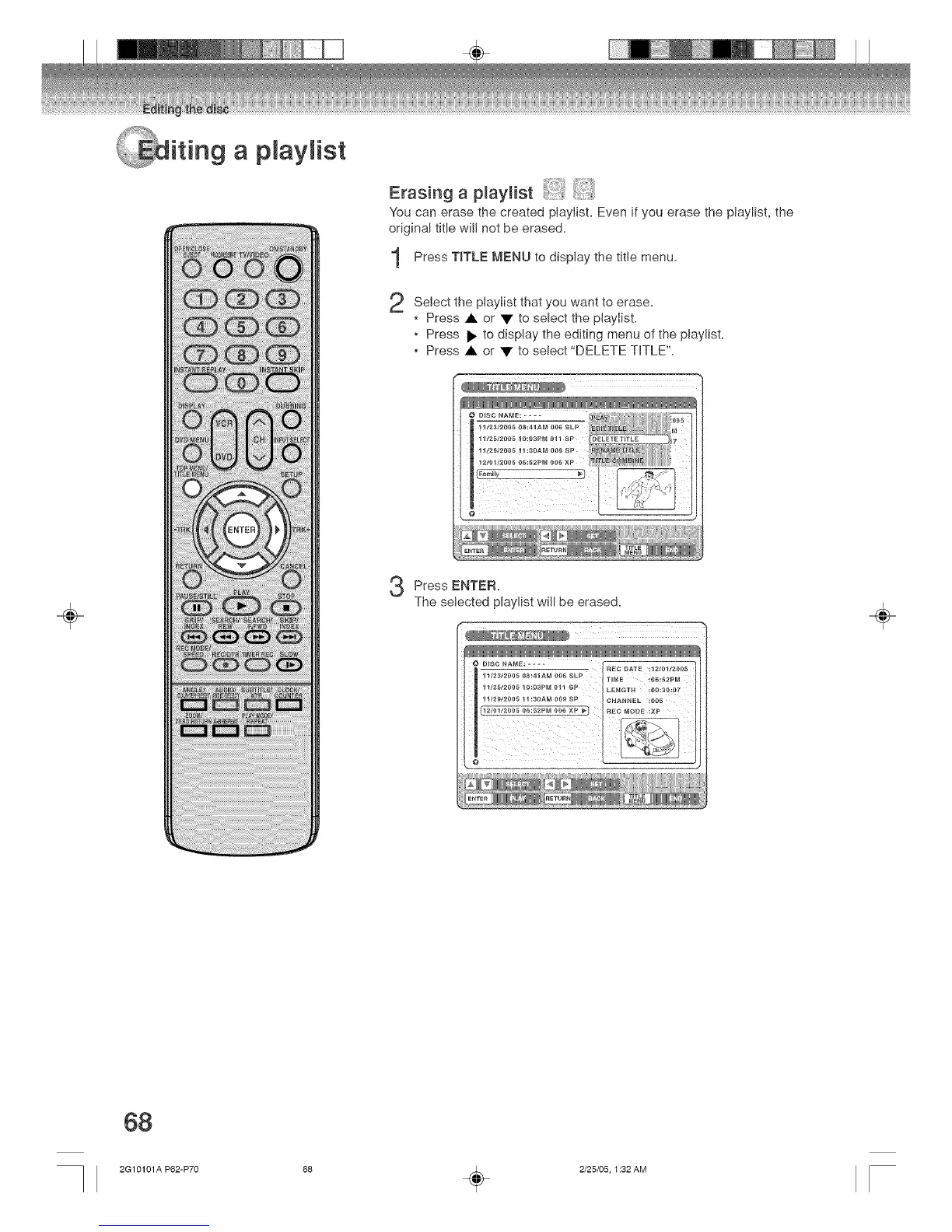
You can erase the created playlist. Even if you erase the playlist, the
original title will not be erased.
Press T_TLE MENU to the tit)e
display
menu.
2
Select the piaylist that you want to erase.
, Press • or • to select the playlist.
, Press _ to display the editing menu of the playlist.
, Press • or • to select "DELETE THTLE'L
Q D_SC NA_E: ....
Press ENTER.
The selected playlist will be erased.
O D_SC NAME: _EC DATE :1210112005
11/_3/2005 08:41AM r)06 _LP T_ME :06_52PM
111_5/2005 10:03PM 011 £P L£NGTH _00:30:07
11/2_/2_05 11:30AM 0{)9 SP CHAN_EL :OO5
_EC MODE :XP
÷
68
2G10101A P62-P70 58 _ 2/25/05, 1:32 AM



 To Next Page