2-6 User’s Manual
Qosmio F60 Series
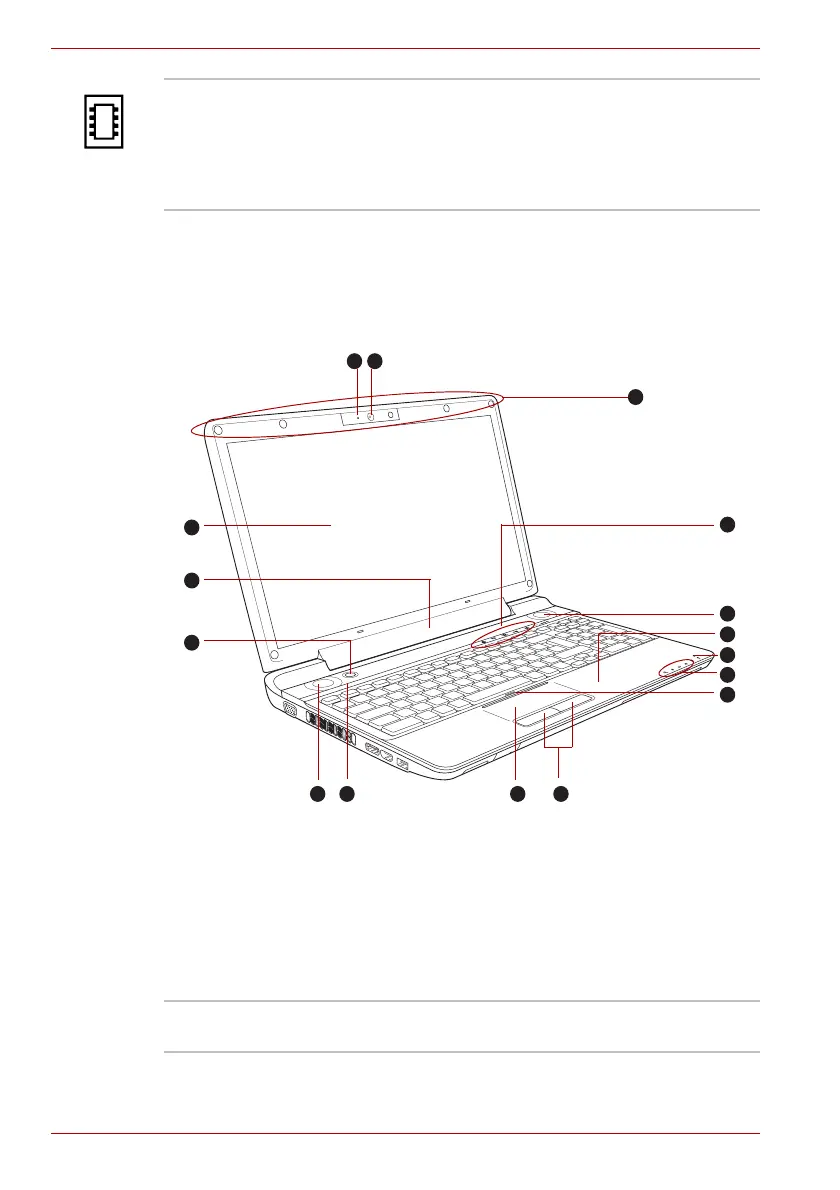
Front with the display open
This section shows the computer with the display panel open. In order to
open the display, lift the display panel up and position it at a comfortable
viewing angle for you.
Figure 2-6 The front of the computer with the display open
Memory module
slots
The memory module slots are located here. The
memory module slots allow for the installation,
replacement and removal of additional memory
modules. Please refer to the Additional memory
module section in Chapter 3, Hardware, Utilities
and Options.
1
2
3
4
5
6
7
8
9
10
1112
13
14
5
15
1. Web Camera LED
2. Web Camera
3. Wireless LAN antennas (Not shown)
4. Front operation panel (seven panels)
5. Stereo speakers
6. Bluetooth antenna (Not shown)
7. Microphone
8. System indicators
9. Touch Pad On/Off button
10. Touch Pad control buttons
11. Touch Pad
12. LCD Sensor switch (Not shown)
13. Power button
14. Display hinge
15. Display screen
Web Camera LED The Web Camera LED glows when the Web
Camera is operating.


 To Next Page
 Loading...