19
22
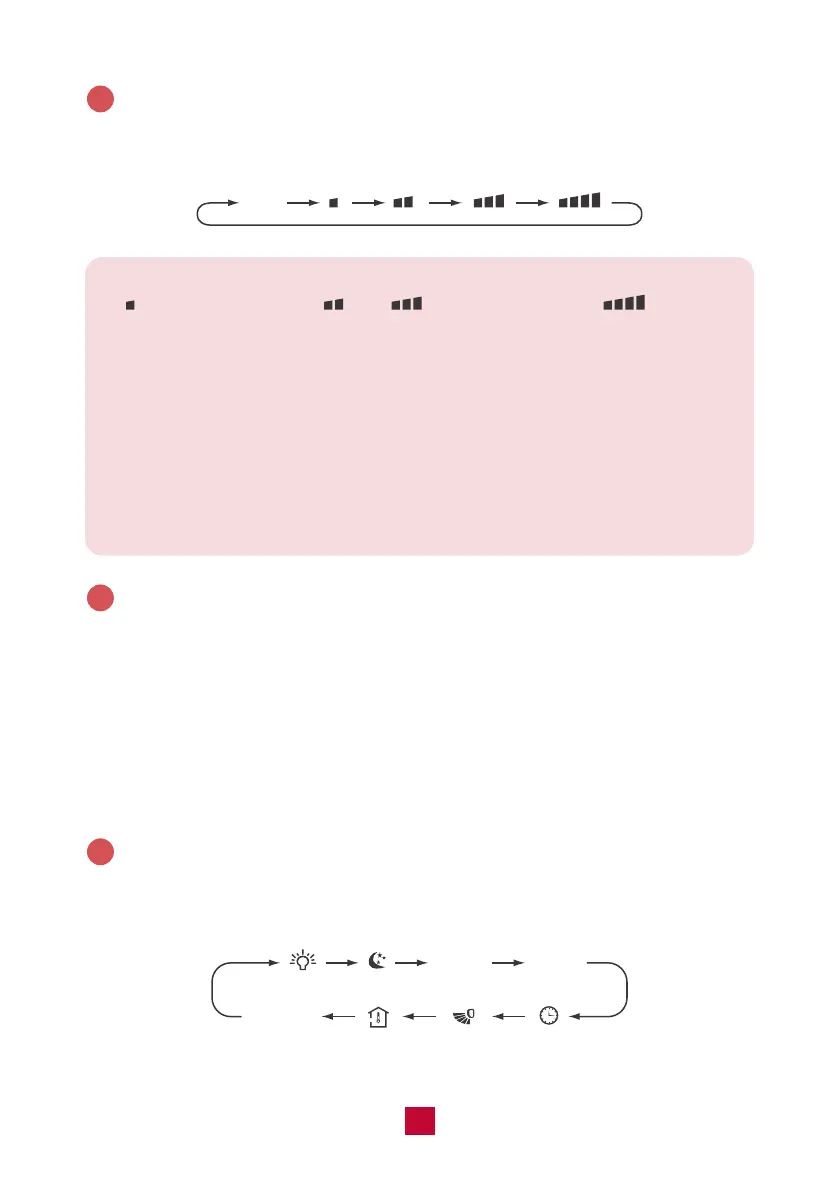
FAN Button
Press this button to cycle through the Auto fan mode and 3 fan speeds (Low, High,
TURBO)
3
Auto
Note:
● indicates low speed, and indicate high speed, indicates
turbo speed.
● Under AUTO fan mode, the air conditioner will select the proper fan speed
automatically.
● X-FAN Function: Hold the fan button for 2 seconds in COOL or DRY mode.
When you turn the machine off you will find the fan is running at a low speed
and will automatically stop. X-FAN is not available in AUTO, FAN, or HEAT
modes. To shut the X-FAN off after powering the unit off, hold the fan button
for 2 seconds.
+/- Button
● Pressing the “+” or “-” button will increase/decrease the set temperature by 1°F.
Holding the button for 2 seconds will cause the temperature to change rapidly.
Release the button once your desired temperature is reached. The set temperature
range is 61°F - 86°F (16°C - 30°C).
● After pressing the Timer button, each press of the +/- button will increase/decrease
the time by 1 minute. Holding the button for 2 seconds will cause the timer to
change rapidly. Release the button once your desired time setting has been reached.
MENU & SET Button
Press this button to select other functions and then press the “SET” button to set
the function status. The functions can be selected circularly as follows:
4
5
TIMER
ON
blank
No Setting
TIMER
OFF


 To Next Page
 Loading...