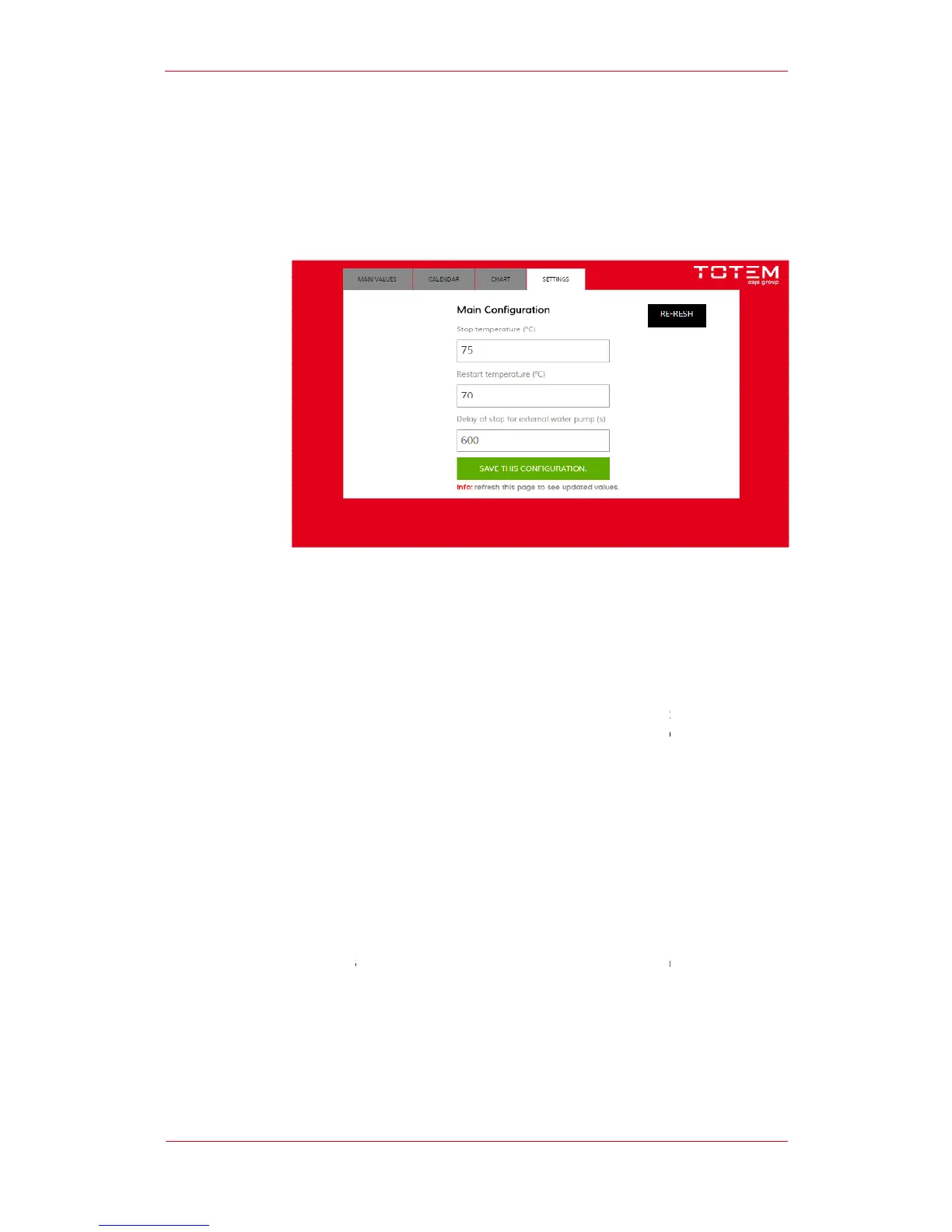
The “Settings” sreenshots
units work based on the “thermal
emperature value can be set in
In addition to the start temperature
set. When the temperature of water
commanded to stop with a delay that can be set by the user. The delay is
The “Settings” sreenshots
allows to set some of the unit’s operating parameters
ing and Working Principle
units work based on the “thermal
delivery of heat and electricity
that allows to recover heat from the internal
g the aforementioned condition
the “ON” button that is found on
enabled, the TOTEM starts functioning fol
Activation of the User’s Water system circulator
the unit’s on-board flow switch;
Water temperature below the value set by the User.
emperature value can be set in
s” screenshot on the Operator Panel
In addition to the start temperature
set. When the temperature of water
exceeds the set value, the
stops, going into stand-by mode.
pump control outlet. When the st
is also enabled. When the unit
commanded to stop with a delay that can be set by the user. The delay is
within the unit after it is switched off thus
allows to set some of the unit’s operating parameters
delivery of heat and electricity
Water temperature below the value set by the User.
s” screenshot on the Operator Panel
exceeds the set value, the
pump control outlet. When the st
commanded to stop with a delay that can be set by the user. The delay is


 To Next Page