23
OVERVIEWFEATURES & OPERATIONSTOYOTA SAFETY SENSESAFETY & EMERGENCY FEATURES
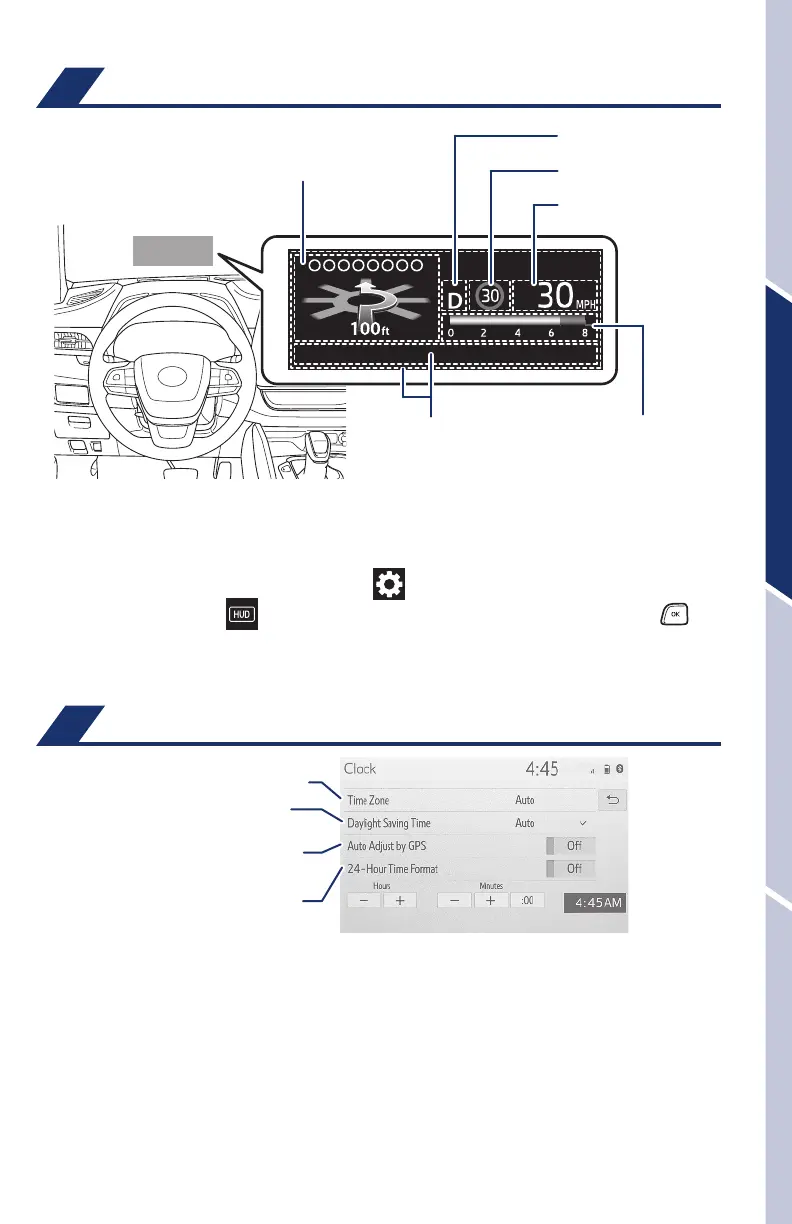
Head-Up Display (HUD) (if equipped)
- Navigation system-linked display area (if equipped)
- Driving assist system status display
Speed limit/RSA (Road
Sign Assist) display
Shift position display
ECO driving indicator/
Tachometer/
Outside temperature
Message display
Vehicle speed display
The head-up display is linked to the meters and navigation system (if equipped)
and projects a variety of driving related information and the operating state of the
driving support systems on the windshield.
Press meter control switches and select “
” in the Multi-Information Display
(MID) and then select “
” to access Head-up display settings. And push “ ,”
to enter selection.
Refer to the Owner’s Manual for more details.
Clock
1) Push “MENU” button next to the screen.
2) Select “Setup” or “General” in the touchscreen to access the general setting
screen.
3) Select “Clock.”
4) Select desired items to be set.
Refer to the “Navigation and Multimedia System Owner’s Manual” for more details.
*
Available only on vehicles equipped with Premium Audio/12.3-in display
Select to change the time zone.
Select to set daylight saving
time ON/OFF/AUTO
*
.
Select to set to automatic GPS
adjustment of clock.
Select to set the 24 hour time
format on/off.
130494_MY21_Highlander_QRG_V7_ML_070821_PRINT_R1.indd 23 7/9/21 6:46 AM













 To Next Page