37
OVERVIEWFEATURES & OPERATIONSTOYOTA SAFETY SENSESAFETY & EMERGENCY FEATURES
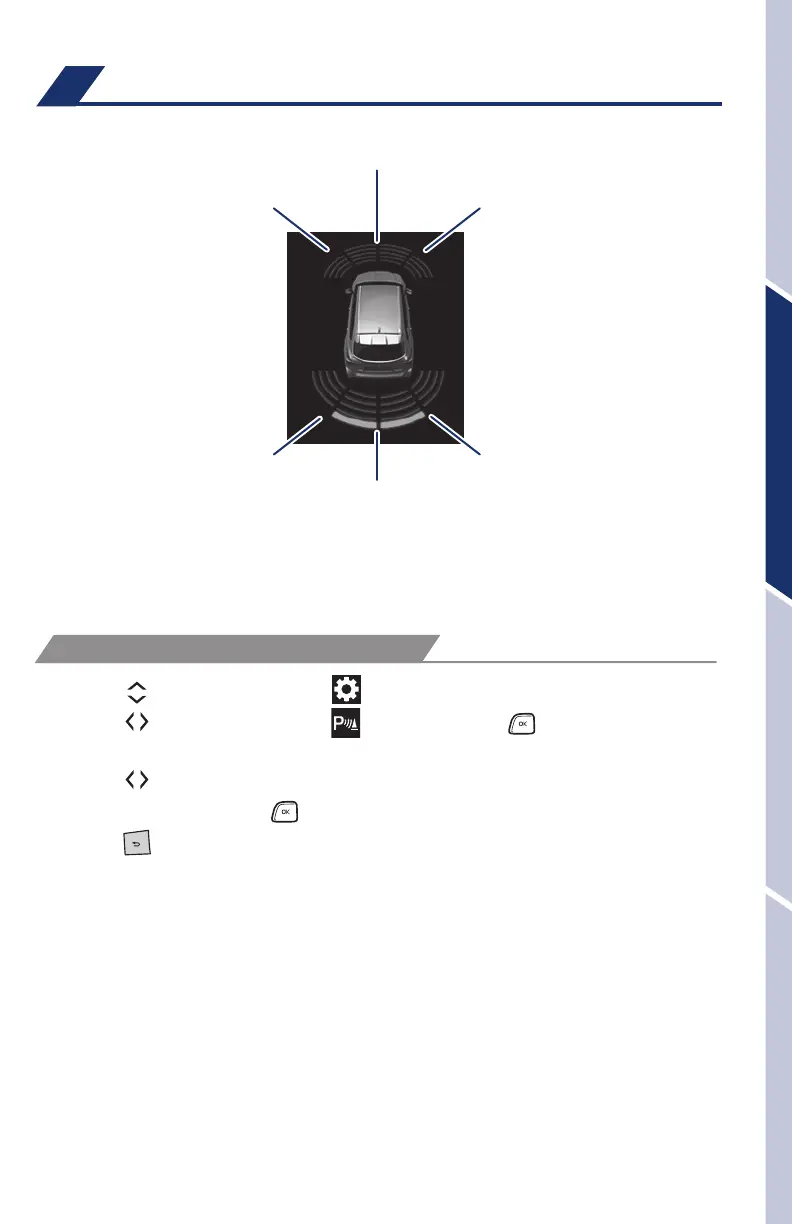
Intuitive parking assist (if equipped)
Rear
center sensor
Front
center sensor
Corner sensors
(front)
Corner sensors
(rear)
Corner sensors
(front)
Corner sensors
(rear)
Multi-Information Display (MID)
If the sensors detect an obstacle, the buzzer and MID or navigation system
display inform the driver of the approximate position and distance of the obstacle
by illuminating continuously (far) or blinking (near). Depending on your Audio
Multimedia system, you can adjust settings.
(1) Press “
” switches and select “ ” from the Multi-Information Display (MID).
(2) Press “
”switches and select “ ” and then press “ .” The setting screen
is displayed.
(3) Press “
”switches and select the “Intuitive parking assist on/off” setting
function and then press “
.”
(4) Press “
” to go back to the menu.
Refer to the Owner’s Manual for limitations and more details.
SYSTEM ON/OFF
130494_MY21_Highlander_QRG_V7_ML_070821_PRINT_R1.indd 37 7/9/21 6:46 AM















 To Next Page