25
OVERVIEWFEATURES & OPERATIONSTOYOTA SAFETY SENSESAFETY & EMERGENCY FEATURES
“ ”
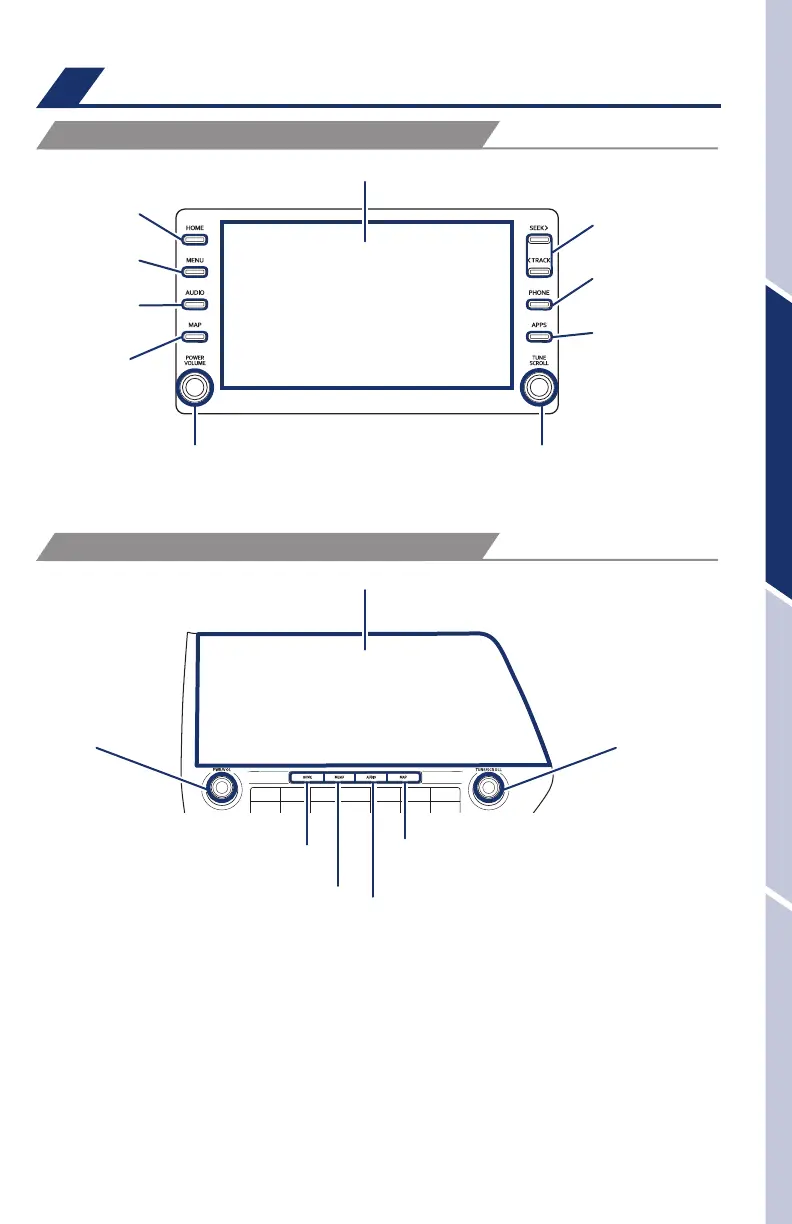
Use to search within the
selected audio feature.
Refer to the “Navigation and Multimedia System Owner’s Manual” or visit
www.toyota.com/audio-multimedia for additional resources.
NOTE: Always use safe driving practices and follow all traffic rules.
Audio
Touchscreen display
Touchscreen display
Push to turn ON/OFF,
turn to adjust the volume
Push to turn ON/OFF,
turn to adjust the
volume
Turn to tune radio stations
manually or select tracks or files
Turn to tune radio
stations manually or
select tracks or files
Access
HOME screen
Access
HOME screen
Access
MENU screen
Access
MENU screen
Access
AUDIO screen
Access
AUDIO screen
Access
MAP screen
Access
MAP screen
Seek station/
track/file select
Access Bluetooth
hands-free system
Access
Apps screen
VEHICLES EQUIPPED WITH 8-in DISPLAY
VEHICLES EQUIPPED WITH 12.3-in DISPLAY
130494_MY21_Highlander_QRG_V7_ML_070821_PRINT_R1.indd 25 7/9/21 6:46 AM














 To Next Page