38
FEATURES & OPERATIONS
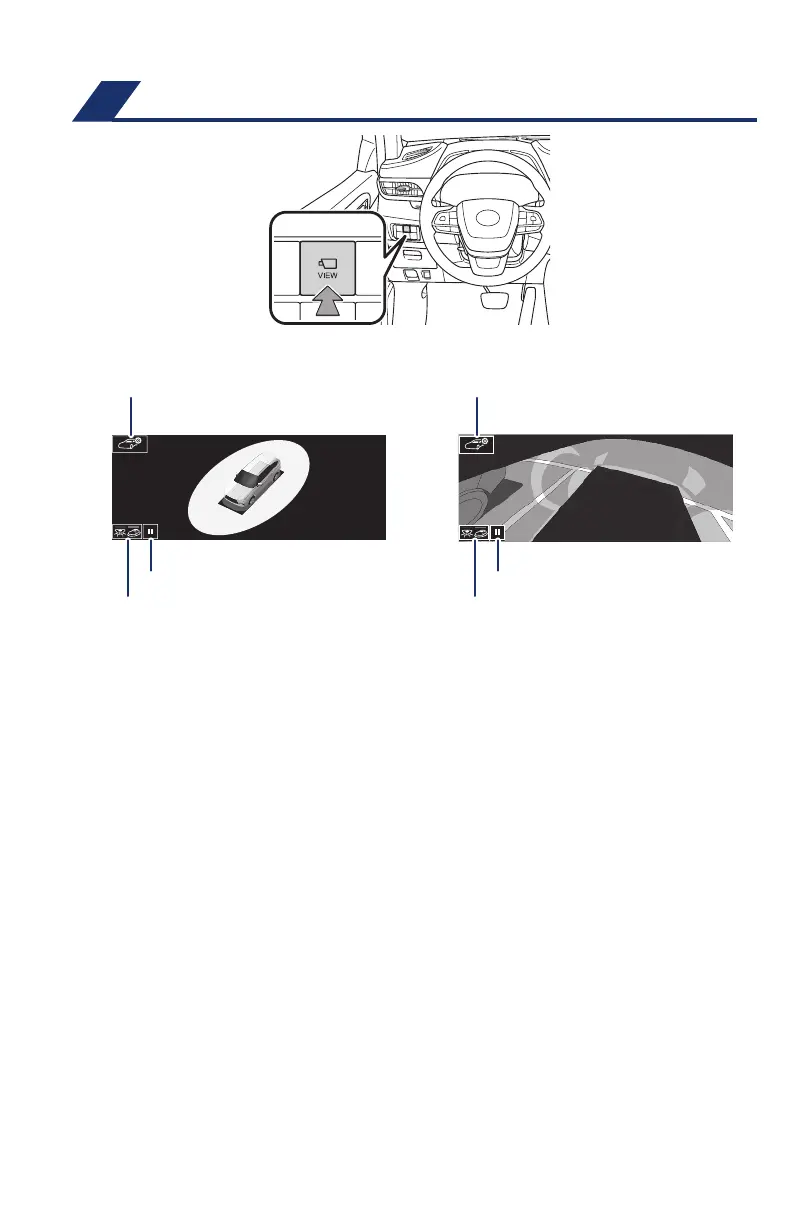
Display mode switching button
Body color setting switch Body color setting switch
Display mode switching button
Rotation pause switch Rotation pause switch
The Bird’s Eye View Camera with Perimeter Scan function assists the driver in
viewing the surroundings, when operating at low speeds or parking, by combining
front, side and rear cameras and displaying an overhead image on the Audio
Multimedia System screen.
To display the moving view/see-through view screen, press the camera switch when
the shift lever is in the “P” position and the Intuitive parking assist is enabled.
For limitations and more details, refer to the “Navigation and Multimedia System
Owner’s Manual.”
Moving view See-through view
Bird’s Eye View Camera
with Perimeter Scan
(if equipped)
130494_MY21_Highlander_QRG_V7_ML_070821_PRINT_R1.indd 38 7/9/21 6:46 AM














 To Next Page