28
Toyota multi-operation touch*
** Refer to the “Navigation and Multimedia
System Owner’s Manual.
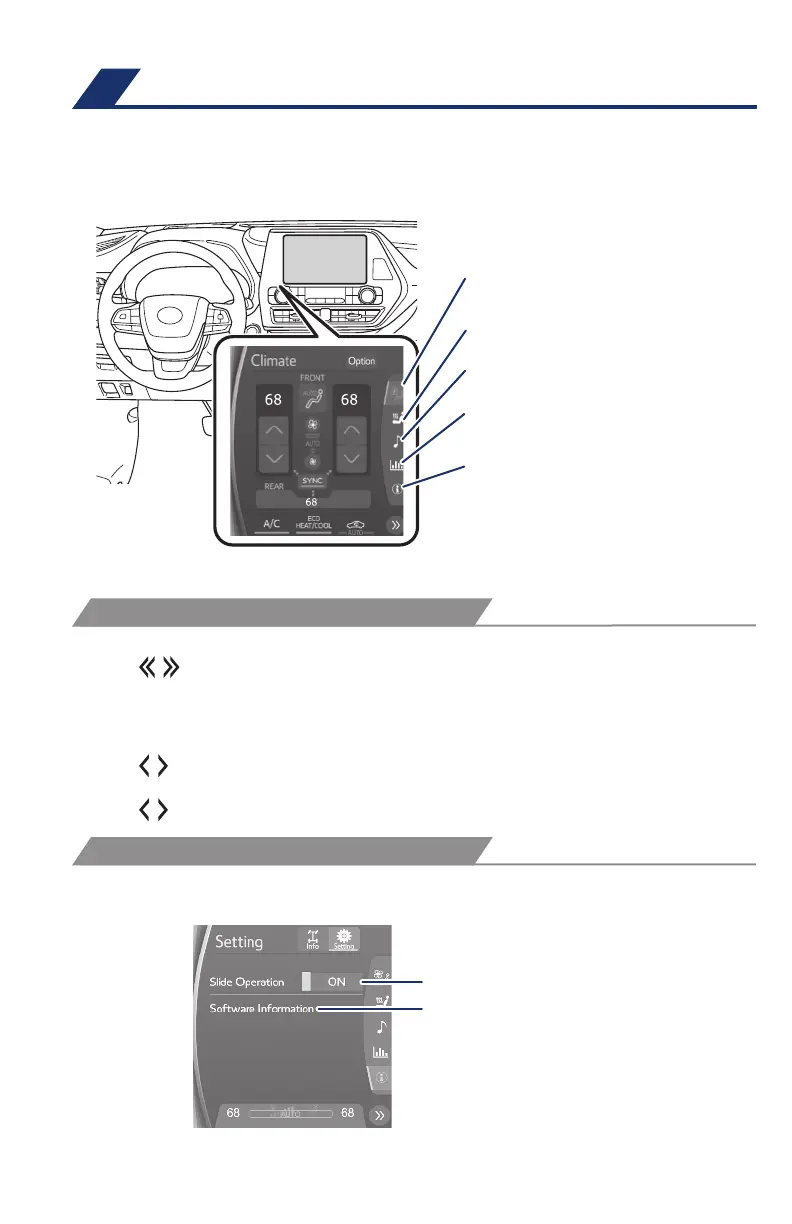
Toyota multi-operation touch allows a screen, such as the air conditioning control
screen, and the navigation screen to be displayed and operated simultaneously.
Available only on vehicles with 12.3-in display.
Moving screens:
Select “
” to change its displayed position on the Toyota multi-operation touch.
The screen position can also be changed by performing a left or right flick
operation on a screen.
Full screen display/split screen display:
Select “
” on the energy monitor/consumption screen or vehicle information
screen will display that screen in full screen.
Select “
” to return to the split-screen display.
AWD models: Select “Setting” on the vehicle information screen to display the
setting screen.
Select to display the air conditioning control
screen
Select slide operation on/off
Display the software information
Select to display the seats climate screen
Select to display the audio control screen**
Select to display the fuel consumption
screen
Select to display the setting screen (2WD
models)/
Select to display the vehicle information
screen (AWD models)
* © 1982-2013, QNX Software Systems Limited. All rights reserved.
Refer to the Owner’s Manual or “Navigation and Multimedia System Owner’s
Manual” for more details.
FEATURES & OPERATIONS
OPERATION
SETTINGS
130494_MY21_Highlander_QRG_V7_ML_070821_PRINT_R1.indd 28 7/9/21 6:46 AM














 To Next Page