375
5
Audio system
HIGHLANDER_U (OM0E017U)
5-6. Using an external device
→P. 3 55
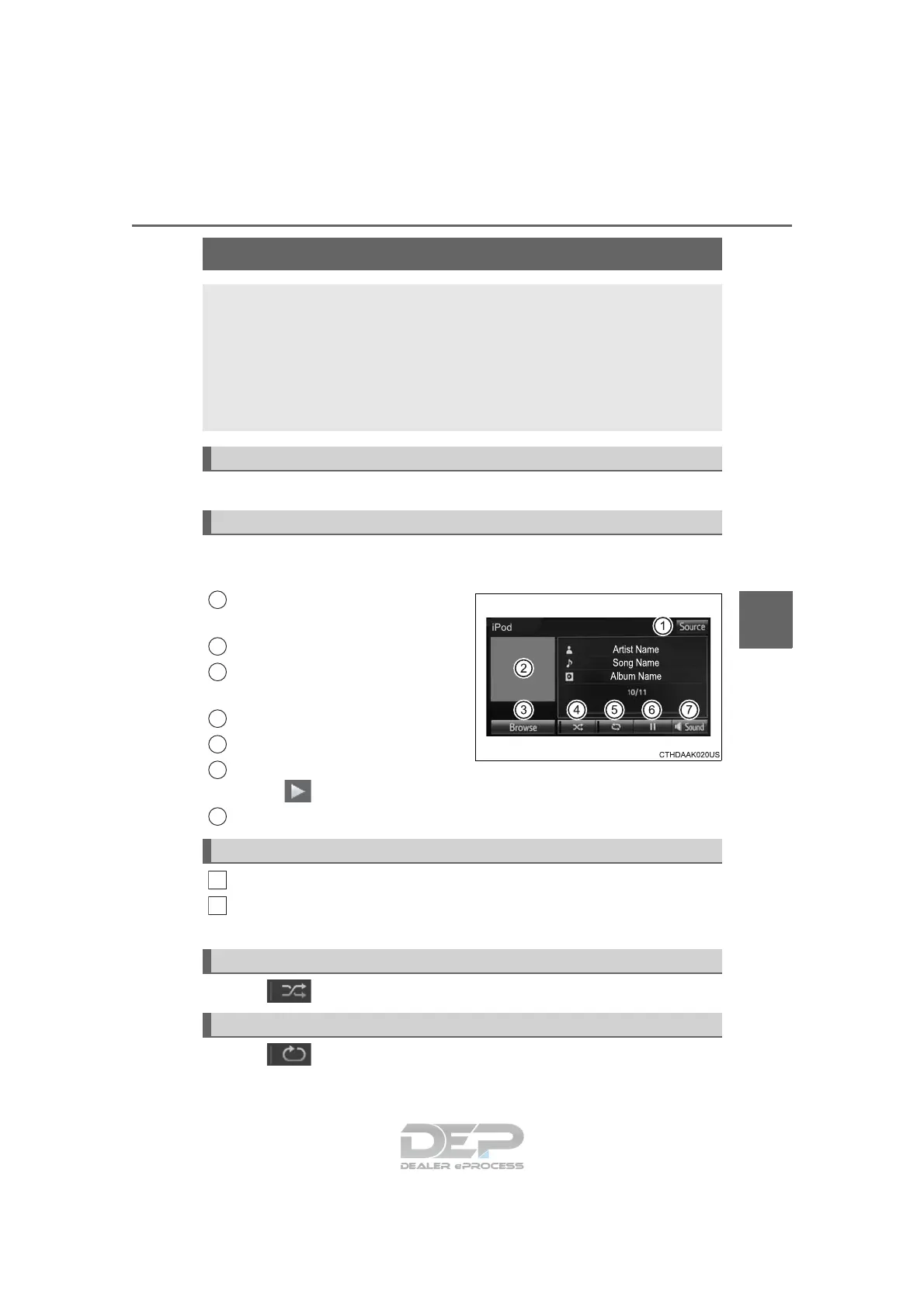
Pressing the “AUDIO” button displays the audio control screen from
any screens of the selected source.
Audio source selection screen
appears
Displays cover art
Selecting the play mode
(→P. 375)
Shuffle play (→P. 375)
Repeat play (→P. 375)
Pause
Select to resume playback
Setting the sound (→P. 366)
Select “Browse” on the screen.
Select the desired play mode. Then select a song to begin using
the selected play mode.
Select to change on/off.
Select to change on/off.
Listening to an iPod
Connecting an iPod enables you to enjoy music from the vehicle
speakers.
Select “iPod” on the audio source selection screen.
When the iPod connected to the system includes iPod video, the
system can only output the sound by selecting the browse
screen.
Connecting an iPod
Audio control screen
1
2
3
4
5
6
Selecting a play mode
Shuffle play
Repeat play
7
1
2















 To Next Page