379
5-6. Using an external device
5
Audio system
HIGHLANDER_U (OM0E017U)
→P. 3 55
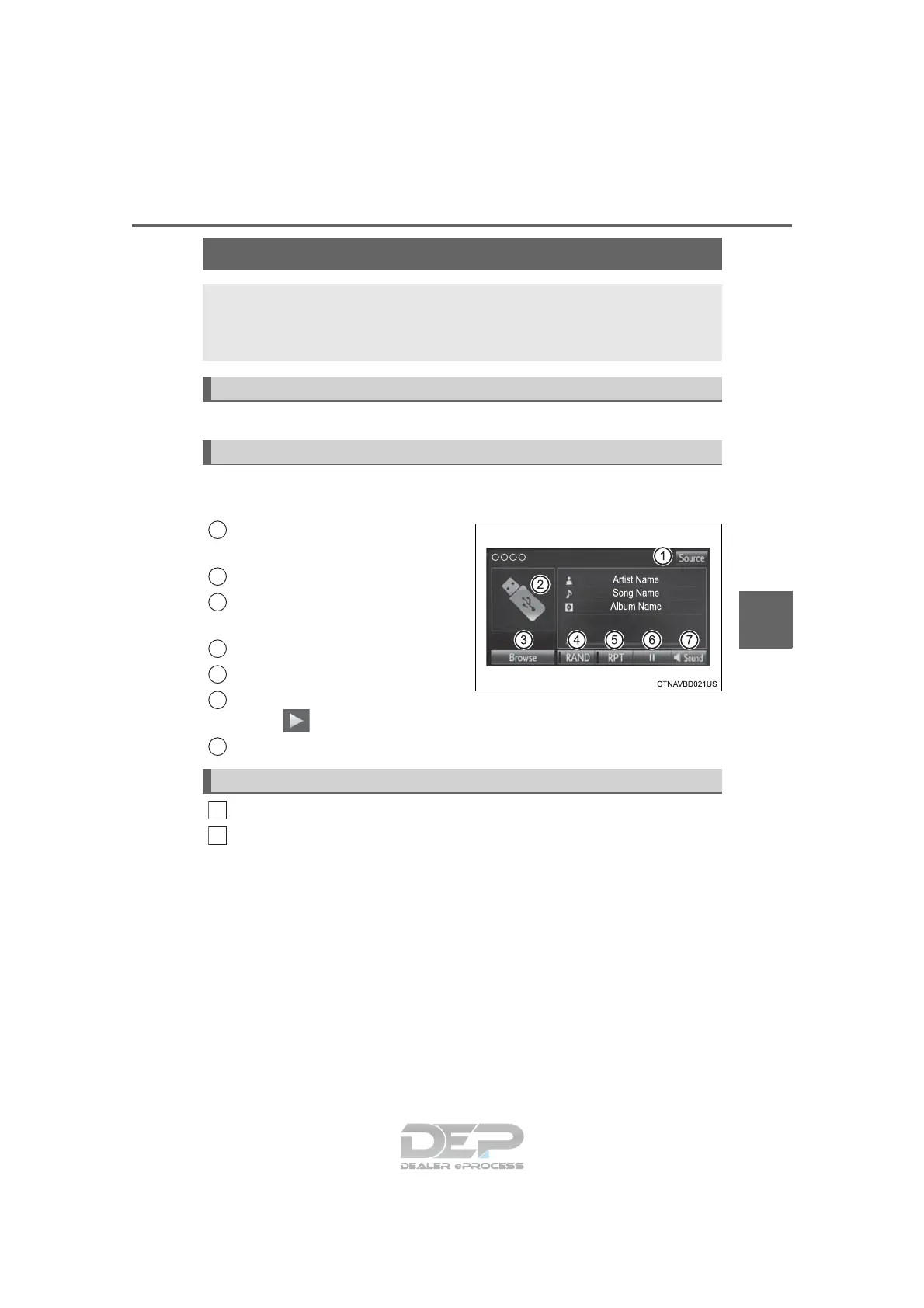
Pressing the “AUDIO” button displays the audio control screen from
any screens of the selected source.
Audio source selection screen
appears
Displays cover art
Selecting the play mode
(→P. 379)
Random playback (→P. 357)
Repeat play (→P. 357)
Pause
Select to resume playback
Setting the sound (→P. 366)
Select “Browse” on the screen.
Select the desired play mode. Then select a song to begin using
the selected play mode.
■ Displaying the now playing list
Touch the cover art display.
Listening to a USB memory device
Connecting a USB memory device enables you to enjoy music
from the vehicle speakers.
Touch “USB” on the audio source selection screen.
Connecting a USB memory device
Audio control screen
1
2
3
4
5
6
7
Selecting a play mode
1
2












 To Next Page